
Optoma W319USTir Manual
PDF manual · 108 Pages
English



Quick check
Incorrect answer, please try again.
Chat with your Optoma W319USTir manual using AI
Get instant AI answers from your Optoma W319USTir manual
Ask anything about the Optoma W319USTir. Answers come from this manual, with the pages they are based on.
W319USTir Maintenance Schedule
Clean the air filter every 500 hours of operation or more often in dusty environments.
Reset the Lamp Reset function from the Options menu after replacing the lamp module.
Ask a Question
Do you recommend W319USTir?
Yes NoFrequently Asked Questions
It is best for classrooms, meeting rooms, and presentation spaces where short-throw placement, interactive use, and flexible connectivity are useful.
Is this answer helpful?
Yes. The projector supports 3D playback and includes options for 3D mode, 3D format, and sync settings to match different source types and glasses.
Is this answer helpful?
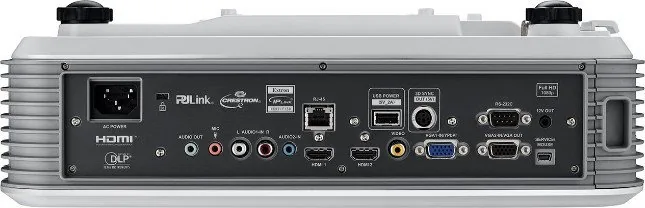
It includes HDMI, VGA, composite video, USB, LAN, RS232, audio in/out, and other control-oriented ports for broad device compatibility.
Is this answer helpful?
Yes. It supports network-based control and monitoring, including compatibility with systems like Crestron, Extron, PJLink, AMX, and Telnet.
Is this answer helpful?
Keep the lens and vents clean, check lamp usage, replace the lamp when needed, and clean the dust filter if your model includes one.
Is this answer helpful?
Yes. The projector offers keystone correction, zoom, image shift, focus adjustment, and aspect ratio controls to help correct placement and fit the screen.
Is this answer helpful?
Yes. It includes eco-oriented lamp modes, standby power options, sleep timer settings, auto power off, and quick resume for more efficient use.
Is this answer helpful?
Advantages and Disadvantages
Advantages

- Short-throw design reduces shadowing and works well in tight spaces.
- Wide input support includes HDMI, VGA, composite, LAN, USB, and RS232.
- Multiple image modes help optimize performance for different content types.
- Network control compatibility supports AV integration and remote management.
Disadvantages

- Lamp and filter maintenance require regular attention over time.
- The menu system is feature-rich and may feel complex for casual users.
- Some features depend on model or region, so not every unit is identical.
- Proper setup is important; incorrect installation can affect image quality.
Product Specification
Type
DLP, 1x 0.65"
Light source
Lamp
Resolution (displayable)
WXGA (1280x800)
Resolution (native)
WXGA (1280x800)
Brightness
3300 ANSI lumens (High/Standard/Eco)
Contrast
18,000:1
Image diagonal
85.04-114.96 in
Projection distance
19.29-25.98 in
Throw ratio
0.27:1
Lens shift
no
Video connections
2x HDMI In, 1x VGA In, 1x VGA Out, 1x Composite Video In
Audio connections
1x Stereo Line In (RCA), 2x Jack Audio In, 1x Jack Audio Out
Other connections
2x USB, 1x RJ-45, 1x RS-232
Special features
3D ready (active), integrated speaker (16W), vertical projection axis
Lamp life
4500/6000/6500 hours (Standard/Eco/Eco+)
Noise level
26 dB(A) (Standard/Eco)
Power consumption
235/200W (Standard/Eco)
Dimensions
15.16x4.72x12.21 in (WxHxD)
Weight
10.21 lb
Product Description
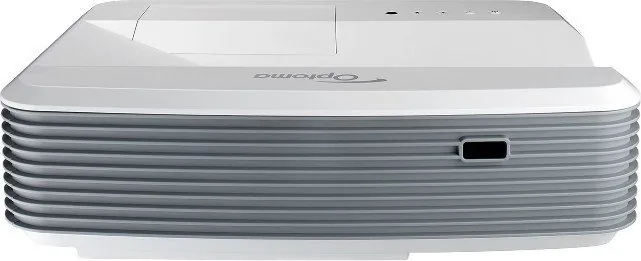
Optoma W319USTir: A Versatile Interactive Short-Throw Projector
The Optoma W319USTir is built for spaces that need a bright, flexible, and easy-to-manage projection setup. The Optoma W319USTir Manual shows a projector designed for classrooms, meeting rooms, and interactive presentations, with short-throw placement that helps reduce shadowing and makes it easier to work close to the screen. It also supports a wide range of sources, including HDMI, VGA, composite video, USB, LAN, and RS232, giving it strong compatibility with both modern and legacy equipment.
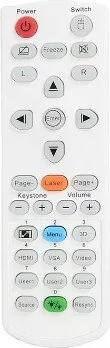
One of the biggest strengths of this model is its presentation flexibility. The projector offers multiple image modes such as Presentation, Bright, Movie, sRGB, Blackboard, and 3D, allowing users to adapt the image to different content and environments. For everyday use, features like keystone correction, zoom, image shift, and aspect ratio control help fine-tune the picture quickly. The manual also highlights interactive support on select versions, making the W319USTir especially appealing for lessons, collaborative sessions, and hands-on demos.
Connectivity is another major advantage. With network control options such as Crestron, Extron, PJLink, AMX, and Telnet, the projector can be integrated into managed AV systems with ease. That makes it a practical choice for IT teams and installers who want remote monitoring, power control, and centralized administration. The built-in on-screen menus are detailed, offering deep control over image, display, setup, audio, security, lamp settings, and filter maintenance.
The W319USTir also includes useful long-term care features. Lamp reminders, filter reminders, power-saving modes, and quick shutdown behavior all help extend usability and reduce downtime. At the same time, the manual stresses safe handling, proper cooling, and regular maintenance, reminding users that performance stays best when the projector is installed with good airflow and cared for properly.
Notes
- Best suited for interactive or presentation-focused environments.
- Short-throw design helps place the projector close to the screen.
- Full 3D support and broad input options add versatility.
- Maintenance matters: lamp life and filter care should be monitored.
Overall, the Optoma W319USTir stands out as a practical, feature-rich projector for users who want reliable projection, strong control options, and adaptable performance in professional or educational settings.
Search for 67,706 Manuals online


Type-in Brand or Model