
Optoma SC26B Manual
PDF manual · 2 Pages
English



Quick check
Incorrect answer, please try again.
Chat with your Optoma SC26B manual using AI
Get instant AI answers from your Optoma SC26B manual
Ask anything about the Optoma SC26B. Answers come from this manual, with the pages they are based on.
Ask a Question
Do you recommend SC26B?
Yes NoFrequently Asked Questions
The normal operating temperature is between 0 and 40 degrees Celsius or 32 to 104 degrees Fahrenheit. You must avoid heat sources like portable heaters to prevent damage.
Is this answer helpful?
No, the camera is not water-proof nor is it dust-proof. You should keep it dry and away from liquids to avoid internal circuit failure.
Is this answer helpful?
No, if the camera is damaged you must not disassemble or attempt self-repair. Please call customer service to request any necessary repairs to avoid voiding warranties or causing more damage.
Is this answer helpful?
Rotate the bracket to face the back as shown in the guide. Use the supplied USB-C cable to connect the camera to the display unit securely.
Is this answer helpful?
Yes, one USB-C to USB-A cable is included in the accessories list to help connect to various display ports.
Is this answer helpful?
The camera and accessories may contain small parts not suitable for children. Please keep them out of the reach of children to ensure safety.
Is this answer helpful?
Pictures are for reference only. The actual function and appearance of the final product may vary from the reference models depicted in the instructions.
Is this answer helpful?
Advantages and Disadvantages
Advantages

- Simple plug-and-play USB-C connectivity for easy setup
- Includes adjustable bracket for flexible camera positioning
- Comprehensive safety guidelines provided for long-term protection
- Standard cable included ensures compatibility with most devices
Disadvantages

- Not waterproof or dust-proof requiring careful environmental handling
- Temperature sensitivity requires avoiding direct sunlight or heaters
- User cannot disassemble the camera for repairs requiring service calls
- Small parts present potential safety risks for households with children
Product Specification
Type
Conference Camera
Image Sensor
1x CMOS
Resolution
3840x2160 Pixels (30fps)
Viewing Angle
120 degrees
Connections
1x USB-C (Female)
Wireless
N/A
Microphone
Integrated (stereo), 13.12 ft range
Lighting
N/A
Power
via USB
Mount
Mounting Clip
Dimensions
5.79 x 3.58 x 2.78 in
Weight
0.66 lb
Package Contents
Camera, USB-C to USB-A Adapter
Features
Status LED
Manufacturer Warranty
2 Years
Product Description
Exploring the Features of the Optoma SC26B Camera
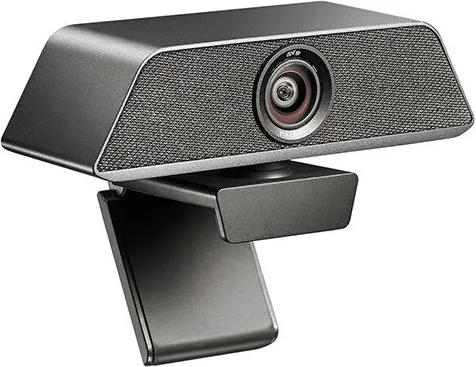
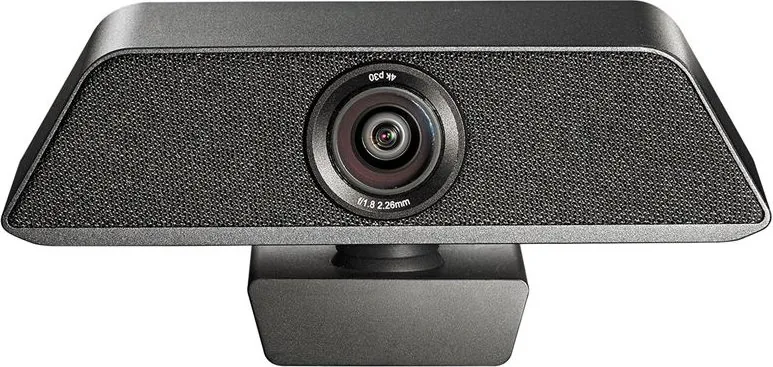
The Optoma SC26B is designed to offer reliable performance for modern communication needs. When you are setting up your video conferencing station, having a clear understanding of the device capabilities is essential. Many users refer to the Optoma SC26B Manual to ensure they are operating the hardware safely and effectively within the designed parameters. This device integrates seamlessly with a variety of displays through a simple connection interface. The camera comes with an adjustable bracket that allows the user to face the lens forward or rotate it to the back for storage or alternative positioning.
Setup and Connectivity Details
Installation is intended to be intuitive. Users connect the provided USB Type-C cable to the display for power and data signals. A USB Type-A port is often used as the target connection point for older systems. The included USB-C to USB-A cable facilitates this transition without requiring additional adapters from third-party vendors. It is crucial to ensure the supply of standard cable is used to avoid voltage issues or connectivity failures during operation.
Environmental Safety Guidelines
Operational life of the camera depends heavily on environmental factors. The unit should not be exposed to heat sources such as portable heaters or direct sunlight. Operating temperature ranges from 0 degrees Celsius to 40 degrees Celsius. Humidity levels between 10 percent and 90 percent relative humidity are acceptable for normal function. Environments that are dusty or humid should be avoided to prevent component failure. Additionally, this hardware is not water-proof or dust-proof, so keeping liquids away from the lens and casing is vital.
Maintenance and Device Care
Proper care ensures the longevity of your equipment. If damage occurs, the device should not be disassembled or repaired by the user. Contact customer service for any repair requests involving the camera. Inserting sharp or pointed objects into the accessory ports is strictly prohibited to avoid internal damage. Dropping or hitting the unit can result in mechanical failure. Child safety is also important as small parts are included in the box. These accessories must be placed out of reach of children to prevent choking hazards.
Intellectual Property and Legal Notes
The hardware design and software are covered by various patents. Unauthorized reproduction of the product or instruction content is legally liable. Pictures in official guides are for reference only and the actual received product may look different. The manufacturer reserves the right to change design appearance without notice. Always ensure you follow all safety precautions to avoid dangerous and illegal use of the device.
By adhering to these operational standards, users can maintain a high-quality video experience while protecting their investment in the hardware technology provided by the manufacturer.
Search for 67,706 Manuals online


Type-in Brand or Model