
Optoma NuForce BE Free8 Manual
PDF manual · 16 Pages
English



Quick check
Incorrect answer, please try again.
Chat with your Optoma NuForce BE Free8 manual using AI
Get instant AI answers from your Optoma NuForce BE Free8 manual
Ask anything about the Optoma NuForce BE Free8. Answers come from this manual, with the pages they are based on.
Ask a Question
Do you recommend NuForce BE Free8?
Yes NoFrequently Asked Questions
The package includes the BE Free8 earphones, a charging case, a Micro-USB charging cable, multiple silicone ear tips, a basic user guide, and safety instructions. The extra tips help users find a more comfortable and secure fit.
Is this answer helpful?
Remove the left earbud from the case, hold the power/function button for about 4 seconds until the LED flashes orange and white, then select BE Free8 from your device’s Bluetooth list. After pairing, the earbuds can reconnect automatically.
Is this answer helpful?
The earbuds are rated for up to 4 hours of playback. The charging case adds convenience by storing and recharging the earbuds, so total day-to-day use depends on how often you place them back in the case.
Is this answer helpful?
Yes. When connected to a smartphone, you can press and hold the left earbud’s power/function button for about 2 seconds to activate Siri on iOS or Google Voice Search on Android. A tap stops the command mode.
Is this answer helpful?
You can play or pause audio with a tap on the left earbud, answer or end calls with a tap, and skip tracks using the volume-up button with a double click. The left earbud handles most controls.
Is this answer helpful?
The BE Free8 supports Bluetooth 4.1 and includes SBC, AAC, and aptX Low Latency codec support. That helps deliver smoother sound and lower delay, which is especially useful for videos and casual gaming.
Is this answer helpful?
Make sure the earbuds are not connected to any device, put them into pairing mode, then double-click the left earbud’s power/function button until the LED flashes in the required pattern. This clears saved pairing data.
Is this answer helpful?
Advantages and Disadvantages
Advantages

- Lightweight true wireless design that is easy to carry and wear for long periods.
- Supports aptX Low Latency and AAC for better audio and video syncing.
- Includes multiple ear tip sizes for a more secure and comfortable fit.
- Charging case, voice prompts, and auto-reconnect make daily use simpler.
Disadvantages

- Four-hour battery life is limited compared with many newer true wireless earphones.
- Most controls rely on the left earbud, which can feel restrictive.
- Bluetooth 4.1 is functional but older than current wireless standards.
- Pairing and reset steps may feel a bit technical for first-time users.
Product Specification
Type
Earbuds (In-Ear)
Form Factor
True Wireless, without headband
Principle
closed
Microphone
integrated
Wireless
Bluetooth 4.1, AAC, aptX, aptX LL, NFMI
Control
1-button remote control
Battery life
4h, 16h (with charging case)
Battery
USB Micro-B charging port, charging case, 2h charging time
Frequency range
20Hz-20kHz
Impedance
32 ohm
Sensitivity
92dB
Driver
0.23 in
Features
water-resistant (IPX5)
Color
black
Weight
0.39 oz
Product Description
Optoma NuForce BE Free8: Compact True Wireless Sound
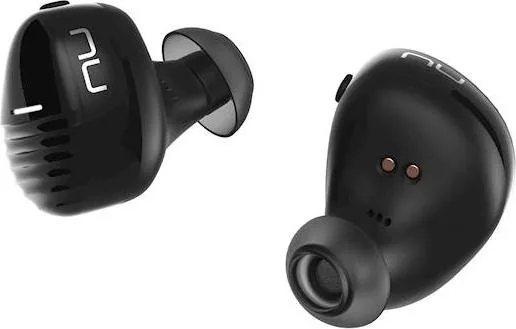
The Optoma NuForce BE Free8 is built for listeners who want a lightweight, cable-free earphone set that is easy to carry and simple to use every day. Designed as a premium true wireless option, it focuses on comfort, clear voice prompts, quick pairing, and practical controls rather than flashy extras. For anyone searching for the Optoma NuForce BE Free8 Manual, the key takeaway is that this model is made to be straightforward: charge it, pair it, wear it, and enjoy music or calls with minimal fuss.
Everyday performance with useful details
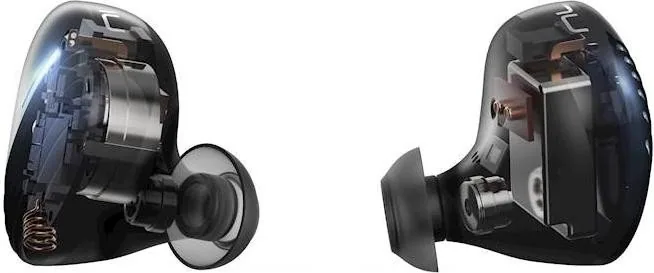
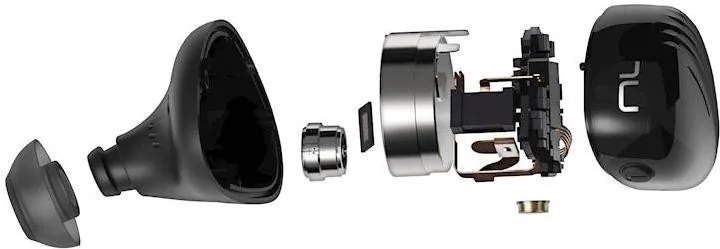
The BE Free8 uses a compact in-ear design with 5.8 mm dynamic drivers and a secure fit supported by multiple silicone tip options. That matters because a stable seal improves both comfort and sound quality. With five pairs of ear tips included, users can fine-tune the fit for long listening sessions, commuting, workouts, or office use. The left earbud acts as the main control center, handling playback, calls, and voice assistant access.
Audio support is another strong point. Bluetooth 4.1 connectivity works with common profiles such as HSP, HFP, A2DP, and AVRCP, while codec support includes SBC, AAC, and aptX Low Latency. In practical terms, this makes the BE Free8 a good match for music and video where reduced delay matters. The range reaches up to 10 meters, giving you enough freedom for normal movement around a room or desk.
Charging, pairing, and calling
The charging case is part of the experience, not just an accessory. It keeps the earbuds powered, helps with storage, and provides a quick way to turn the earphones off when placed inside. A full charge takes about two hours, while battery life reaches up to four hours on the earbuds themselves. Voice alerts help track power status, and low-battery warnings are built in so you are less likely to be caught off guard.
For calls, the left earpiece makes everyday use easy. You can answer or end calls with a tap, and you can launch Siri or Google Voice Search with a longer press. That makes the BE Free8 feel convenient for hands-free use, especially when paired with a smartphone. The automatic reconnection feature also reduces setup time once your device has already been paired.
Notes
- Best suited for users who value portability and simple controls.
- Multiple ear tip sizes help improve comfort and sound isolation.
- Battery life is modest, so the charging case is important for regular use.
- The left earbud handles most control functions.
- Factory reset clears saved devices and returns the earbuds to pairing mode.
Search for 67,706 Manuals online


Type-in Brand or Model