
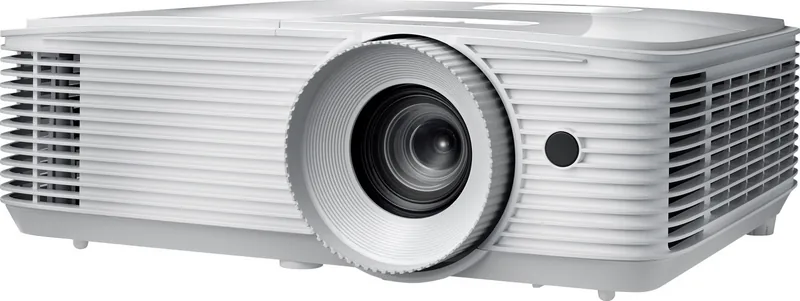
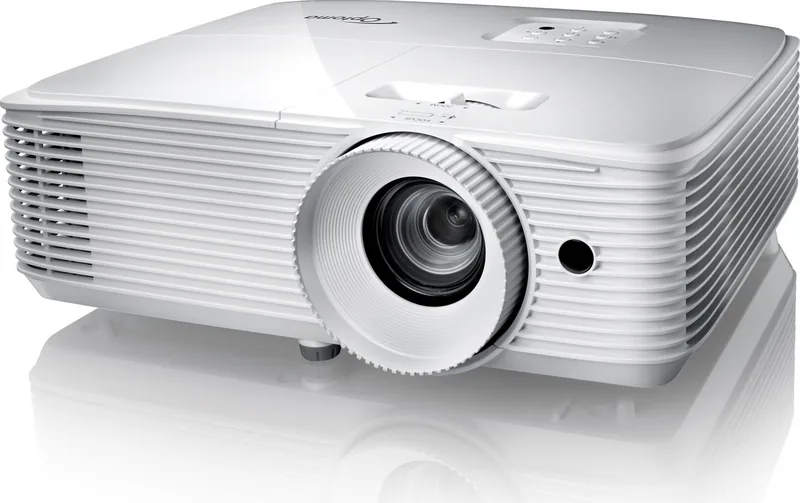
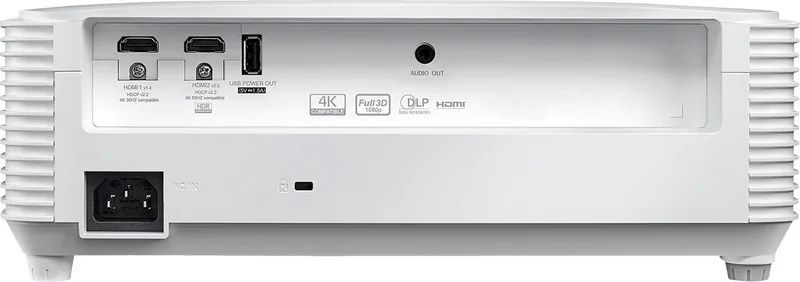
Optoma HD29He Manual
PDF manual · 57 Pages
English



Quick check
Incorrect answer, please try again.
Chat with your Optoma HD29He manual using AI
Get instant AI answers from your Optoma HD29He manual
Ask anything about the Optoma HD29He. Answers come from this manual, with the pages they are based on.
Ask a Question
Do you recommend HD29He?
Yes NoFrequently Asked Questions
The Optoma HD29He features a native resolution of 1920 x 1080 pixels, delivering full HD clarity for movies and games.
Is this answer helpful?
Yes, the projector supports 4K input signals. One HDMI port handles 4K at 60Hz while the other supports 4K at 30Hz, though it downscales to 1080p.
Is this answer helpful?
Absolutely. It includes an Enhanced Gaming mode that lowers input lag to 16ms, making it ideal for fast-paced video games.
Is this answer helpful?
Use a high-speed HDMI cable to connect your console to either of the two HDMI ports. The projector will automatically detect the source.
Is this answer helpful?
Yes, it comes equipped with a 3-watt built-in speaker for basic audio, but external speakers are recommended for better sound quality.
Is this answer helpful?
Yes, the HD29He supports ceiling mounting. Just ensure you use the correct mounting kit and maintain proper ventilation clearance.
Is this answer helpful?
The lamp life varies by mode. In Eco mode, it lasts longer, while Bright mode offers maximum luminosity. The projector alerts you when replacement is needed.
Is this answer helpful?
Advantages and Disadvantages
Advantages

- Native 1080p resolution with excellent color accuracy
- Enhanced gaming mode reduces input lag for responsive play
- Dual HDMI ports support 4K 60Hz and HDR content
- Flexible installation options include front and ceiling mounting
- Built-in speaker and multiple connectivity options
Disadvantages

- Manual zoom and focus require physical adjustment
- Noisy fan operation during extended use
- Limited brightness compared to higher-end commercial models
- Remote control battery types vary by region
- Lamp replacement requires professional service attention
Product Specification
Type
DLP, 1x 0.65"
Light source
Lamp
Resolution (displayable)
Full HD (1920x1080)
Resolution (native)
Full HD (1920x1080)
Brightness
3600 ANSI Lumens (High/Standard/Eco)
Contrast
50,000:1
Image diagonal
2.33-25.10 ft
Projection distance
3.28-32.15 ft
Projection ratio
1.47:1-1.62:1
Lens Shift
No
Video connections
1x HDMI 2.0 In, 1x HDMI 1.4a In, MHL
Audio connections
1x 3.5mm Audio Out
Other connections
1x USB 2.0
Features
3D ready (active), built-in speaker (1x 5W)
Lamp life
4,000/10,000 hours (Standard/Eco/Eco+)
Noise level
28/26 dB(A) (Standard/Eco)
Power consumption
282/204W (Standard/Eco)
Dimensions
12.44x4.25x9.61 in (WxDxH)
Weight
5.51 lbs
Product Description
Discover the Optoma HD29He: Your Ultimate Home Theater Companion
The Optoma HD29He projector stands as a beacon for home entertainment enthusiasts seeking high-definition visuals without breaking the bank. Designed with precision engineering, this device brings cinema-quality experiences directly into your living room. Whether you are hosting a movie night, engaging in competitive gaming, or presenting business slides, the HD29He delivers sharp, vibrant images that captivate audiences.
At the heart of this projector lies its native 1080p resolution, ensuring every frame is crisp and detailed. The inclusion of DLP technology provides deep blacks and rich colors, creating an immersive viewing environment. Gamers will appreciate the enhanced gaming mode which significantly reduces input lag, allowing for responsive gameplay that can make all the difference in fast-paced titles. For those who love action-packed films, the projector supports HDR content, expanding the dynamic range to reveal subtle details in both shadows and highlights.
Installation is straightforward thanks to flexible placement options. You can position the unit on a table for front projection or mount it on the ceiling for a seamless setup. The lens features manual zoom and focus controls, while keystone correction helps adjust the image shape if the projector cannot be placed perfectly perpendicular to the screen. A built-in speaker offers convenient audio, though connecting external sound systems is easy via the various HDMI inputs.
Connectivity is robust, featuring dual HDMI ports. One port supports 4K at 60Hz for ultra-high definition streaming and gaming, while the other handles standard 4K at 30Hz. This versatility ensures compatibility with the latest consoles, streaming devices, and computers. The user-friendly interface allows for quick adjustments to brightness, contrast, and color temperature through an intuitive menu system.
Safety and longevity are prioritized with automatic lamp life monitoring and cooling fan management. The projector includes comprehensive safety warnings regarding heat dissipation and proper ventilation to ensure optimal performance over time. With a wide array of picture modes including Cinema, Vivid, and ISF calibrated settings, you can tailor the visual output to suit any content type.
Important Notes
- Ensure adequate ventilation around the projector to prevent overheating.
- Use high-speed HDMI cables for best signal integrity.
- Allow the lamp to cool down before handling or replacing it.
- Keep the lens clean using only recommended materials to avoid damage.
Search for 67,706 Manuals online


Type-in Brand or Model