
Optoma EH512 Manual
PDF manual · 74 Pages
English



Quick check
Incorrect answer, please try again.
Chat with your Optoma EH512 manual using AI
Get instant AI answers from your Optoma EH512 manual
Ask anything about the Optoma EH512. Answers come from this manual, with the pages they are based on.
EH512 Maintenance Schedule
Clean the dust filter once every three months. Clean more frequently if used in a dusty environment.
Replace the lamp immediately when the warning message appears. Allow the projector to cool for at least 30 minutes before replacement.
Reset the dust filter counter after replacing or cleaning the filter via the Setup menu.
Free maintenance reminders
Timed to your purchase date. Always free, unsubscribe anytime.
Ask a Question
Do you recommend EH512?
Yes NoFrequently Asked Questions
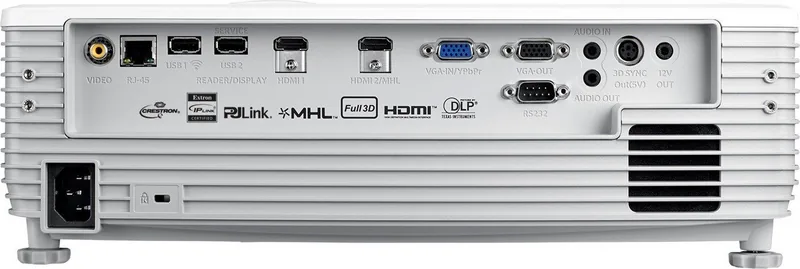
The EH512 offers HDMI (including one HDMI/MHL), VGA (YPbPr), composite video, two USB Type-A ports (one for power/Wi‑Fi dongle and one for USB display/reader), audio in/out, RS232 and RJ45 for network control.
Is this answer helpful?
Use the built-in web interface (access via projector IP), or integrate with control systems using Crestron, Extron, PJLink, AMX Device Discovery, Telnet or HTTP. Configure LAN settings (DHCP or static IP) in the Network > LAN menu, then log in with the default admin credentials.
Is this answer helpful?
Regular tasks include replacing the lamp when the lamp-life warning appears, cleaning or replacing the optional dust filter (recommended every three months in dusty environments), and monitoring lamp/filter hours via the OSD to schedule service before failures.
Is this answer helpful?
Yes. It supports DLP‑Link and IR 3D glasses and common 3D formats such as Side-by-Side, Top-and-Bottom and Frame Sequential via HDMI 1.4a timings. Some 3D timings and resolutions are limited—check the projector’s 3D timing compatibility table for exact supported modes.
Is this answer helpful?
Use the OSD geometric correction tools: four-corner adjustment, H/V keystone, auto keystone, image shift, zoom and edge mask. These allow digital correction of trapezoid and corner distortion to fit irregular screens or projections.
Is this answer helpful?
Choose Bright, Eco, Dynamic, or Eco+ brightness modes. Additional power settings include Direct Power On, Signal Power On, Auto Power Off, Sleep Timer, Quick Resume and a low-power Eco standby option to minimize consumption and extend lamp lifespan.
Is this answer helpful?
Turn off and unplug the projector, ensure vents are unobstructed, allow it to cool for 30 seconds to minutes, then retry. If Temp or Fan error LEDs persist or the unit won’t restart, contact Optoma service for repair.
Is this answer helpful?
Advantages and Disadvantages
Advantages

- Robust connectivity: multiple HDMI (MHL), VGA, USB, RS232, RJ45 and 3D sync for diverse sources.
- Advanced image tuning: BrilliantColor, RGB gain/bias, gamma, wall-color and geometric correction tools.
- Network & control-ready: web interface, Crestron, Extron, PJLink, AMX and Telnet/RS232-over-Telnet support.
- Maintenance features: lamp/filter counters with reminders, replaceable lamp and optional dust filter.
- Flexible installation: lens shift, zoom, focus, four mounting orientations and keystone adjustments.
Disadvantages

- Lamp-based projector requires periodic lamp replacement and can be noisy during cooling cycles.
- Bulk and weight (approx. 4.6 kg) make it less ideal for highly portable use.
- Complex menus and many settings may require time and AV expertise to optimize.
- Optional filter and some accessories vary by region and may add to total cost.
- 3D compatibility depends on source timing and glasses type; some formats require manual setup.
Product Specification
Type
DLP, 1x 0.65"
Light source
Lamp
Resolution (displayable)
Full HD (1920x1080)
Resolution (native)
Full HD (1920x1080)
Brightness
-/5000/- ANSI Lumen (High/Standard/Eco)
Contrast
15,000:1
Image diagonal
26.38-301.18 in
Projection distance
4.27-30.84 ft
Throw ratio
1.41:1-2.24:1
Lens shift
manual, vertical -0% +17%
Video connections
2x HDMI 1.4a In, MHL, 1x VGA In, 1x VGA Out, 1x Composite Video In
Audio connections
1x Stereo Line In (RCA), 1x Jack Audio In, 1x Jack Audio Out
Other connections
2x USB, 1x RJ-45, 1x RS-232
Special features
3D ready (active), integrated speaker (2x 10W)
Lamp life
3000/5000/7000 hours (Standard/Eco/Eco+)
Noise level
30/-dB(A) (Standard/Eco)
Power consumption
390/310W (Standard/Eco)
Dimensions
14.53x5.20x11.61 in (WxHxD)
Weight
10.14 lb
Manufacturer warranty
3 years
Product Description
Optoma EH512 — Powerful, Flexible Projection for Business and Education
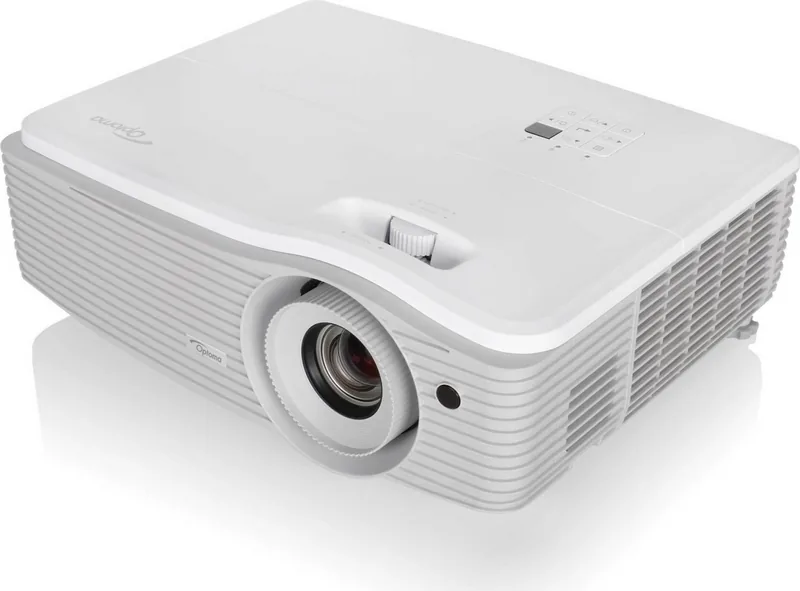
The Optoma EH512 is a high-performance DLP projector designed for classrooms, conference rooms, and professional AV applications. Delivering bright, crisp XGA/WXGA/1080p-capable imaging with versatile connectivity, the EH512 balances image quality, reliability, and installation flexibility. Its adjustable lens, zoom and focus controls, and lens-shift features make positioning simple, while robust menu options let integrators fine-tune color, geometry, and network control for varied environments.
Packed with features that matter to IT managers and AV technicians, the EH512 supports multiple HDMI inputs (including MHL), VGA, composite video, USB ports for power and optional Wi‑Fi dongles, RS232 and RJ45 for network control, and a 3D sync output for active systems. Onboard LAN allows remote management via web interface and supports protocols including Crestron, Extron, PJLink and AMX for large deployment monitoring and control. The projector also exposes useful info—lamp hours, IP address, firmware version—via its OSD and web UI.
Image tuning is extensive: multiple display presets (Presentation, Bright, Cinema, Game, sRGB, DICOM Sim), BrilliantColor enhancement, RGB gain/bias, gamma curves, wall-color compensation, and detailed scaling/aspect-ratio options (Auto, Native, LBX, 16:9/4:3/16:10). Geometric Correction tools (four-corner, horizontal/vertical keystone, image shift, zoom, edge mask) simplify alignment on non-ideal surfaces without additional hardware.
Operational controls emphasize uptime and convenience. Lamp and optional filter counters with reminders and reset functions help schedule maintenance. Power options include Direct Power On, Signal Power On, auto-power-off, sleep timer, Quick Resume and eco modes to reduce lamp power and extend life. Security features include keypad lock, password protection with a security timer, and HDMI CEC (HDMI Link) for unified power control with connected devices.
3D-capable over supported HDMI timings, the EH512 works with DLP‑Link or IR glasses and supports common 3D formats (Side-by-Side, Top-and-Bottom, Frame Sequential) with sync invert for compatibility tweaks. Built-in 10W audio provides simple sound, while audio-out and 12V trigger ports accommodate external systems.
Physically the unit is installation-friendly with multiple mount orientations (table/ceiling front/rear), clear ventilation requirements, dust-filter options, and replaceable lamp modules. Comprehensive OSD menus, remote control with mouse emulation, and detailed troubleshooting and safety guidance round out a professional feature set.
Notes
- Supports extensive network remote management and common control protocols.
- Detailed color and geometry controls enable precise calibration for different sources and screens.
- Maintenance-friendly: lamp and filter reminders, accessible lamp compartment and cleaning procedures.
Search for 67,706 Manuals online


Type-in Brand or Model