
Optoma EH335 Manual
PDF manual · 73 Pages
English



Quick check
Incorrect answer, please try again.
Chat with your Optoma EH335 manual using AI
Get instant AI answers from your Optoma EH335 manual
Ask anything about the Optoma EH335. Answers come from this manual, with the pages they are based on.
EH335 Maintenance Schedule
Clean the dust filter once every three months. Clean it more frequently if the projector is used in a dusty environment.
Replace the lamp immediately when the 'Lamp life exceeded' warning message appears or at the end of lamp life.
Free maintenance reminders
Timed to your purchase date. Always free, unsubscribe anytime.
Ask a Question
Do you recommend EH335?
Yes NoFrequently Asked Questions
It is a flexible DLP projector built for presentations, mixed media, and general-purpose projection. It focuses on practical setup, image tuning, and reliable everyday use in offices, classrooms, and similar spaces.
Is this answer helpful?
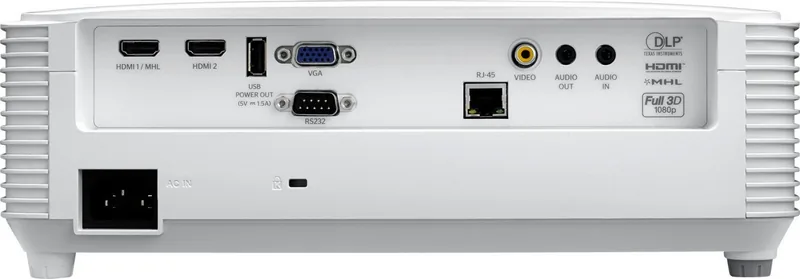
The EH335 supports common inputs such as HDMI and VGA, plus audio connections and USB power. Some versions also include LAN and RS-232, which are useful for network control and managed installations.
Is this answer helpful?
Yes. The projector includes manual zoom and focus, along with image shift and keystone correction. These tools help you fit the image to the screen and correct distortion caused by placement.
Is this answer helpful?
Yes, the projector includes 3D options for compatible content. The settings can be adjusted for different 3D formats, but viewers should follow the safety guidance and take regular breaks when needed.
Is this answer helpful?
Maintenance includes lamp replacement, dust filter cleaning, and checking warning messages. The projector tracks lamp usage and can alert you when service is needed, helping keep performance steady over time.
Is this answer helpful?
Yes, select configurations support network management, projector ID settings, and control protocols such as PJ Link and others. This makes it useful for larger setups where centralized control is important.
Is this answer helpful?
Advantages and Disadvantages
Advantages

- Flexible connectivity for HDMI, VGA, audio, USB power, and select LAN control.
- Manual zoom, focus, keystone, and image shift make installation easier.
- Multiple display modes and color settings help tailor the image to different uses.
- Built-in speaker and power-saving options add convenience for everyday operation.
Disadvantages

- Lamp-based design requires regular maintenance and eventual replacement.
- Cooling, airflow, and placement rules must be followed carefully.
- Some features vary by model or region, which can limit consistency.
- Remote range and IR performance can be affected by room conditions.
Product Specification
Type
DLP, 1x 0.65"
Light source
Lamp
Resolution (displayable)
Full HD (1920x1080)
Resolution (native)
Full HD (1920x1080)
Brightness
-/3,600/- ANSI Lumen (High/Standard/Eco)
Contrast
20,000:1
Image diagonal
2.33-25.12ft
Projection distance
3.28-32.15ft
Throw ratio
1.47:1-1.62:1
Lens shift
no
Video connectors
2x HDMI 1.4a In, MHL, 1x VGA In, 1x Composite Video In
Audio connectors
1x Jack Audio In, 1x Jack Audio Out
Other connectors
1x USB 2.0, 1x RJ-45, 1x RS-232
Special features
3D ready (active), integrated speaker (1x 10W)
Lamp life
3,500/10,000/15,000 hours (Standard/Eco/Eco+)
Noise level
-/27dB(A) (Standard/Eco)
Power consumption
295/-W (Standard/Eco)
Dimensions
12.44x4.25x9.61in (WxHxD)
Weight
6.46lb
Product Description
Optoma EH335 Manual: A Practical Guide to a Bright, Flexible Projector
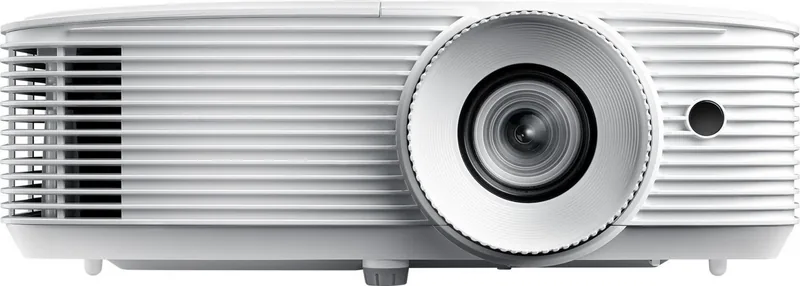
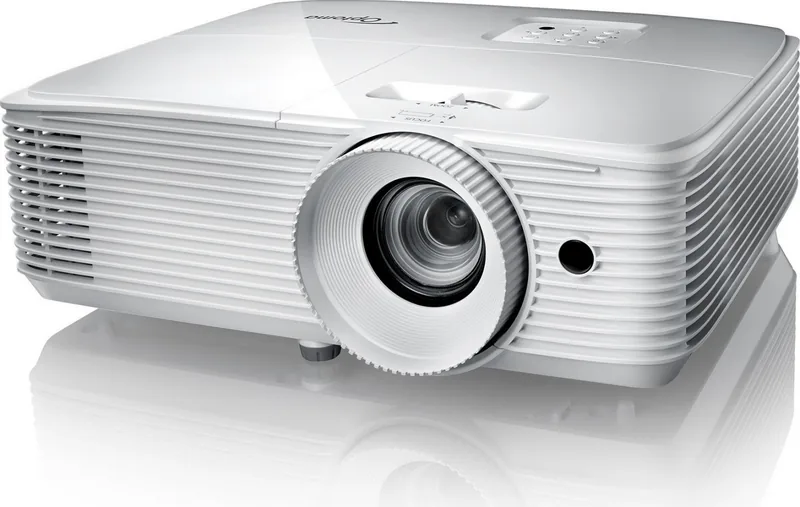
The Optoma EH335 is designed for people who want a projector that feels straightforward in daily use yet still offers plenty of control behind the scenes. Its compact form, manual zoom and focus, and broad image adjustment range make it a strong fit for meeting rooms, classrooms, training spaces, and home viewing setups where quick setup matters. The overall experience is centered on clarity, convenience, and dependable performance.
A major strength of the EH335 is its versatility. It supports multiple source types, including HDMI, VGA, audio connections, and USB power, while select versions also add LAN and serial control for more advanced environments. This makes it easy to connect modern laptops, older PCs, media players, and network-managed systems. The projector also includes a built-in 10W speaker, so simple presentations can run without extra audio gear.
The Optoma EH335 Manual highlights a wide set of image tools that help users fine-tune the picture. You can adjust brightness, contrast, sharpness, color balance, gamma, aspect ratio, keystone, zoom, and image shift to suit different screens and room layouts. Preset display modes for presentation, cinema, game, and 3D content make it easier to match the image to the task. For users who value efficiency, lamp-saving modes and auto power options can help reduce energy use and extend lamp life.
Maintenance and safety are also given strong attention. The projector includes lamp reminders, filter settings, security features, and clear shutdown guidance, all of which support long-term reliability. Proper ventilation, correct orientation, and routine cleaning are essential to keep the system running smoothly. The design encourages careful placement and consistent upkeep rather than a “set it and forget it” approach.
For larger installations, the EH335 offers network control, projector ID management, and compatibility with common AV control systems. That makes it more adaptable than many basic projectors, especially when multiple units need to be monitored or adjusted from a distance. If you are comparing projectors for productivity, education, or mixed-use rooms, the EH335 stands out as a balanced option that blends image quality, useful controls, and practical maintenance features.
Notes
- Best results come from proper alignment, clean airflow, and the correct aspect ratio.
- Lamp replacement and filter care should be handled on schedule for stable performance.
- Keep the projector within its recommended temperature and humidity range.
- Use the right brightness mode for the room and content type.
Search for 67,706 Manuals online


Type-in Brand or Model