
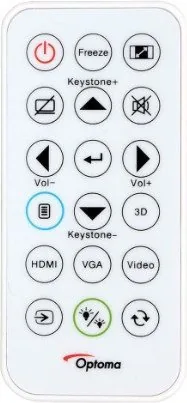
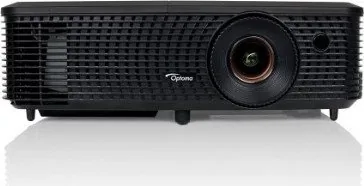
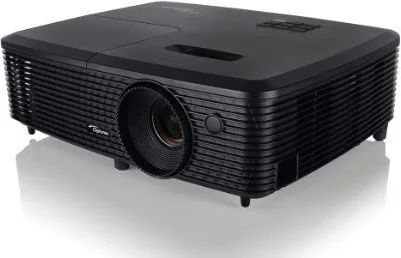
Optoma DW315 Manual
PDF manual · 59 Pages
English



Quick check
Incorrect answer, please try again.
Chat with your Optoma DW315 manual using AI
Get instant AI answers from your Optoma DW315 manual
Ask anything about the Optoma DW315. Answers come from this manual, with the pages they are based on.
DW315 Maintenance Schedule
Clean or replace the dust filter every three months. Clean it more often if the projector is used in a dusty environment.
Replace the lamp when the warning message 'Lamp life exceeded' appears on the screen. Ensure the projector has cooled down for at least 30 minutes before changing.
Free maintenance reminders
Timed to your purchase date. Always free, unsubscribe anytime.
Ask a Question
Do you recommend DW315?
Yes NoFrequently Asked Questions
The DW315 is designed for presentations, classroom content, and general multimedia viewing. Its flexibility makes it useful for office meetings, home entertainment, and installed projection setups.
Is this answer helpful?
Yes, it supports 3D playback with compatible source signals and 3D glasses. The projector includes 3D modes such as DLP-Link and IR, plus format options like SBS and Top-and-Bottom.
Is this answer helpful?
It includes HDMI, VGA in/out, composite video, audio in/out, RS-232, and USB-related functions on supported models. This helps it work with modern and older devices.
Is this answer helpful?
Clean the dust filter regularly, allow the unit to cool before shutdown or maintenance, and replace the lamp when warned. Good airflow and proper installation also help extend its life.
Is this answer helpful?
Yes. It supports ceiling-front and ceiling-rear installation, as long as the mount and screw specifications are correct. Proper alignment and ventilation are important for safe use.
Is this answer helpful?
Check the focus ring, adjust zoom, and use keystone correction if needed. Also confirm the projector is placed at the correct distance and that the input aspect ratio matches the content.
Is this answer helpful?
Advantages and Disadvantages
Advantages

- Wide connection support, including HDMI, VGA, audio, and RS-232 for many devices.
- Flexible installation options for front, rear, and ceiling mounting setups.
- Rich image controls such as keystone, zoom, aspect ratio, and color tuning.
- Lamp and filter maintenance tools help keep performance consistent over time.
Disadvantages

- Lamp-based design means periodic replacement and reset steps are required.
- Manual focus and zoom may take extra time during setup.
- 3D features need compatible sources, glasses, and correct signal formats.
- Some advanced functions depend on model type and regional accessory availability.
Product Specification
Type
DLP, 1x 0.65"
Light source
Lamp
Resolution (displayable)
WXGA (1280x800)
Resolution (native)
WXGA (1280x800)
Brightness
-/3000/- ANSI Lumen (High/Standard/Eco)
Contrast
20,000:1
Image diagonal
26.77-316.69 in
Projection distance
3.28-39.37 ft
Throw ratio
1.55:1-1.73:1
Lens shift
no
Video connectors
1x HDMI 1.4a In, 1x VGA In, 1x Composite Video In
Audio connectors
1x Jack Audio In, 1x Jack Audio Out
Other connectors
1x USB, 1x RS-232
Special features
3D ready (active), integrated speaker (1x 2W)
Lamp life
5000/6000/7000 hours (Standard/Eco/Eco+)
Noise level
-/29dB(A) (Standard/Eco)
Power consumption
225/187W (Standard/Eco)
Dimensions
11.73x3.80x9.06 in (WxHxD)
Weight
4.78 lb
Product Description
Optoma DW315: A Flexible Projector for Work, Learning, and Entertainment
The Optoma DW315 Manual points to a projector built for users who want practical performance without unnecessary complexity. The DW315 is a DLP projector designed for everyday presentation needs, home viewing, and classroom use, with a strong focus on image control, reliable connections, and simple operation. Its compact 2.5 kg design also makes it easy to move between rooms or mount in a fixed setup.
One of the most useful qualities of the DW315 is its versatility. It supports multiple input options, including HDMI, VGA, composite video, audio in/out, RS-232, and USB power or service features on supported models. That makes it a comfortable fit for laptops, media players, and legacy equipment alike. The projector can be installed in front, rear, ceiling-front, or ceiling-rear positions, giving users freedom to adapt it to different room layouts.
Image tuning is another strength. The DW315 offers manual focus and zoom, keystone correction, image shift, edge mask, aspect ratio controls, and a wide set of color settings. Users can choose from presentation, bright, cinema, game, sRGB, DICOM, and user modes, making it easier to match the picture to the content. The projector also includes 3D support, which adds value for compatible media and educational content when paired with the right glasses and source signal.
Operation is designed to be straightforward, but the menu system is still deep enough for advanced users. Brightness modes, eco settings, security options, test patterns, and input naming help personalize the experience. The lamp system includes reminders and reset tools, while the dust filter section makes routine upkeep easier in dusty environments. Safety guidance is also prominent, with clear warnings about ventilation, lamp heat, and proper shutdown.
If you need a projector that balances control, compatibility, and dependable performance, the DW315 remains a solid choice. It is especially appealing for users who want manual adjustment options and detailed setup tools rather than a stripped-down plug-and-play device.
Notes
- Best suited for presentations, mixed media, and flexible room setups.
- Manual image adjustment gives users more control over setup.
- Lamp and filter maintenance should be part of regular use.
- 3D and advanced features depend on compatible sources and accessories.
Search for 67,706 Manuals online


Type-in Brand or Model