
Optoma DC552 Manual
PDF manual · 22 Pages
English



Quick check
Incorrect answer, please try again.
Chat with your Optoma DC552 manual using AI
Get instant AI answers from your Optoma DC552 manual
Ask anything about the Optoma DC552. Answers come from this manual, with the pages they are based on.
Ask a Question
Do you recommend DC552?
Yes NoFrequently Asked Questions
No, the device requires a wired connection via USB, HDMI, or VGA cables to transmit video signals to a laptop or display.
Is this answer helpful?
The DC552 supports up to 1080p resolution. The DC556 model supports up to 4K resolution depending on the output port used.
Is this answer helpful?
Switch the focus mode to Macro using the menu or remote button. This allows the camera to focus on objects as close as 3cm from the lens.
Is this answer helpful?
No, the SD card and USB flash drive are not supplied with the product and must be purchased separately.
Is this answer helpful?
Yes, by connecting via USB and selecting PC Cam mode, you can use the camera as a live feed or record through software on your computer.
Is this answer helpful?
Adjust the distance between the camera and the object, then press the auto-focus button or use manual focus controls to sharpen the image.
Is this answer helpful?
Advantages and Disadvantages
Advantages

- Supports 4K resolution output on compatible models for ultra-clear visuals
- Includes built-in LED lamp with adjustable brightness for low-light conditions
- Versatile connectivity with HDMI, VGA, and USB ports for diverse setups
- Dedicated macro mode and microscope adapter support for detailed inspection
- Easy-to-use remote control with highlighted and masked area functions
Disadvantages

- Remote control requires two AAA batteries which are not included
- Microscope adapters are sold separately and must be matched to eyepiece size
- Video files are saved in MOV format requiring specific media players on PC
- Internal memory capacity may fill up quickly during extended recording sessions
- SD card slot does not support newer high-capacity cards without formatting
Product Specification
Type
Document camera/Overhead camera
Resolution
1920x1080dpi
Connections
1x USB 2.0, 1x USB-A 2.0 (Host), Card reader (SD), 1x HDMI-In, 1x HDMI-Out, 1x VGA-In, 1x VGA-Out, 1x Audio-In (3.5mm jack), 1x Audio-Out (3.5mm jack)
Power consumption
7W (max), 3W (typical), 0.15W (standby)
Dimensions
16.14x7.05x21.26in
Features
LED lighting, 17x optical zoom, 8x digital zoom, autofocus, security lock
Product Description
Unlocking Clarity: The Optoma DC552 Document Camera Experience
The Optoma DC552 Document Camera stands as a transformative tool for modern education and professional presentations. Designed to bridge the gap between physical materials and digital displays, this device offers an intuitive way to share content with high fidelity. Whether you are in a classroom setting or a corporate boardroom, the camera ensures that every detail is visible to all participants.
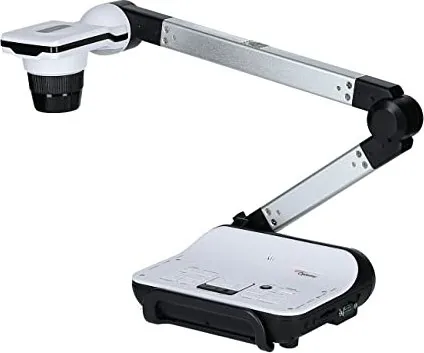
At its core, the unit features a versatile adjustable arm and a high-resolution camera head capable of capturing everything from small text to large charts. The integrated LED illumination system provides consistent lighting, ensuring that documents remain clear even in dimly lit environments. Users can easily switch between standard viewing modes and specialized settings like macro mode for close-up inspections or microscope adapters for scientific demonstrations.
Connectivity is seamless, supporting multiple output options including HDMI and VGA to match various display setups. The ability to record video clips and capture still images directly onto internal memory or external storage cards adds significant value. Furthermore, the passthrough feature allows users to project computer screens without needing additional cables, streamlining workflow efficiency.
Key Features and Benefits
This device prioritizes ease of use with a dedicated control panel and a comprehensive remote control. Functions such as instant freeze, image inversion, and digital zoom allow presenters to maintain focus on their audience while managing visual aids effortlessly. The inclusion of picture-in-picture capabilities enables simultaneous display of different content sources, enhancing interactive sessions.
Important Notes
- Always avoid looking directly at the LED light source to prevent eye strain.
- Use the carrying handle when moving the unit to protect the delicate arm structure.
- Format new SD cards using the device before first use for optimal performance.
Search for 67,706 Manuals online


Type-in Brand or Model