
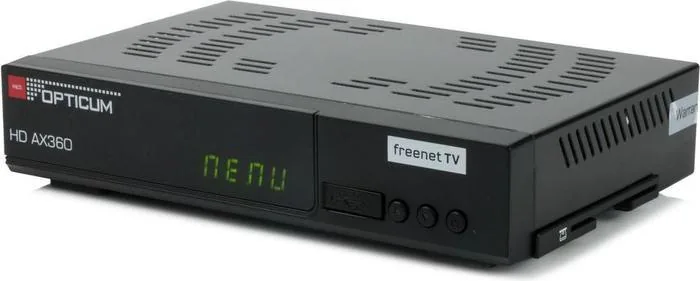

Opticum HD AX360 Manual
PDF manual · 72 Pages
English



Quick check
Incorrect answer, please try again.
Chat with your Opticum HD AX360 manual using AI
Get instant AI answers from your Opticum HD AX360 manual
Ask anything about the Opticum HD AX360. Answers come from this manual, with the pages they are based on.
Ask a Question
Do you recommend HD AX360?
Yes NoFrequently Asked Questions
Use the installation menu to start an automatic scan. Choose the correct antenna settings and press the blue key to begin. Wait for the process to finish and save the channels.
Is this answer helpful?
Yes, but PVR functions are optional and require a USB storage device. You can manually record or set timers for specific programs using the menu options.
Is this answer helpful?
Yes, it supports both DVB-T and DVB-T2 standards for terrestrial television in Germany.
Is this answer helpful?
Use the Ethernet connection or the OTA software download option in the System Manager menu. This allows remote updates without physical media.
Is this answer helpful?
Yes, the cardless Irdeto solution is used for freenet TV services, meaning no physical smart card is needed inside the box.
Is this answer helpful?
Lock Control and pin codes are available to restrict access to channels or menu functions.
Is this answer helpful?
Go to the channel settings menu and select delete all options. Confirm the action to remove all saved programs.
Is this answer helpful?
Advantages and Disadvantages
Advantages

- Supports DVB-T and DVB-T2 standards with HEVC decoding for HD
- Features HDMI and S/PDIF optical audio outputs for quality
- Cardless Irdeto security solution simplifies service activation
- Ethernet allows remote software updates and network connectivity
- User friendly installation assistant with multilingual menu support
Disadvantages

- PVR recording requires external USB storage and is optional
- Recordings on encrypted channels have playback restrictions
- Signal quality depends heavily on antenna placement and strength
- No built-in hard drive available for permanent storage
- Remote control may require direct line of sight for optimal function
Product Specification
Tuner Slots
1 (Fixed)
Single Tuner
1x DVB-T2
Twin Tuner
No
Dual Tuner
No
Triple Tuner
No
Decoder
HEVC, HDTV
Smart Card Reader
1 (Irdeto)
PVR
No
Video Connections
1x HDMI 1.4 Out
Audio Connections
1x Digital Audio Out (optical)
Additional Connections
1x USB 2.0, 1x RJ-45
Display
4-digit 7-segment LED
Features
EPG, Media Player, Teletext, Web Browser, Web Services
Channel Memory Slots
999
Special Features
Device Buttons
Color
Black
Product Description
Product Overview
The Opticum HD AX360 freenet receiver offers an excellent entry point for digital television enthusiasts seeking clarity. When referring to the Opticum HD AX360 freenet without PVR Manual specifications, users can expect reliable performance from a sturdy device. This unit supports DVB-T and DVB-T2 standards for clear terrestrial reception across multiple regions. It features advanced HEVC decoding for high definition video quality up to 1080p resolution. The processor ensures smooth menu navigation without lag during operation.
Audio output is versatile with both HDMI and S/PDIF optical connections available for home theater setups. Network capabilities include Ethernet for online software updates and media sharing options via FTP. The system utilizes a cardless Irdeto security solution specifically for freenet TV services. This setup simplifies the viewing experience without needing physical smart cards inserted into the slot. Installation is remarkably user friendly with an assistant. An integrated installation assistant helps set up antennas and select languages automatically. The main menu is fully multilingual to assist various users easily.
Power usage stays low during standby modes to save energy compared to older models. Timeshift functions allow pausing live broadcasts comfortably for a few minutes. Child protection locks secure restricted content access effectively for families. USB ports support media playback and optional recording functions on external drives. Electronic Program Guides provide detailed show information for planning weekly viewing. Sleep timers help automate power cycles for overnight viewing sessions.
Channel lists can be edited or saved as favorites for quick access to preferred channels. Text information overlays show signal quality and time during viewing on the screen. Video text navigation is supported for supplementary content like news. Troubleshooting sections assist with signal loss or remote issues when problems occur. Users should note signal strength requirements during initial setup to ensure best results.
Obstructions may affect reception quality significantly within certain geographic areas. Regular firmware updates ensure compatibility with new broadcaster standards and fixes. The interface guides users through channel scanning easily with color coded instructions. Sound settings allow for Dolby Digital output configuration via optical cable. Video formats adjust automatically based on source material resolution. Network file transfer enables firmware upgrades remotely without needing USB sticks.
Remote control buttons include dedicated keys for menu navigation and volume adjustment. The media player supports various file formats for personal content sharing. Favorites lists organize channels alphabetically or by frequency for organization. System settings allow customization of OSD transparency and banner times. Lock control protects against unauthorized changes to sensitive settings. Software manager handles backup and restore procedures efficiently for system maintenance.
Important Notes
Keep vents clear for cooling to prevent overheating issues over time. Use quality HDMI cables for best picture quality at all times. Check USB drive compatibility before recording to avoid errors. Avoid water exposure near electronic components to prevent damage. Ensure stable power supply connections for consistent operation.
Search for 67,706 Manuals online


Type-in Brand or Model