
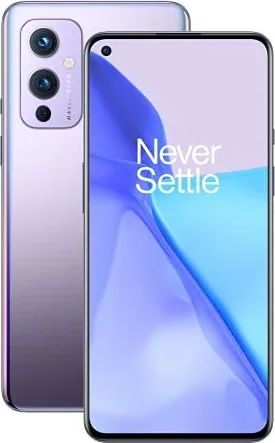
OnePlus 9 Manual
PDF manual · 131 Pages
English



Quick check
Incorrect answer, please try again.
Chat with your OnePlus 9 manual using AI
Get instant AI answers from your OnePlus 9 manual
Ask anything about the OnePlus 9. Answers come from this manual, with the pages they are based on.
Ask a Question
Do you recommend 9?
Yes NoFrequently Asked Questions
Use the OnePlus Switch app available on both devices. For Android phones, select 'I'm a new phone' on the OnePlus and 'I'm an old phone' on the other device to scan a QR code. For iPhones, sync data to iCloud first, then open OnePlus Switch, select iPhone, sign in, and start the import process.
Is this answer helpful?
The Alert Slider is a physical switch on the right side of the phone that toggles between three modes: Silent (no sound or vibration except alarms), Vibrate (calls and notifications vibrate but no sound), and Ring (full sound and vibration). It works independently of software settings.
Is this answer helpful?
Yes, the Parallel Apps feature allows you to create a second copy of supported applications. This lets you log into different accounts simultaneously, such as having two WhatsApp accounts or two social media profiles active at the same time.
Is this answer helpful?
Warp Charge 65 uses a special adapter and USB cable to deliver up to 65 watts of power safely. It charges the phone quickly while keeping it cool. You must use the official OnePlus charger and cable to achieve these speeds; third-party chargers will charge much slower.
Is this answer helpful?
When enabled, the phone silences calls, notifications, and vibrations. Alarms still ring unless configured otherwise. Critical notifications related to phone activity may still appear. You can set schedules or exceptions for specific contacts and apps within the settings.
Is this answer helpful?
Advantages and Disadvantages
Advantages

- Warp Charge 65 enables incredibly fast charging speeds for busy lifestyles
- Alert Slider provides instant physical control over sound profiles
- High refresh rate display delivers buttery smooth visuals for gaming and browsing
- Dual-channel network acceleration ensures stable connectivity in weak signal areas
- Zen Mode helps reduce digital distraction and promotes mental well-being
Disadvantages

- Non-original SIM cards may cause hardware damage if not handled carefully
- Some pre-installed applications cannot be uninstalled by the user
- Wireless charging requires specific positioning and distance from the body
- Battery life optimization settings may restrict background app activity
- Certain regulatory restrictions apply to 5GHz band usage in specific regions
Product Specification
Operating System
Android 14.0 (via Update / LineageOS Support), Android 11.0 (out of the box)
Rear Camera
48MP, f/1.8, Phase Detection AF (All-Pixel AF/Omnidirectional), Contrast AF, Dual-LED Flash, Videos @4320p/30fps (Camera 1); 50MP, f/2.2, Wide-angle Lens (Camera 2); 2MP, f/2.4, Monochrome (Camera 3)
Front Camera
16MP, f/2.4, Videos @1080p/30fps
Interfaces
USB-C 3.1 (5Gb/s, OTG), Wi-Fi 6 (WLAN 802.11a/b/g/n/ac/ax), Bluetooth 5.2 (aptX HD), NFC
Sensors
Accelerometer, Gyroscope, Proximity Sensor, Light Sensor, Compass, Fingerprint Sensor (Display)
SoC
Qualcomm SM8350 Snapdragon 888, 64-bit
CPU
1x 2.84GHz Kryo 680 Prime + 3x 2.42GHz Kryo 680 Gold + 4x 1.80GHz Kryo 680 Silver
GPU
Adreno 660
Navigation
A-GPS (L1/L5), GLONASS, BeiDou, Galileo (E1/E5a)
Modem
GSM (0.2Mbps/0.1Mbps), UMTS, LTE, 5G
Frequency Bands
2G (850/900/1800/1900), 3G (B1/B2/B4/B5/B8/B9/B19), 4G (B1/B2/B3/B4/B5/B7/B8/B12/B13/B17/B18/B19/B20/B25/B26/B28/B32/B38/B39/B40/B41/B66), 5G (n1/n3/n5/n7/n8/n20/n28/n38/n40/n41/n66/n78)
Battery
4500mAh, Non-removable, Wireless Charging, Reverse Wireless Charging
Charging Power
65W (OnePlus Warp Charge 65T), 15W (Qi), 5W (Reverse Wireless Charging)
Form Factor
Bar
Build Material
Glass (Back), Plastic (Frame)
SIM Form Factor
Nano-SIM
Features
Dual-SIM, Stereo Speakers (hybrid)
Dimensions
6.3 x 2.9 x 0.3 inches
Weight
6.8 oz
Screen-to-Body Ratio
87.3%
Product Description
Discover the Power of OnePlus 9
The OnePlus 9 represents a significant leap in smartphone technology, blending premium design with exceptional performance. This device is crafted for users who demand speed, clarity, and versatility in their daily digital lives. With its sleek form factor and intuitive interface, the OnePlus 9 offers an experience that feels both familiar and revolutionary.
At the heart of this phone lies a powerful processor paired with advanced camera systems capable of capturing stunning portraits and vibrant landscapes. The display features high refresh rates for smooth scrolling and gaming, while the battery life ensures you stay connected throughout the day. The Warp Charge 65 technology allows for rapid charging, getting you back to full power in minutes rather than hours.
Navigating the device is effortless thanks to customizable gestures and the unique Alert Slider, which lets you instantly switch between silent, vibrate, and ring modes. The software experience is enriched by OxygenOS, offering features like Zen Mode for digital detox, Parallel Apps for managing multiple accounts, and robust security options including fingerprint and face unlock. Whether you are transferring data from an old device using OnePlus Switch or customizing your home screen, the phone adapts to your needs seamlessly.
For content creators and gamers, the dedicated Gaming Mode optimizes performance by blocking distractions and enhancing graphics. The camera suite includes Pro mode for manual controls, Night mode for low-light photography, and Super Macro for detailed close-ups. With comprehensive connectivity options like 5G support, Wi-Fi 6, and NFC for contactless payments, the OnePlus 9 keeps you connected anywhere.
Key Features Overview
The phone supports dual-channel network acceleration, ensuring stable internet even when signals fluctuate. Accessibility features such as Live Caption and Color Correction make the device inclusive for all users. Additionally, the inclusion of Google services provides access to a vast ecosystem of apps and cloud storage solutions.
Important Notes
- Always use official chargers to maintain safety and warranty validity.
- Enable Do Not Disturb mode during meetings to avoid interruptions.
- Regularly update the system to enjoy the latest security patches and features.
Search for 67,706 Manuals online


Type-in Brand or Model