
Omnitronic XDP-3002 Manual
PDF manual · 20 Pages
English



Quick check
Incorrect answer, please try again.
Chat with your Omnitronic XDP-3002 manual using AI
Get instant AI answers from your Omnitronic XDP-3002 manual
Ask anything about the Omnitronic XDP-3002. Answers come from this manual, with the pages they are based on.
XDP-3002 Maintenance Schedule
Inspect the device and the power cord from time to time to ensure they are not crimped or damaged by sharp edges.
If the power plug or device is dusty, disconnect it from mains and clean it with a dry cloth to prevent insulation reduction.
Ask a Question
Do you recommend XDP-3002?
Yes NoFrequently Asked Questions
Yes, the device features two USB ports for storage devices to play music files directly.
Is this answer helpful?
Yes, it is designed for bars, clubs, and permanent installations requiring reliable performance.
Is this answer helpful?
The housing design fits into a standard 19-inch rack taking up 2 height units.
Is this answer helpful?
Yes, there are dedicated buttons for IN, OUT, and RELOOP for seamless looping.
Is this answer helpful?
It accepts 100 to 240 volts AC, making it suitable for worldwide use.
Is this answer helpful?
Yes, you can adjust pitch by +/-4, +/-8, or +/-16 percent.
Is this answer helpful?
Yes, it includes anti-shock buffers to protect discs during movement.
Is this answer helpful?
Advantages and Disadvantages
Advantages

- Dual deck design supports simultaneous playback on two sources for complex mixes.
- Supports multiple media types including CD, USB, and SD cards for flexibility.
- Robust rack mount construction suitable for professional venues and touring.
- Pitch control with adjustable ranges for professional mixing needs.
- Bright VFD display provides clear visibility of track information and status.
Disadvantages

- Requires specific rack spacing for proper ventilation during operation.
- Manual setup recommended for optimal configuration and safety compliance.
- Limited to 64 GB storage capacity for USB and SD media.
- External connections require separate RCA cables for audio output.
- Not waterproof and sensitive to high humidity environments.
Product Specification
Type
Double CD Player
Outputs
2x Stereo Line Out (RCA)
Additional Connections
2x USB-A, Card Reader (SD/SDHC)
Jog Wheel
2x
Dimensions
19.02 x 11.02 x 0.70 in
Weight
12.02 lbs
Product Description
Omnitronic XDP-3002 DJ System Overview
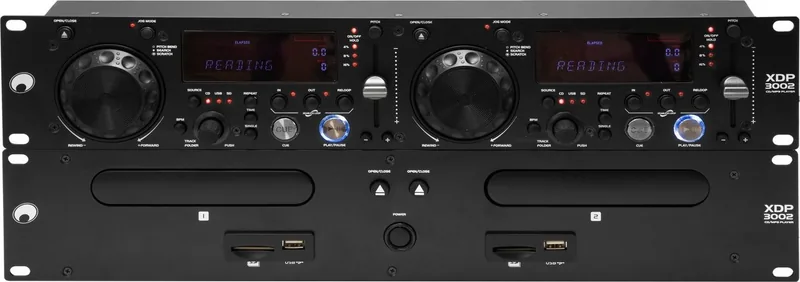
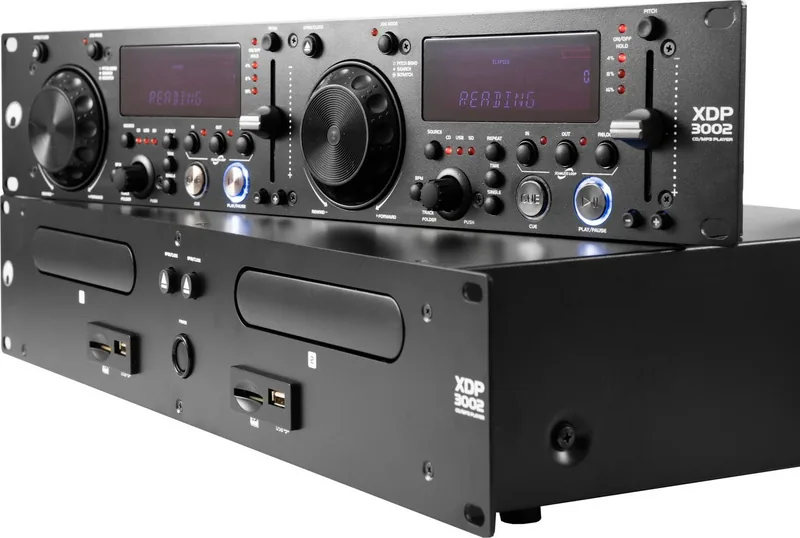
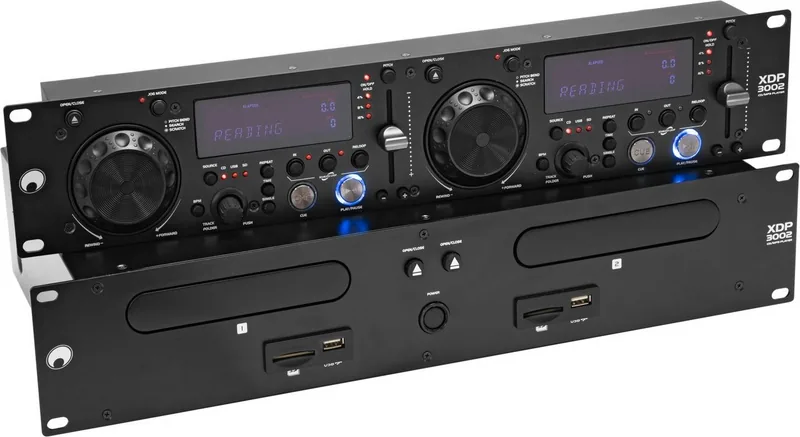
The Omnitronic XDP-3002 represents a significant leap in professional audio integration designed specifically for demanding environments. This slim dual player unit stands out for its versatility in DJ racks and permanent installations. Whether you manage a lively bar, a bustling restaurant, or offer mobile DJ services, this equipment ensures reliable performance. The design prioritizes user-friendliness without compromising on power. It serves as an essential tool for creating seamless soundscapes that keep people moving throughout the night. Stability is key for high-volume venues requiring constant playback without interruptions.
Core Functionality
Each deck handles various sources with ease. You can play Audio CDs, CD-Rs, and MP3 CDs seamlessly on two decks simultaneously. The unit also integrates USB ports and SD card slots supporting media up to 64 GB. This flexibility allows for modern playlist management alongside traditional disc formats. A bright VFD display confirms every track detail, pitch percentage, and loop status instantly. Organization is effortless with folder navigation supported on digital media. ID3 tag support ensures metadata is visible for quick selection. You do not need to rely solely on filenames to find what you need. The display also tracks elapsed time and remaining time accurately for precise tracklisting.
Control and Precision
Pitch control is vital for seamless mixing. The XDP-3002 offers adjustment ranges of +/-4, 8, or 16 percent. Pitch Bend buttons and a jog dial provide tactile manipulation for beat matching and scratching. The Jog Mode selector switches between Pitch Bend, scratch effects, and frame-accurate searching. For beat synchronization, the BPM Tap function allows manual calculation of tempo by tapping along to the rhythm. Loops can be set and recalled easily with dedicated IN, OUT, and RELOOP buttons. Seamless transitions occur when cues are saved precisely within milliseconds.
Installation and Durability
Building a professional rig requires robust construction. This unit fits a standard 19-inch rack taking up only 2 height units. Internal anti-shock buffers protect discs during transport or movement. Safety features include laser safety classes and protection against moisture when used correctly. The wiring supports international voltage from 100 to 240 volts. For detailed setup instructions, referencing the Omnitronic XDP-3002 Manual remains a best practice for first-time operators. Proper ventilation ensures the electronics stay cool during long sets. Never place the device near heaters or direct sunlight. High humidity can damage insulation, so keep it dry.
Audio Outputs and Maintenance
Connecting to mixers or amplifiers is straightforward via stereo RCA outputs. Line level signals ensure clear sound transmission without distortion. The device remains cool thanks to unobstructed ventilation openings. Regular maintenance involves only cleaning with a soft cloth. Always disconnect power before removing dust or liquid spills. This system combines durability with modern playback standards for continuous operation. If problems arise, consult authorized service providers. Keep the original packaging if shipping is required later.
Environmental Safety
Disposal of the device requires local recycling to protect the environment. Do not throw it in household waste. Batteries must be separated and returned separately. Protecting the device extends its life and reduces electronic waste. Proper usage prevents voiding warranty conditions regarding unauthorized modifications.
Notes: Avoid liquid ingress. Check rack mounting points. Verify power connection stability. Contact support for issues.
Search for 67,706 Manuals online


Type-in Brand or Model