

Omnitronic GEQ-2310 Manual
PDF manual · 20 Pages
English



Quick check
Incorrect answer, please try again.
Chat with your Omnitronic GEQ-2310 manual using AI
Get instant AI answers from your Omnitronic GEQ-2310 manual
Ask anything about the Omnitronic GEQ-2310. Answers come from this manual, with the pages they are based on.
GEQ-2310 Maintenance Schedule
Always disconnect the device from the power outlet before cleaning to ensure safety.
Check the device and power cord from time to time for damage or wear.
If dusty, clean the device and plug with a dry cloth after disconnecting from mains. Do not use solvents.
Only replace the fine-wire fuse with one of the same type and rating when the device is unplugged.
Ask a Question
Do you recommend GEQ-2310?
Yes NoFrequently Asked Questions
It is used to shape and correct audio frequencies in professional sound systems. Typical uses include live sound, DJ setups, and installed audio where precise tone control is needed.
Is this answer helpful?
It offers 31 sliders per channel, giving detailed control over the frequency spectrum. With two channels, you can adjust left and right signals separately.
Is this answer helpful?
Yes. The range can be switched between ±6 dB and ±12 dB. The smaller range is useful for subtle tuning, while the larger range allows more dramatic adjustments.
Is this answer helpful?
Yes. The bypass button lets you compare the processed sound with the original signal instantly. This is helpful when checking whether your EQ changes improve the mix.
Is this answer helpful?
The unit provides balanced XLR and 6.3 mm jack inputs and outputs. These parallel connections make it easy to integrate into many professional audio setups.
Is this answer helpful?
The ground-lift switch separates signal ground from chassis ground to help reduce hum caused by ground loops. It is useful when unwanted noise appears in the system.
Is this answer helpful?
Yes. It is designed for 19-inch rack installation and takes 2U of rack space. That makes it a practical fit for mixers, amps, and other rack gear.
Is this answer helpful?
Advantages and Disadvantages
Advantages

- Two fully independent channels with 31-band control each.
- Switchable ±6 dB / ±12 dB range for gentle or stronger EQ moves.
- Bypass, clip indicator, and level controls make setup easier.
- Balanced XLR and jack I/O plus ground lift improve integration.
Disadvantages

- Requires rack space and is best suited for installed or pro setups.
- Manual, hands-on control can be slower than modern digital EQ.
- No advanced presets or storage functions for quick recall.
- Strong EQ boosts can cause clipping if gain staging is not managed.
Product Specification
Type
Equalizer (graphic)
Channels
2
Format
19" Rack (2U)
Product Description
Omnitronic GEQ-2310: Hands-On Control for Clean, Detailed Sound
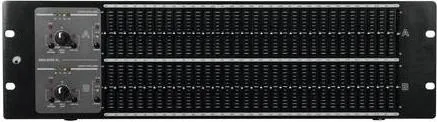
The Omnitronic GEQ-2310 is a straightforward yet capable 2-channel graphic equalizer built for audio users who want precise control without unnecessary complexity. With two independent channels and 31 frequency sliders per side, it gives you a detailed way to shape the tone of a system, tame problem frequencies, and bring more clarity to music, speech, or live playback. Whether used in a rack system, DJ setup, or small professional installation, it focuses on practical results and dependable operation.
What makes this unit appealing is the balance between flexibility and simplicity. The long-throw sliders make adjustments easy to see and feel, while the center detent helps you return to a neutral position quickly. You can switch the EQ range between ±6 dB and ±12 dB, which is useful when you want either subtle correction or stronger tonal shaping. The included Low Cut and Hi Cut filters add even more control, helping narrow the usable range and keep the signal cleaner.
The Omnitronic GEQ-2310 Manual highlights several features that matter in real-world use: a bypass function for instant A/B comparison, clip indication for safer gain staging, and separate level control per channel. Those details make it easier to dial in sound accurately without guessing. If you are trying to improve clarity in a vocal system, reduce rumble, or control harsh high frequencies, this equalizer gives you the tools to do it efficiently.
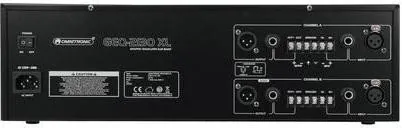
Connectivity is also well covered. Balanced XLR and 6.3 mm jack inputs and outputs make integration simple, and the ground-lift switch helps reduce hum caused by ground loops. Since it is designed for 19-inch rack mounting, it fits neatly into a standard audio setup and is easy to integrate alongside mixers, amplifiers, and other processing gear. Its compact 2U design keeps the front panel accessible while staying practical for permanent installations.
Overall, the GEQ-2310 is a solid choice for users who want direct tactile EQ control and reliable signal management. It is not flashy, but it is focused on the essentials: shaping sound, protecting audio quality, and making adjustments fast and intuitive.
Notes
- Use balanced connections when possible for better noise rejection.
- Reduce amplifier levels before switching EQ range settings.
- Set all sliders to center before powering on for safer startup.
- Use bypass to compare changes and avoid overprocessing.
Search for 67,706 Manuals online


Type-in Brand or Model