
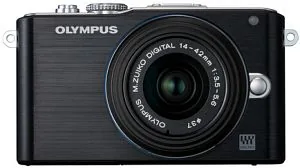
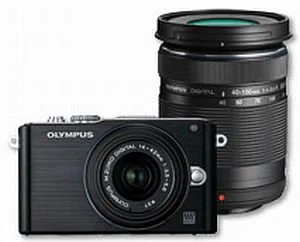
Olympus PEN E-PL3 Manual
PDF manual · 127 Pages
English



Quick check
Incorrect answer, please try again.
Chat with your Olympus PEN E-PL3 manual using AI
Get instant AI answers from your Olympus PEN E-PL3 manual
Ask anything about the Olympus PEN E-PL3. Answers come from this manual, with the pages they are based on.
PEN E-PL3 Maintenance Schedule
The camera automatically performs dust reduction and pixel mapping when turned on. Hold the camera upright for effectiveness.
When storing the camera for a long time, remove the battery and card. Insert the battery periodically to test functions.
Check each part of the camera before use if it has not been used for a long time. Take a test shot to ensure proper operation.
Free maintenance reminders
Timed to your purchase date. Always free, unsubscribe anytime.
Ask a Question
Do you recommend PEN E-PL3?
Yes NoFrequently Asked Questions
Align the red marks on the lens and camera body, insert the lens, and rotate it until it clicks into place. Ensure the camera is turned off before attaching or removing lenses.
Is this answer helpful?
Art Filter mode applies creative effects like Soft Focus or Grainy Film directly to JPEG images. You can adjust the intensity of these effects before taking the photo.
Is this answer helpful?
Yes, you can take a still photo during movie recording by pressing the shutter button. However, only one photo can be taken at a time, and flash cannot be used.
Is this answer helpful?
Navigate to the Setup menu, select Reset/Myset, choose Full Reset, and confirm. This restores all settings except date, time, and some custom configurations.
Is this answer helpful?
Yes, the E-PL3 includes an internal Image Stabilizer that reduces camera shake. You can turn it on or off depending on whether you are using a tripod or a lens with its own stabilizer.
Is this answer helpful?
Use the Live Control menu to select White Balance. Choose presets like Sunny or Cloudy, or use One-Touch WB to measure color temperature from a white object.
Is this answer helpful?
Advantages and Disadvantages
Advantages

- Compact and lightweight body with interchangeable lenses
- Flip-out monitor for flexible shooting angles
- Art Filter modes for creative in-camera effects
- HD video recording with sound capability
- Intuitive menu system with helpful live guides
Disadvantages

- No built-in viewfinder requires reliance on screen
- Limited battery life during extended use
- Digital zoom reduces image quality significantly
- Manual focus can be challenging in low light
- Flash unit lacks tilt or swivel functionality
Product Specification
Type
Mirrorless
Effective Megapixels
12.3 Megapixels
Sensor
Four-Thirds, Live MOS 0.68x0.51in, 4.29µm Pixel Size
Autofocus
Contrast detection, 35 zones
Resolutions
max. 4032x3024(4:3) pixels (JPEG/RAW), 12bit
Lens Mount
Micro Four Thirds, Crop Factor 2.0
Image Stabilizer
Optical
Display
3.0" LCD, Live View, 0.46 million dots, tilting
Viewfinder
No
Flash
Hot shoe
Flash Sync Speed
1/160s, first curtain sync, second curtain sync
Video Function
AVCHD, 1920x1080@60p (16:9)
Sensitivity (ISO)
200-12800
Shutter Speed
1/4000-60s
Burst Mode
max. 4.1 frames/sec
Memory Card
SD/SDHC/SDXC
Connectivity
USB 2.0, HDMI, Audio/Video output
Power Supply
Li-Ion Battery (BLS-1, BLS-5)
Dimensions (WxHxD)
4.33x2.52x1.46in
Weight
9.35oz
Weight with Battery and Card
11.04oz
Manufacturer Warranty
1 year
Product Description
Discover the Olympus PEN E-PL3 Manual Guide
The Olympus PEN E-PL3 is a stylish and compact digital camera designed for enthusiasts who want professional results without the bulk of a traditional DSLR. This mirrorless system camera combines elegant design with powerful performance, making it an ideal choice for travelers, street photographers, and hobbyists alike. The accompanying manual serves as an essential companion, guiding users through every feature from basic setup to advanced creative controls.
At the heart of the E-PL3 is its interchangeable lens system, which allows for incredible versatility. Whether you are capturing fast-moving subjects with high-speed shutter settings or creating soft, dreamy portraits with wide apertures, this camera adapts to your needs. The manual details how to attach lenses securely, manage battery life, and utilize the included flash unit effectively. It also explains the intuitive interface, including the flip-out monitor that makes shooting from high or low angles effortless.
One of the standout features highlighted in the documentation is the Art Filter mode. This unique function lets users apply instant creative effects like Pop Art, Soft Focus, or Pin Hole directly in-camera. The guide walks you through selecting these filters and customizing their intensity to match your artistic vision. Additionally, the Scene modes offer one-touch optimization for specific situations such as landscapes, night scenes, or sports, ensuring sharp images even when you are not familiar with complex camera settings.
For those interested in videography, the E-PL3 supports HD movie recording with sound. The manual provides step-by-step instructions on switching to movie mode, adjusting aperture and shutter speed for cinematic effects, and managing audio levels. It also covers practical tips like using image stabilization to reduce shake during handheld filming.
Playback and editing capabilities are equally robust. Users can review photos in various display modes, including histograms and highlight warnings to ensure perfect exposure. The camera allows for simple in-camera edits like red-eye correction and brightness adjustments before sharing images via Wi-Fi or printing directly.
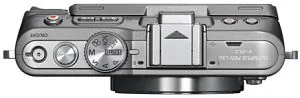
Understanding the control layout is crucial for mastering this device. The manual breaks down the function of each button, dial, and menu option, helping new users navigate the shooting menus with confidence. From setting the date and time to customizing button functions, every aspect is explained clearly to maximize the camera's potential.
Key Notes
- Always charge the battery fully before first use to ensure optimal performance.
- Use compatible SD cards to prevent data loss during recording.
- Regularly clean the sensor and lens to maintain image quality.
- Explore the live guide feature for real-time help with advanced techniques.
Search for 67,706 Manuals online


Type-in Brand or Model