
Olympus OM-D E-M5 Mark II Manual
PDF manual · 184 Pages
English



Quick check
Incorrect answer, please try again.
Chat with your Olympus OM-D E-M5 Mark II manual using AI
Get instant AI answers from your Olympus OM-D E-M5 Mark II manual
Ask anything about the Olympus OM-D E-M5 Mark II. Answers come from this manual, with the pages they are based on.
OM-D E-M5 Mark II Maintenance Schedule
Turn off the camera and remove the battery. Wipe the exterior with a soft dry cloth. For stubborn dirt, use a damp cloth with neutral soap or clear water.
The camera has an ultrasonic dust protection function that activates when powered on. Do not tilt the camera during this process to ensure effective cleaning.
If the camera has been stored for a long time, perform a careful function check and take test shots before important photography to ensure proper operation.
Ask a Question
Do you recommend OM-D E-M5 Mark II?
Yes NoFrequently Asked Questions
Press the MENU button, navigate to the setup tab marked with a wrench icon, select Date/Time, adjust the values using the arrow pad, and press Q to save. Ensure this is done before taking important photos.
Is this answer helpful?
Enable the Image Stabilizer in the menu. For static subjects, use S-IS AUTO. When panning horizontally, switch to S-IS3. Always mount on a tripod for long exposures to eliminate shake completely.
Is this answer helpful?
Yes, using the Movie+Photo mode. Press the shutter button during recording to capture a still frame. Note that autofocus behavior differs slightly in movie mode compared to stills.
Is this answer helpful?
Download the Olympus Image Share app. Turn on Wi-Fi in the camera menu, select Smartphone connection, and follow the on-screen prompts to pair the devices for transferring images or remote shooting.
Is this answer helpful?
It is used to capture light trails, fireworks, or star fields. It combines multiple exposures into one image while keeping the background dark, allowing you to see the light accumulation in real-time.
Is this answer helpful?
Press the Q button, select Aspect Ratio from the super control panel, and choose between 4:3, 16:9, 3:2, 1:1, or 3:4 using the front dial. JPEGs will be cropped, but RAW data remains intact.
Is this answer helpful?
Advantages and Disadvantages
Advantages

- Five-axis image stabilization significantly reduces camera shake
- High-resolution electronic viewfinder provides clear composition
- Versatile touch screen with tilt functionality for flexible angles
- Advanced video features including 60fps recording and slow motion
- Built-in Wi-Fi enables easy sharing and remote operation
Disadvantages

- Battery life may be limited during intensive video recording sessions
- Complex menu system requires time to master for new users
- No internal flash unit included, requiring external accessories
- Touch screen can be less responsive when wearing gloves
- RAW files require specific software for initial processing
Product Specification
Type
Mirrorless
Effective Megapixels
16.1 MP
Sensor
Four-Thirds, Live MOS 0.68x0.51 in (17.3x13.0mm), 3.75µm pixel size, no low-pass filter
Autofocus
Contrast detection, 81 zones
Resolutions
max. 4608x3456(4:3) pixels (JPEG/RAW), 12bit
Lens Mount
Micro Four Thirds, Crop factor 2.0
Image Stabilizer
Optical, compensates up to 5 stops
Display
3.0" OLED, Live View, Touchscreen, 1.04 million dots, tilting, swiveling, 180° flip-up
Viewfinder
LCD, 2.36 million dots, 100% field of view, 0.74x magnification
Flash
Flash shoe
Flash Sync Speed
1/250s, first-curtain sync, second-curtain sync
Video Function
H.264, MOV, 1920x1080@60p (16:9)
Sensitivity (ISO)
200-25600
Shutter Speed
1/8000-60s (mechanical), 1/16000-60s (electronic)
Continuous Shooting
max. 10 fps
Memory Card
SD/SDHC/SDXC (UHS-I)
Connections
USB 2.0, Micro HDMI, Audio/Video output
Wireless
Wi-Fi (WLAN)
Power Supply
Li-ion battery (BLN-1)
Features
Sealed
Dimensions (WxHxD)
4.88x3.35x1.50 in
Weight
14.7 oz
Weight with Battery and Card
16.5 oz
Manufacturer Warranty
1 year
Product Description
Discover the Olympus OM-D E-M5 Mark II Manual
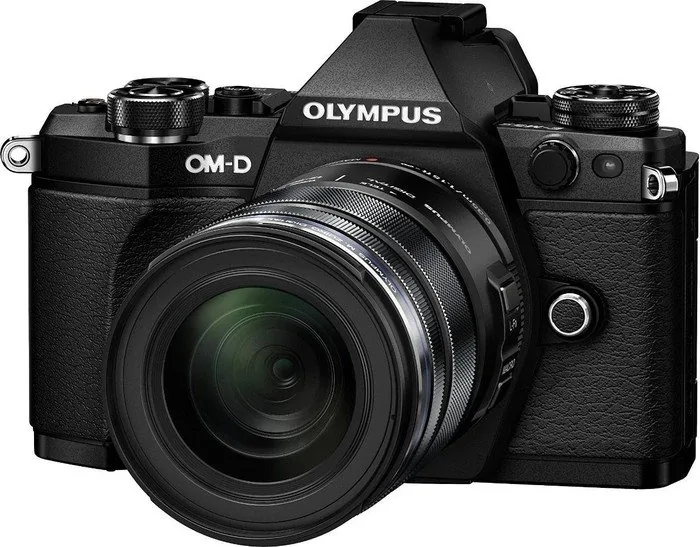
The Olympus OM-D E-M5 Mark II stands as a testament to professional-grade photography in a compact body. This camera is designed for enthusiasts and professionals who demand high performance without sacrificing portability. The manual serves as an essential guide, unlocking the full potential of this versatile mirrorless system. Whether you are capturing fast-paced action, delicate portraits, or cinematic footage, understanding the intricate features of your device is key to mastering your craft.
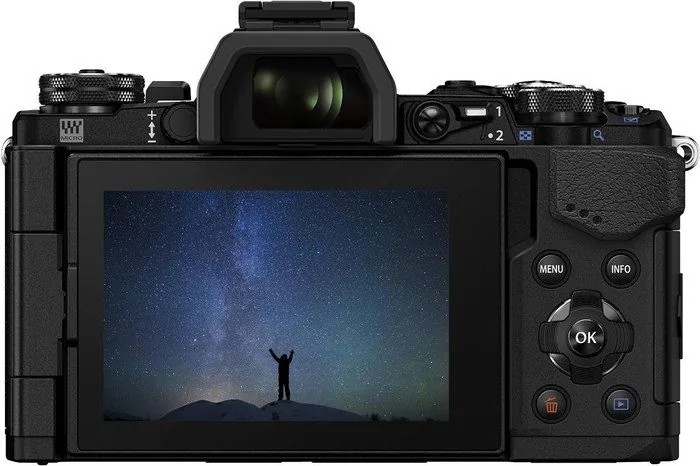
At the heart of the E-M5 Mark II lies its advanced image stabilization and 16-megapixel sensor. The user guide details how to leverage the five-axis Image Stabilization (I.S.) system, which compensates for camera shake across all directions. This feature allows for sharp images even in low-light conditions or when shooting with long focal lengths. The manual walks you through various shooting modes, from the intuitive iAUTO for beginners to the full control offered by Manual (M) mode for seasoned photographers. You will learn how to utilize the electronic viewfinder and the tilting touchscreen monitor to compose shots from any angle, making it ideal for street photography and self-portraits alike.
Beyond still photography, the E-M5 Mark II excels in video capabilities. The documentation explains how to record Full HD movies at 60 frames per second, offering smooth motion and flexibility for creative storytelling. Features like the Movie+Photo mode allow you to capture a high-resolution frame while recording a video clip simultaneously. The guide also covers specialized techniques such as Live Composite photography for stunning light trails and starry night skies, as well as High Resolution Shot mode for ultra-detailed landscapes.
Connectivity is seamless with the built-in Wi-Fi, enabling instant transfer of images to smartphones for social sharing or remote control of the camera via a mobile app. The manual provides step-by-step instructions for pairing devices and managing wireless settings. Additionally, it offers comprehensive advice on battery care, lens interchangeability, and maintenance to ensure your camera remains in top condition for years to come.
Search for 67,706 Manuals online


Type-in Brand or Model