
Olympus DS-2600 Manual
PDF manual · 51 Pages
English



Quick check
Incorrect answer, please try again.
Chat with your Olympus DS-2600 manual using AI
Get instant AI answers from your Olympus DS-2600 manual
Ask anything about the Olympus DS-2600. Answers come from this manual, with the pages they are based on.
DS-2600 Maintenance Schedule
Wipe gently with a soft cloth. If very dirty, use mild soapy water then dry. Do not use solvents.
Charge frequently during first use and regularly before use due to self-discharge. Replace when operating time shortens despite full charge.
Format if used in non-Olympus devices or not recognized. Also do if performance reduces after repeated writing/deleting.
Ask a Question
Do you recommend DS-2600?
Yes NoFrequently Asked Questions
It is designed for professional voice recording, especially dictation, interviews, meetings, and other tasks where clear speech capture and organized file management matter.
Is this answer helpful?
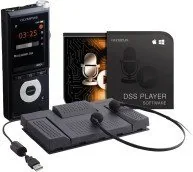
The AS-2400 provides a transcription-focused workflow with a foot switch, headset, and DSS Player software, making playback and typing more efficient.
Is this answer helpful?
The DS-2600 supports DSS, PCM, and MP3 formats. This gives users a choice between speech-optimized files, higher-quality audio, and more compressed recordings.
Is this answer helpful?
Yes. It supports SD and SDHC cards from 4 GB to 32 GB, and you can choose between internal memory and the card for saving recordings.
Is this answer helpful?
The battery can be charged through a USB cable or with a docking station and AC adapter. USB charging is convenient, while the dock can provide a steadier setup.
Is this answer helpful?
You can append, overwrite, or insert audio into files, and you can also use index marks to mark important points for quicker review later.
Is this answer helpful?
Advantages and Disadvantages
Advantages

- Supports DSS, PCM, and MP3 formats for flexible recording needs.
- Slide switch controls and index marks make navigation fast and simple.
- AS-2400 adds a foot switch, headset, and software for easier transcription.
- USB connectivity and rechargeable battery support everyday office use.
Disadvantages

- Docking station and AC adapter may be sold separately.
- Some advanced edit functions are not available for MP3 files.
- Formatting a memory card erases all stored data, including locked files.
- Battery, card, and file handling require careful attention to avoid data loss.
Product Specification
Type
Digital dictation system
Recording formats
DSS Pro, MP3, WAV
Playback formats
DSS Pro, MP3, WAV
Recording duration
max. 56 h
Integrated memory
2GB
Integrated microphones
2
Connections
Headphones (3.5mm jack), Microphone (3.5mm jack), USB 2.0, Cardreader (SD/SDHC)
Special features
Display, voice-activated recording, variable playback speed
Dimensions
1.97x4.76x0.75in (WxHxD)
Weight
0.26lb
Product Description
Olympus DS-2600 + AS-2400: A Practical Dictation Setup
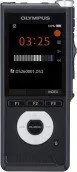
The Olympus DS-2600 + AS-2400 Manual highlights a workflow designed for people who rely on fast, accurate voice capture and simple transcription. The DS-2600 digital voice recorder is built around a slide switch layout, a bright color display, and clear status indicators, making it easy to start, stop, review, and manage recordings without slowing down the workday. It supports DSS, PCM, and MP3 formats, so users can choose between speech-focused efficiency, higher audio quality, or more compact files depending on the task.
One of the recorder’s strongest points is flexibility. It offers multiple microphone modes for dictation and conference settings, plus adjustable sensitivity to match the environment. That makes it suitable for solo notes, meetings, interviews, and office dictation. The device also supports index marks, playback speed control, overwrite and insert functions, and organized storage through five folders with room for many files. In daily use, these features help keep recordings tidy and easy to revisit later.
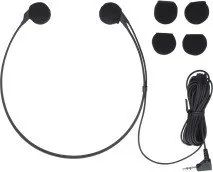
The AS-2400 transcription kit adds even more value by supporting a smoother handoff from recording to editing. With a foot switch, headset, and DSS Player software, it helps users listen, pause, and transcribe with less effort. For busy professionals, that means less time spent managing playback and more time focused on the content itself. Combined with the recorder, the kit creates a practical setup for anyone handling regular dictation work.
Battery and connectivity options also make the system convenient. The DS-2600 can charge through USB or a docking station, and it can transfer files to a computer quickly through USB 2.0. Internal memory and SD/SDHC card support add storage flexibility, while menu settings allow users to customize display, sound, language, and power-saving behavior. It is a thoughtful blend of control and simplicity.
Key takeaways
- A versatile recorder for dictation, meetings, and structured note-taking.
- The transcription kit improves playback control and workflow speed.
- Multiple recording formats and microphone options add adaptability.
- File management features help users stay organized over time.
Notes
- Test recording levels before important sessions.
- Back up files regularly before erasing or formatting.
- Use the recommended battery and compatible memory cards for best results.
Search for 67,706 Manuals online


Type-in Brand or Model