
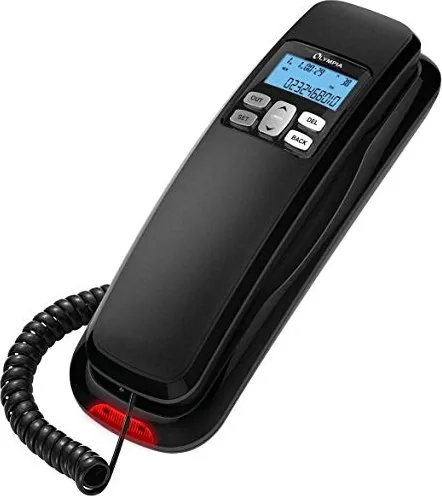

Olympia 4510 Manual
PDF manual · 44 Pages
English



Quick check
Incorrect answer, please try again.
Chat with your Olympia 4510 manual using AI
Get instant AI answers from your Olympia 4510 manual
Ask anything about the Olympia 4510. Answers come from this manual, with the pages they are based on.
Ask a Question
Do you recommend 4510?
Yes NoFrequently Asked Questions
Open the battery compartment on the underside or rear of the unit, insert the specified batteries observing polarity, then close the compartment. Follow the manual’s step-by-step diagram and recycle old batteries properly.
Is this answer helpful?
Use the menu to access display settings. Select the LCD or contrast option, then increase or decrease contrast and enable/adjust the backlight as needed. The manual lists menu numbers for quick access.
Is this answer helpful?
The phone supports both pulse (impulse) and tone (DTMF) dialing. Change the dialing mode in the settings menu (P/T or PULSE/TONE) depending on your line requirements.
Is this answer helpful?
Navigate to the call list or incoming/outgoing calls menu to review stored numbers. Use the provided keys to select an entry and choose the delete or recall option to remove or redial the number.
Is this answer helpful?
Yes — the Olympia 4510 supports optional wall mounting. Follow the installation instructions in the guide, and take care to avoid damaging cables or pipes when drilling.
Is this answer helpful?
Adjust the ringtone volume using the dedicated volume control or settings menu. Verify the ringer setting is not OFF and set to LO or HI as desired. Check handset and base connections if volume remains low.
Is this answer helpful?
Service contacts and warranty details are provided in the product documentation and on the manufacturer’s support page. The manual lists a customer service phone number and web resources for assistance.
Is this answer helpful?
Advantages and Disadvantages
Advantages

- Backlit LC display with adjustable contrast for clear visibility in varied lighting.
- Intuitive function keys for redial, hold, mute, volume and menu navigation.
- Call lists for incoming/outgoing numbers with easy recall and deletion.
- Supports both pulse and tone dialing plus programmable PCODE features.
- Compact footprint with optional wall-mounting and simple battery backup.
Disadvantages

- Basic feature set lacks advanced digital functions like VoIP or smartphone integration.
- Relies on batteries for backup—may need periodic replacement.
- No touchscreen; all configuration requires navigating physical menus.
- May require consultation of manual for advanced settings (area code filtering, PCODE).
- Not optimized for large-scale business use or multi-line environments.
Product Specification
Type
Analog phone (corded)
Display
monochrome
Call list
38 entries
Interfaces
1x analog
Answering machine
no
Special features
Caller ID, hands-free function, big button phone, hearing aid compatible
Dimensions
8.27x2.76x2.48in
Weight
0.65 lb
Product Description
Olympia 4510 Manual — Compact Phone Overview
The Olympia 4510 is a compact corded telephone designed for everyday home and small-office use. It combines a backlit LC display with intuitive function keys, offering an accessible interface for users who need reliable calling basics plus helpful extras like call history, hold melody, and adjustable display contrast. The phone’s layout emphasizes clear navigation: dedicated keys for redial, call lists, and menu navigation let you manage incoming and outgoing calls fast, while an easy-to-read display shows caller information, date/time, and status icons.
Design and usability
Built with a compact footprint, the 4510 fits easily on desks or wall mounts. The backlit LC display improves visibility in dim light, and adjustable contrast and brightness let you adapt the screen for different lighting conditions. Function keys are labeled and grouped for straightforward operation: answer, end, hold, mute, and volume controls are all within thumb reach. Battery-powered back-up and simple battery insertion make setup and maintenance uncomplicated.
Features worth noting
The phone supports call memory and lists for incoming and outgoing calls, easy recall and deletion of stored numbers, and a melody hold function that alerts when a call is placed on hold. It can be configured for pulse or tone dialing, and includes options for area code filtering, call blocking, and programmable codes (PCODE) for network features. Installation options include desk placement or optional wall mounting, with guidance to avoid damaging building wiring.
Practical benefits
For users who want a no-fuss reliable telephone, the Olympia 4510 delivers essential telephony with a few convenience features that improve everyday handling. Clear on-device instructions, accessible menus for setting date/time, display parameters, and volume make it manageable for non-technical users. The unit is accompanied by safety, disposal, and care guidelines to prolong service life.
Final note
Overall, the Olympia 4510 balances simplicity and functionality. It’s suitable where dependable voice communication and clear basic controls are the priority, offering a well-organized control scheme and readable display for comfortable daily use.
Notes:
- Adjustable contrast and backlight for visibility
- Supports pulse or tone dialing and PCODE configurations
- Includes call lists, redial, hold melody, and mounting options
Search for 67,706 Manuals online


Type-in Brand or Model