Visit www.olightworld.com to see our complete product line
of portable illumination tools.
EU-Declaration of Conformity can be found here :
https://olightworld.com/ec-declaration
A HASZNÁLAT MÓDJA
BE/KI:
A gomb egyszeri megnyomásával kapcsolható be/ki a lámpa. A
kikapcsolt, majd újra bekapcsolt lámpa a kikapcsoláskor érvényben lévő
fehér fényű üzemmódra áll. Kérjük, ne feledje, hogy a vörös fényű üzemmód
nem támogatja a memória funkciót. Ha a lámpa kikapcsoláskor vörös fényű
üzemmódban volt, visszakapcsoláskor az alapbeállítás szerinti alacsony
erősségű fehér fényű üzemmódra áll.
A SZÍN ÜZEMMÓD MEGVÁLTOZTATÁSA:
A gomb kétszeri gyors egymás utáni
megnyomásával lehet átkapcsolni a fehér és a vörös fényű üzemmódok között.
A FEÉNYERŐ MEGVÁLTOZTATÁSA:
Ha a lámpa fehér fényű üzemmódban
van, a gomb nyomva tartásakor a lámpa az aktuális fényerőfokozatról
indulva automatikusan végigkapcsol az alacsony, közepes és erős
fokozatokon. Vörös fényű üzemmódban csak egyetlen fényerő fokozat van,
így a fényerő nem változtatható meg.
LEZÁRÁS / FELOLDÁS:
A kikapcsolt lámpán tartsa nyomva a gombot. Ekkor a
lámpa egy rövid ideig alacsony fényerőfokozaton világít, majd lezárt állapotra
áll. A lezárt állapotban lévő lámpa gombjának egyszeri megnyomásakor a
gomb körül világító vörös fény jelzi, hogy a lámpa le van zárva. A feloldáshoz
tartsa nyomva a gombot mindaddig, amíg a lámpa alacsony fényerőfokozattal
be nem kapcsol.
IN THE BOX
ParameterSpecication
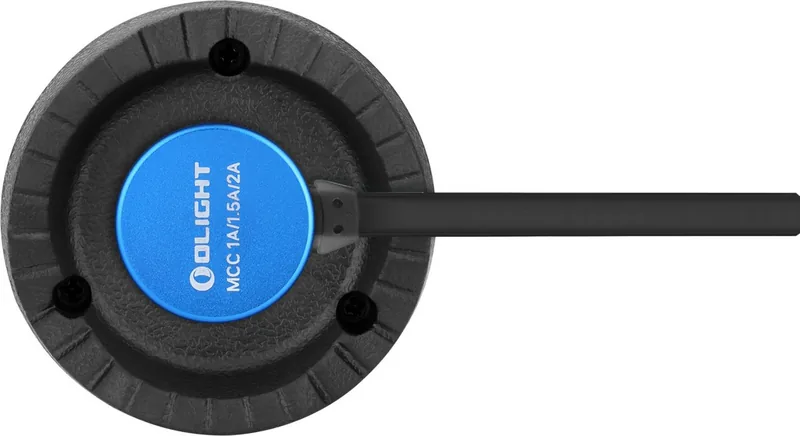
USB type A - magnetic charging connector
Length: 1.2m
Charging cable
USB A - Type DC 5V 1A
Input
CC&CV
Charging pattern
Maximum charging current
1A
4.2V±0.05V
Voltageoffullychargedbattery
3.5h
Time to fully charge
Charge indication
Red: charging Green: full (over 95%)
or disconnected with Olantern Mini
All above specifications are test results based on ANSI/NEMA FL1-2009 Standard.
(H)3.91* (D)2.06in
(H)99.35 *(D)52.20mm
8.43oz / 239g1.0m
IPX4
HIGH
lumens
150
4
h
lumens
15
LOW
48h34h
lumen
RED LIGHT
1
50
MED
lumens
12h
Button
(Before first use, please press
and hold the button to unlock)
CHARGING
RED
Charging
GREEN
Charging Completed
* Before first use please fully charge the product.
* Connect the magnetic USB end of the charging cable (MCC3) to an
external USB power source, then attach the other end of the magnetic
charging cable to the charging port (best charging efficiency with more
than 5W (5V 1A)USB power source). The red indicator means charging,
green indicator means charging completed (battery power>95%).
* Only charge with standard MCC3, not compatible with other MCC.
• DO NOT shine the light directly into human eyes for a long time, which
may cause temporary blindness or permanent damage to the eyes.
• DO NOT cover the Olantern Mini that is on. The generated heat can cause
burning or even unpredictable disasters.
• Keep it out of reach of children.
DANGER
•
DO NOT immerse the Olantern Mini in water.
WARNING
EXCLUSION CLAUSE
Olight is not liable for damages or injuries sustained resulting from the usage
of the product inconsistent with the warnings in the manual, including but not
limited to using the product inconsistent with the recommended lockout
mode.
The Olantern Mini battery indicator is motion-sensitive. The indicator will
fade on and off in green, yellow, or red to indicate a high, medium, or low
battery level when you move the Olantern Mini. After seven seconds with no
motion, the indicator will turn off.
NOTICE
USER MANUAL
Thank you for purchasing this Olight Product. Please read this
manual carefully before use and keep it for future reference!
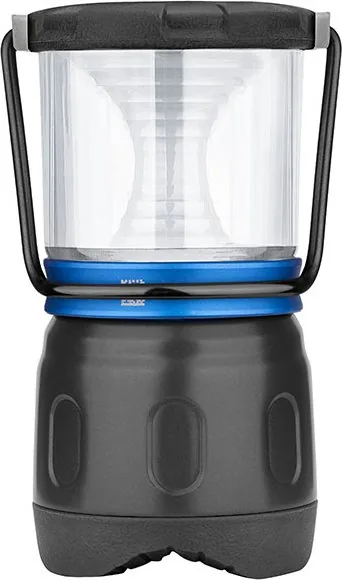
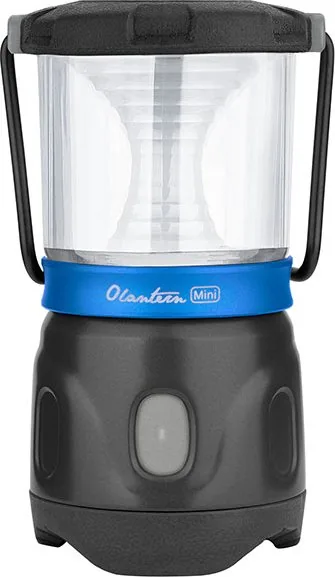
Olantern Mini
Olantern Mini
Microfiber Cleaning Cloth
USB Magnetic Charging Cable
• Compact and sleek backpacking lantern that delivers excellent runtimes and
output for its size.
•360-degree light source that includes a red light (1 lumen) to preserve night
vision or give signals and a dimmable white light (15, 50, 150 lumens) for
general purpose use.
• Tornado-shaped diffuser for a softer and more balanced output.
• The nonslip and elastic TPE base stands stably on any flat surface, or you
can easily hang it with the attached handle or the optional magnetic hook.
• Runtime up to 48 hours with an integrated 3.7V 2000mAh rechargeable
lithium-ion battery.
• Equipped with a motion sensor that allows the battery indicator around the
switch to light up after a shake or move.
FEATURES
SPECIFICATIONS
USB MAGNETIC CHARGING CABLE -- MCC3PRODUCT OVERVIEW
BATTERY LEVEL INDICATOR
Hanging Hook
Battery Indicator
Tornado-Shaped Diffuser
Green
: >70%
Blinks Red
: <10%
Red
: <30%
Yellow
: 30%-70%
/1
%
Quick check
I'm not a robot
Incorrect answer, please try again.
Chat with your Olight Olantern Mini manual using AI
Get instant AI answers from your Olight Olantern Mini manual
Ask anything about the Olight Olantern Mini. Answers come from this manual, with the pages they are based on.
Ask a Question
0/1000
Do you recommend Olantern Mini?
YesNo
Frequently Asked
Questions
A
Single-click the button to turn the lantern on or off. When it is turned back on, it returns to the previously memorized white-light brightness setting. If it was switched off while using red light, it starts again in low white mode.
Is this answer helpful?
A
Quickly double-click the button to switch between white light and red light. White light provides three adjustable levels, while red light provides one fixed 1-lumen level.
Is this answer helpful?
A
With white light turned on, press and hold the button. The lantern cycles through low, medium, and high brightness settings. Release the button when the desired level is active.
Is this answer helpful?
A
Move the lantern to activate the motion-sensitive battery indicator. Green shows more than 70 percent charge, yellow shows 30 to 70 percent, red shows less than 30 percent, and blinking red shows less than 10 percent. It turns off after seven seconds without movement.
Is this answer helpful?
A
With the lantern switched off, press and hold the button until low mode briefly appears and then the light enters lockout. In lockout mode, a single press activates a red indicator around the button. Hold the button until low mode returns to unlock it.
Is this answer helpful?
A
A full charge takes approximately 3.5 hours using a 5V 1A USB power source. Connect the USB end of the included MCC3 cable to power and attach the magnetic end to the lantern. Red means charging, and green means more than 95 percent charged.
Is this answer helpful?
M: gpt-5.6-terra
Advantagesand
Disadvantages
Advantages
Compact 239 g lantern provides 360-degree white or red illumination for camping, home use, and emergency lighting.
Three white-light levels deliver 15, 50, or 150 lumens, with up to 48 hours of runtime on low.
Red 1-lumen mode helps preserve night vision and offers a low-impact signaling option.
Magnetic USB charging, motion-sensitive battery indication, hanging hook, and non-slip base improve convenience.
VS
Disadvantages
Red light has only one brightness level and does not retain its setting after the lantern is turned off.
IPX4 splash resistance is not suitable for immersion or heavy water exposure.
The lantern requires the standard MCC3 magnetic charging cable and is not compatible with other MCC cables.
Maximum 150-lumen output may be insufficient for users needing powerful area lighting.
M: gpt-5.6-terra
Product
Specification
Type
Lantern
Max. light output
150 lm
Max. runtime
48 h
Power supply
Li-ion rechargeable battery (2,000 mAh)
Dimensions
3.90 x 2.05 in
Weight
8.43 oz
Features
Water-resistant (IPX4)
M: gpt-5.6-terra
Product
Description
OLight Olantern Mini Lantern - Read, Download & Print Free
The OLight Olantern Mini Lantern is a compact rechargeable light designed for campsites, backpacks, emergency kits, patios, and everyday indoor use. Its cylindrical design provides a broad 360-degree glow, while a tornado-shaped diffuser softens the output for more balanced illumination. At just 3.91 inches tall and 2.06 inches in diameter, it is easy to carry without giving up useful runtime or versatile lighting options.
White light is available in low, medium, and high settings, offering 15, 50, and 150 lumens respectively. The low setting can run for up to 48 hours, making this lantern a practical companion for overnight trips, power outages, or relaxed evenings outdoors. Press and hold the button while using white light to cycle through the three brightness levels. The lantern remembers the last white-light setting used, so it can return to your preferred output after being switched off.
A quick double press changes the OLight Olantern Mini Lantern between white and red light. The red mode delivers a gentle 1-lumen output that can help preserve night vision, create a low-impact campsite atmosphere, or serve as a simple signal light. Red light has one fixed brightness level and does not use the memory function. When the lantern is turned off in red mode, it returns to low white light the next time it is switched on.
The integrated 3.7V 2000mAh lithium-ion battery is recharged with the included MCC3 USB magnetic charging cable. A red indicator shows that charging is in progress, while green indicates the battery is more than 95 percent charged or the cable is disconnected. The battery indicator is motion-sensitive, lighting in green, yellow, or red after the lantern is moved to show the remaining charge level.
For flexible placement, the lantern has a non-slip elastic TPE base for stable use on flat surfaces and a built-in hanging hook for overhead lighting. An optional magnetic hook can provide another hanging option. Its IPX4 rating offers resistance to splashing water, helping it handle common outdoor conditions, though it should not be immersed.
Notes
Hold the button while the lantern is off to activate or release lockout mode.
A red ring around the button confirms that lockout mode is active.
Fully charge the lantern before first use.
Do not cover the lantern while it is on or shine it directly into eyes for extended periods.