
Oehlbach PureClock Manual
PDF manual · 48 Pages
English



Quick check
Incorrect answer, please try again.
Chat with your Oehlbach PureClock manual using AI
Get instant AI answers from your Oehlbach PureClock manual
Ask anything about the Oehlbach PureClock. Answers come from this manual, with the pages they are based on.
Ask a Question
Do you recommend PureClock?
Yes NoFrequently Asked Questions
The Oehlbach PureClock is designed to reduce electromagnetic interference and minimize jitter when used between a computer and external USB devices like DACs. This results in improved signal processing, better sound fidelity, and higher resolution during audio playback.
Is this answer helpful?
Simply connect the PureClock in series between the USB port of your computer and your external device, such as a DAC, headphone amplifier, or external hard drive. It draws power directly from the USB connection and requires no additional cables or power adapters.
Is this answer helpful?
Yes, the PureClock can be used in mobile mode with smartphones and car radios. It helps minimize interference in these setups, ensuring a cleaner signal path for better audio quality on the go.
Is this answer helpful?
The Oehlbach PureClock comes with a 2-year warranty that begins on the date of purchase. This warranty applies only to the original owner and covers defects in material or workmanship, excluding accidental damage or misuse.
Is this answer helpful?
No, you should not cover the PureClock or place it in enclosed spaces like bookshelves or cabinets. Proper ventilation is essential to prevent overheating, which could lead to short circuits or fire hazards.
Is this answer helpful?
If the product arrives with visible or invisible shipping damage, you must file a claim immediately with the shipping company or carrier. The manufacturer's warranty does not cover transport damages, so prompt action is required.
Is this answer helpful?
Advantages and Disadvantages
Advantages

- Significantly reduces electromagnetic interference and jitter for clearer audio
- Improves sampling accuracy and sound fidelity in digital-to-analog conversion
- Compact and lightweight design allows for easy portability and flexible placement
- Compatible with a wide range of devices including DACs, NAS servers, and smartphones
Disadvantages

- Warranty does not cover cosmetic damage like scratches or transport-related issues
- Performance may vary depending on the specific configuration of connected devices
- Requires proper ventilation and must be kept away from heat sources to function safely
- Limited to USB-powered operation which restricts usage in non-USB powered setups
Product Specification
Type
Filter
Product Description
Unlocking Audio Fidelity with the Oehlbach PureClock
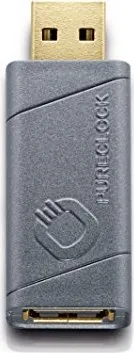
The Oehlbach PureClock stands as a testament to precision engineering in the realm of digital audio enhancement. Designed for audiophiles and tech enthusiasts alike, this compact device serves as a crucial bridge between your computer's USB interface and external peripherals such as DACs, headphone amplifiers, or external hard drives. Its primary mission is to eliminate electromagnetic interference that often plagues digital signal paths, thereby ensuring a cleaner and more accurate transmission of data.
When integrated into your setup, the PureClock actively minimizes jitter, a phenomenon known to degrade sound quality by introducing timing errors in digital signals. By stabilizing the power supply and reducing noise, it significantly improves the sampling accuracy of digital-to-analog converters. The result is an audible upgrade in audio playback, characterized by enhanced fidelity, greater dynamic range, and superior resolution. Whether you are streaming music from a NAS server, connecting a smartphone to a car radio, or utilizing a high-end desktop system, the PureClock adapts seamlessly to various configurations.
This device is not merely an accessory but a functional component that respects the integrity of your audio chain. It operates within a robust temperature range and requires no external power source other than the standard 5V DC provided via USB. Its lightweight design, weighing only 10 grams, makes it incredibly portable, allowing for use on the go without adding bulk to your gear. The product adheres to strict EU safety and environmental directives, ensuring compliance with low voltage and waste electrical equipment regulations.
Key Application Scenarios
Utilizing the PureClock offers flexibility across multiple platforms. You can place it in series between a computer and a USB-DAC to refine the conversion process. It also works effectively with local USB devices like printers and cameras to reduce interference. For mobile users, it pairs well with smartphones and autoradios, while networked environments benefit from its integration with modems, routers, and streaming devices.
Important Notes
- Always ensure the device is placed in a well-ventilated area away from heat sources.
- Do not expose the unit to moisture or rain to prevent short circuits.
- Clean only with a dry cloth to maintain optimal performance.
- Warranty covers manufacturing defects but excludes physical damage or unauthorized modifications.
Search for 67,706 Manuals online


Type-in Brand or Model