
Odys NoteTab Pro LTE 2in1 Edition Manual
PDF manual · 74 Pages
English



Quick check
Incorrect answer, please try again.
Chat with your Odys NoteTab Pro LTE 2in1 Edition manual using AI
Get instant AI answers from your Odys NoteTab Pro LTE 2in1 Edition manual
Ask anything about the Odys NoteTab Pro LTE 2in1 Edition. Answers come from this manual, with the pages they are based on.
NoteTab Pro LTE 2in1 Edition Maintenance Schedule
If the device will not be used for an extended period or is used infrequently, charge the battery at least once per month to maintain battery life.
Clean the device using a dry cloth. Do not use chemicals, solvents, or cleaners to avoid corrosion or damage.
Free maintenance reminders
Timed to your purchase date. Always free, unsubscribe anytime.
Ask a Question
Do you recommend NoteTab Pro LTE 2in1 Edition?
Yes NoFrequently Asked Questions
The tablet uses Android 8.1. It supports Android apps, Google services, system customization, browser access, account management, and common communication features.
Is this answer helpful?
Yes. With a compatible standard-size SIM card and a suitable mobile plan, it supports GSM, UMTS/HSPA, and LTE-FDD mobile connections. Mobile data settings or APN details may be required depending on the provider.
Is this answer helpful?
It is designed to work with its supplied Bluetooth keyboard. The keyboard includes a rechargeable battery and shortcut keys for navigation, media, brightness, volume, screenshots, and text actions.
Is this answer helpful?
The device includes 16 GB of internal flash storage and supports MicroSD or MicroSDHC cards up to 32 GB. Available internal space is lower because Android and preinstalled apps use part of the storage.
Is this answer helpful?
The NoteTab Pro supports Wi-Fi 802.11 a/b/g/n on 2.4 GHz and 5 GHz bands, Bluetooth for compatible accessories, and mobile network connections through its SIM slots.
Is this answer helpful?
A full tablet charge takes approximately five hours using the supplied charger. The keyboard charges separately and takes approximately 2.5 hours. Charging while switched off is recommended for shorter charge time and battery care.
Is this answer helpful?
Advantages and Disadvantages
Advantages

- 10.1-inch HD IPS touchscreen supports comfortable browsing, media playback, reading, and everyday Android apps.
- LTE, dual-SIM, Wi-Fi, and Bluetooth connectivity offer flexible options for communication and internet access.
- Bluetooth keyboard adds practical typing and shortcut controls for more productive use.
- MicroSD expansion up to 32 GB helps extend space for compatible media and personal content.
- Front and rear cameras, a speaker, microphone, and headphone jack cover essential multimedia needs.
Disadvantages

- Android 8.1 is an older platform and may limit compatibility with some current apps or services.
- 16 GB internal storage can fill quickly after system software, apps, media, and downloads are added.
- The display resolution of 1280 x 800 is modest compared with newer high-resolution tablets.
- The listed battery play time is about five hours, which may be limited for long days away from charging.
- Only standard-size SIM cards fit directly, reducing convenience for users with Micro or Nano SIM cards.
Product Specification
CPU
MediaTek MT8735B, 4x 1.30 GHz (ARM Cortex-A53)
RAM
2 GB DDR3
Storage
16 GB Flash
Graphics
ARM Mali-T720 MP2 (iGPU)
Display
10.1 in, 1280x800, 149 ppi, multi-touch, IPS
Ports
1x USB 2.0 Micro-B (480 Mb/s)
Wireless
Wi-Fi 4 (WLAN 802.11b/g/n), Bluetooth 4.0
Navigation
A-GPS
SIM
2x SIM, phone function
Cellular
LTE, UMTS (42/5.76), GSM (3.1/1.8)
Networks
4G (B1/B3/B7/B20), 3G (B1/B8), 2G (B2/B3/B5/B8)
Card reader
microSDHC (up to 32 GB)
Webcam
0.3 megapixel (front), 2 megapixel (rear)
Operating system
Android 8.1
Battery
Li-polymer, 2500 mAh, 5 h battery life
Dimensions
10.27 x 6.31 x 0.39 in
Weight
10.23 oz (tablet)
Warranty
one year
Note
Different country versions possible.
Product Description
Odys NoteTab Pro LTE 2in1 Edition - Read, Download & Print Free
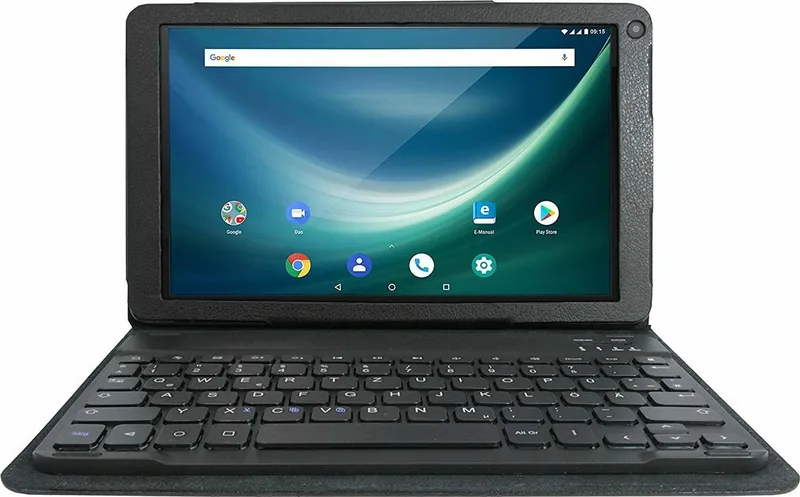
The Odys NoteTab Pro LTE 2in1 Edition is a versatile Android tablet designed for users who want a compact entertainment, communication, and productivity companion. Its 10.1-inch HD IPS touchscreen delivers a clear 1280 x 800 display for browsing, streaming, reading, photo viewing, and everyday apps. With a detachable-style Bluetooth keyboard experience, it can shift easily from relaxed touch control to more focused typing.
Connected at Home and on the Move
This model combines dual-SIM mobile connectivity with Wi-Fi, Bluetooth, and LTE support. It is suited to staying online through compatible 2G, 3G, or 4G mobile networks, while dual-band 2.4 GHz and 5 GHz Wi-Fi provides flexible wireless access indoors. Bluetooth support lets users pair compatible headphones, keyboards, and other accessories without cables.
The Odys NoteTab Pro LTE 2in1 Edition - Read, Download & Print Free experience is supported by Android 8.1, giving access to familiar apps, Google services, browsing tools, and customizable settings. Users can manage contacts, send messages, make calls with a compatible SIM card, and organize accounts directly from the tablet.
Practical Storage and Media Features
A 1.3 GHz 64-bit quad-core processor, 2 GB of RAM, and 16 GB of internal flash storage provide the foundation for core tasks. Storage can be expanded with a MicroSD or MicroSDHC card up to 32 GB, making it easier to carry music, videos, photos, and reading material. The tablet supports common media formats, including MP3 audio, JPEG images, EPUB reading content, and several popular video formats.
Front and rear cameras add flexibility for video calls, quick snapshots, and casual recording. The built-in microphone, speaker, and 3.5 mm headphone jack offer several ways to enjoy sound or communicate. A screenshot shortcut also makes it simple to capture what is displayed on screen.
Keyboard Convenience
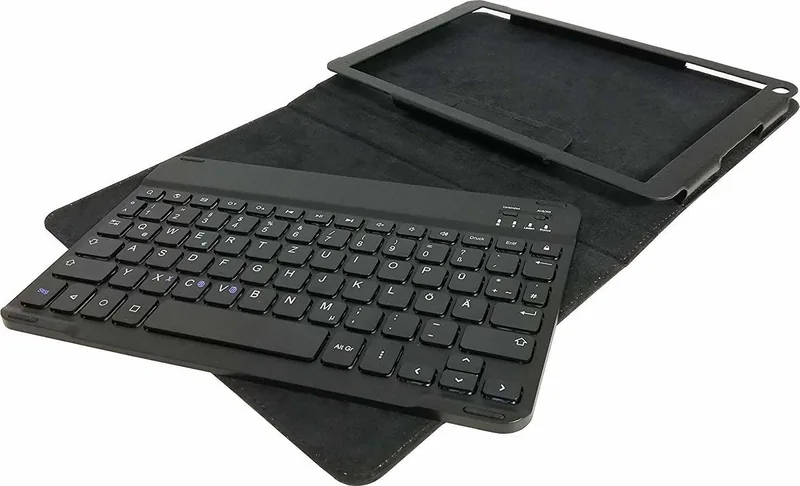
The included Bluetooth keyboard is a useful addition for writing emails, searching the web, editing notes, and entering longer messages. It includes dedicated function keys for brightness, volume, media playback, search, screenshots, navigation, and common copy-and-paste actions. Pairing is handled through Bluetooth settings, and the keyboard has its own rechargeable battery.
Notes
- The tablet battery charges through Micro USB and takes about five hours for a full charge.
- Use standard-size SIM cards only; Micro and Nano SIM cards are not supported without an appropriate solution.
- Regular backups are recommended before system updates or major changes.
- Keep the touchscreen dry, clean it only with a soft cloth, and avoid sharp objects.
Search for 67,706 Manuals online


Type-in Brand or Model