
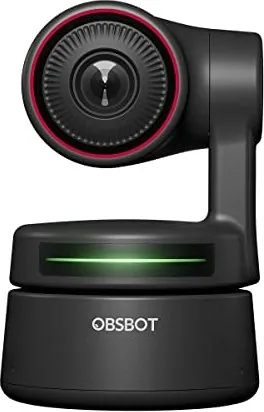
OBSBOT Tiny 4K Manual
PDF manual · 14 Pages
English



Quick check
Incorrect answer, please try again.
Chat with your OBSBOT Tiny 4K manual using AI
Get instant AI answers from your OBSBOT Tiny 4K manual
Ask anything about the OBSBOT Tiny 4K. Answers come from this manual, with the pages they are based on.
Ask a Question
Do you recommend Tiny 4K?
Yes NoFrequently Asked Questions
The camera is fully compatible with Windows 7 and later versions, as well as macOS 10.13 and newer. For optimal 4K performance, it is recommended to use an 8th Gen Intel Core i5 processor or higher on Mac systems.
Is this answer helpful?
To activate gesture control, hold your hand near your face with fingers spread out until the indicator lights turn blue. Follow the tutorial videos on the official website for specific gestures to lock targets or adjust zoom levels manually.
Is this answer helpful?
Yes, the OBSBOT Tiny 4K is designed specifically for live streaming. It offers 4K resolution, AI tracking, and digital zoom capabilities that work seamlessly with popular platforms like Zoom, Teams, Skype, and Google Meet.
Is this answer helpful?
Absolutely. The privacy mode works by pointing the lens straight down. When activated, the indicator light turns off, and both the video feed and microphone are completely disabled to ensure total privacy.
Is this answer helpful?
Lagging or flickering often indicates the camera is connected to a USB 2.0 port without sufficient power. We recommend switching to a USB 3.0 port or connecting the provided DC adapter to ensure stable power delivery for 4K video transmission.
Is this answer helpful?
Advantages and Disadvantages
Advantages

- Advanced AI-powered auto-tracking and automatic framing keep users centered effortlessly
- Supports true 4K resolution at 60 fps for incredibly sharp and detailed video quality
- Unique gesture control allows hands-free management of zoom and tracking targets
- Versatile mounting options include magnetic base, tripod thread, and upside-down mode
- Privacy mode physically blocks the lens and disables audio/video for complete security
Disadvantages

- Requires a USB 3.0 port or external DC adapter to prevent lag during 4K streaming
- Some advanced video configuration settings are only available on Windows systems
- Extended usage can cause the bottom of the unit to become warm due to internal processing
- Gesture recognition requires specific hand positioning and may need calibration initially
- Remote controller for additional control is sold separately and must be purchased from the store
Product Specification
Type
Conference Camera (PTZ)
Image Sensor
1x CMOS
Resolution
3840x2160 Pixels (30fps), 1920x1080 Pixels (60fps)
Viewing Angle
90 degrees (diagonal)
Pan
-150 degrees to 150 degrees (motorized, 120 degrees/sec)
Tilt
-45 degrees to 45 degrees (motorized, 120 degrees/sec)
Zoom Function
4x digital
Compression/Codecs
MJPEG, H.264
Connections
1x USB-C 2.0 (480Mb/s, jack)
Wireless
N/A
Focus
Autofocus
Camera Cover
present
Microphone
integrated (stereo, omnidirectional)
Speaker
N/A
Lighting
N/A
Cable Length
4.92 feet
Power Supply
via USB
Mount
PTZ stand foot, with 1/4 inch thread, magnetic
Dimensions
3.52x2.28x2.28 inches
Weight
5.15 ounces
Package Contents
Camera, Mount, USB-C to USB-A Adapter, USB-C Cable
Features
Motion detection (gesture control), Face recognition (Face-Tracking), controllable via app, privacy zones
Product Description
OBSBOT Tiny 4K PTZ Camera - Elevate Your Streaming Experience
The OBSBOT Tiny 4K PTZ Camera represents a significant leap forward in webcam technology, merging high-definition video quality with advanced artificial intelligence. Designed for content creators, streamers, and professionals who demand reliability, this device utilizes deep learning neural networks to deliver seamless AI tracking and automatic framing. Whether you are conducting important video conferences, live streaming on Twitch or YouTube, or participating in remote meetings, the Tiny 4K ensures you remain the focal point of every interaction.
At the heart of its performance is a powerful 2-axis gimbal that allows for smooth pan and tilt movements, covering a wide range of motion to keep subjects perfectly centered. The camera supports stunning 4K resolution at 60 frames per second, providing crystal-clear visuals that capture every detail. Connectivity is streamlined through a USB-C port, ensuring fast data transfer and stable connections compatible with both Windows and macOS systems. Users can further enhance their setup by using the dedicated OBSBOT TinyCam software, which unlocks a suite of customization options including manual focus, HDR adjustments, and preset positions.
One of the most innovative features of the OBSBOT Tiny 4K is its gesture control system. This unique capability allows users to manage the camera without touching any buttons or devices. By simply raising a hand with fingers splayed, users can lock onto a target, cancel tracking, or adjust the zoom level instantly. This hands-free operation keeps the flow of conversation or presentation uninterrupted. Additionally, the camera includes a privacy mode that physically directs the lens downward and cuts off both audio and video feeds when not in use, offering peace of mind for security-conscious individuals.
The design is equally impressive, featuring a flexible magnetic base that allows for versatile placement on monitors, desktops, or standard tripods via the UNC 1/4-20 interface. The camera also supports an upside-down mounting mode, automatically rotating the display for ceiling installations. With features like anti-flicker technology for fluorescent environments and intelligent auto-focus that adjusts in real-time, the OBSBOT Tiny 4K is built to handle diverse lighting conditions and professional requirements. It transforms the way people connect online, making every call feel personal and professional.
Search for 67,706 Manuals online


Type-in Brand or Model