
NZR SEM16+ Manual
PDF manual · 36 Pages
English



Quick check
Incorrect answer, please try again.
Chat with your NZR SEM16+ manual using AI
Get instant AI answers from your NZR SEM16+ manual
Ask anything about the NZR SEM16+. Answers come from this manual, with the pages they are based on.
Ask a Question
Do you recommend SEM16+?
Yes NoFrequently Asked Questions
It measures present power (W), energy consumption (kWh), annual cost projection, current (A), voltage (V), frequency (Hz), reactive and apparent power, phase angle, power factor, minimum/maximum power, equivalent CO2 and ON/TOTAL times.
Is this answer helpful?
Press SET and FUNCTION together until the costs/kWh prompt appears, then use START/STOP to adjust digits and SET to move left. Confirm with SET + FUNCTION. Repeat the process to set the CO2 emissions factor. Values persist after unplugging.
Is this answer helpful?
You can choose 1, 7, 30 days or 0 days (manual start/stop). Use short periods for constant loads, 7 days for weekly patterns (e.g., TV), and 30 or manual for irregular devices (e.g., washing machine) to improve accuracy.
Is this answer helpful?
The USB model records load profiles (power, current, voltage, reactive power) at selectable intervals (1–60 min), stores ~14,000 points, and works with Home-Energy-Monitor PC software to visualize characteristic curves and export data.
Is this answer helpful?
Navigate to the Energy Consumption or Energy Costs menu and hold START/STOP for about 3 seconds. All measured values (energy, costs, CO2, min/max power) reset to zero; price and CO2 settings remain unchanged.
Is this answer helpful?
Use indoors in dry conditions, operating temperature 0–45°C. Do not exceed 3,680 W (16 A). Inspect regularly for damage; repairs must be done by qualified personnel. The device is not intended for medical use or official billing.
Is this answer helpful?
Select an interval (1,2,3,4,5,6,10,12,15,20,30,60 min) balancing detail and storage: shorter intervals give finer resolution but fill memory faster. Change interval by pressing START/STOP and FUNCTION together and cycling with START/STOP.
Is this answer helpful?
Advantages and Disadvantages
Advantages

- Comprehensive real-time and cumulative metrics: W, kWh, A, V, Hz, reactive/apparent power, CO2 equivalent.
- Configurable measurement periods (1, 7, 30 days or manual) and precise cost input to three decimals.
- SEM 16+ USB logs load profiles and pairs with PC software for detailed curve analysis.
- Non-volatile storage preserves measurements through power interruptions.
- Compact plug-in design enables quick appliance-by-appliance testing and standby detection.
Disadvantages

- Not suitable for official billing — intended for household estimates only.
- Maximum load limited to 3,680 W (16 A), so unsuitable for high-power industrial loads.
- USB model requires Windows software and drivers; older OS requirements may limit compatibility.
- Storage capacity (~14,000 points) requires careful interval selection to record long durations.
- Repairs and some battery replacements must be performed by the manufacturer or qualified service.
Product Specification
Type
Sensor
Standard
N/A
Function
Current measurement function
Topology
N/A
Dimensions
4.45x3.43x1.85in
Product Description
NZR SEM 16+ — Accurate Home Energy Monitoring
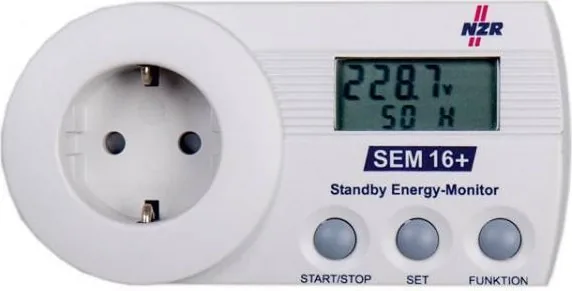
The NZR SEM 16+ (and SEM 16+ USB) is a compact plug-in energy monitor designed to measure and report the electricity consumption and cost of single household appliances. Plug the appliance into the unit and the SEM 16+ automatically begins a measurement cycle (default 24 hours) and displays energy usage in kWh, cost for the measured period, and an extrapolated annual cost based on current consumption. The USB model adds data logging for load curves (power, current, voltage, reactive power) and PC software support for detailed analysis.
Key features and how it helps
The device reports a wide range of live and recorded metrics: present power (W), current (A), voltage (V), frequency (Hz), reactive and apparent power, power factor, phase angle, minimum/maximum power observed, equivalent CO2 for the measured energy and cumulative ON/TOTAL times. Users can set measurement windows of 1, 7 or 30 days (or manual start/stop with 0 days), enter electricity price to three decimal places and set a CO2-emissions factor for environmental impact estimates. All measured values are retained through power interruptions.
The SEM 16+ USB records load profiles at configurable intervals (1–60 minutes) and stores up to approximately 14,000 points, enabling detailed temporal analysis with the supplied Home-Energy-Monitor software. This makes it easy to spot standby drains, identify high-energy devices, and calculate realistic monthly or yearly cost projections using built-in extrapolation formulas.
Practical usage tips
Start a measurement by plugging the SEM into a socket and connecting the appliance. Navigate readings with the FUNCTION and SET buttons; reset measured values (except price/CO2) by holding START/STOP for three seconds while in the energy or cost menu. Choose longer measurement durations for devices with irregular usage (e.g., washing machines), while always-on items can be profiled with shorter intervals. For USB users, choose a logging interval that balances detail with storage capacity.
Safety and maintenance
Operate only indoors in dry conditions; do not exceed 3,680 W (16 A). Keep device protected from moisture and damage. Clean only with a soft dry cloth and disconnect from mains before maintenance. Repairs should be performed by qualified personnel. The SEM 16+ USB contains a manufacturer-serviceable backup battery for date/time retention.
Notes
- Measured values are intended for household monitoring and cost estimation; not for official billing or medical use.
- Factory default price is set currency‑neutral (e.g., 0.240 costs/kWh); update it to your local tariff for accurate cost reporting.
- SEM16+ holds environmental certification (Der Blaue Engel) on some models.
Search for 67,706 Manuals online


Type-in Brand or Model