
NUK Eco Control Video Display 550VD Manual
PDF manual · 238 Pages
English



Quick check
Incorrect answer, please try again.
Chat with your NUK Eco Control Video Display 550VD manual using AI
Get instant AI answers from your NUK Eco Control Video Display 550VD manual
Ask anything about the NUK Eco Control Video Display 550VD. Answers come from this manual, with the pages they are based on.
Eco Control Video Display 550VD Maintenance Schedule
Wipe individual parts with a damp cloth if necessary. Do not immerse parts in water or use abrasive cleaning agents.
Replace the built-in LiPo battery only with an original replacement battery from NUK service.
Ask a Question
Do you recommend Eco Control Video Display 550VD?
Yes NoFrequently Asked Questions
It offers live video, audio monitoring, night vision, temperature tracking, lullabies, a night light, and Eco-Mode. That combination gives parents more than simple sound alerts and helps them monitor sleep more comfortably.
Is this answer helpful?
Yes. The baby unit uses infrared LEDs to capture the room in low light or darkness. The image appears in black and white on the parent unit, so you can still check on your child at night without turning on a light.
Is this answer helpful?
Eco-Mode reduces transmission when the baby is calm and sleeping. It helps save energy and lowers radio activity in the nursery. The system wakes again when sound rises above the chosen VOX level.
Is this answer helpful?
Yes. The parent unit can support up to four cameras. You can switch between them manually or use Patrol Mode, which cycles through the connected cameras automatically every 10 seconds.
Is this answer helpful?
Yes. The baby unit measures room temperature and displays it on the parent unit. You can set minimum and maximum limits, and the monitor will warn you if the temperature goes too high or too low.
Is this answer helpful?
Yes. The Talk-Back function lets you speak from the parent unit to the baby unit. It can help soothe your baby from another room, especially during brief wake-ups or bedtime transitions.
Is this answer helpful?
Advantages and Disadvantages
Advantages

- Eco-Mode lowers transmission when the baby is sleeping and helps save power.
- Video, audio, night vision, and temperature monitoring give broad coverage.
- Supports up to four cameras and a patrol mode for multi-room supervision.
- Includes lullabies, night light, talk-back, zoom, and vibration alerts.
Disadvantages

- The menu structure is feature-rich, so first-time setup can feel a bit complex.
- Video transmission stops in Eco-Mode, which may not suit every parent’s preference.
- Range can drop noticeably through thick walls or metal-heavy environments.
- The baby unit needs mains power, so placement depends on outlet access.
Product Specification
Operating Mode
Battery/Mains Operation (3.7V, 1.26Ah)
Transmission
digital, FHSS
Frequency Band
2400MHz
Range
820.21 ft
Display
LCD
Features
Charging indicator light, Temperature display, Volume display, Lullaby function, Intercom function, Alarm function, Noise sensor, Volume control, Range control, Adjustable sensitivity levels, Vibration alarm, Night light, Night vision function, Zoom function, Eco mode, Wall mount, 32 channels, Automatic channel selection, Multi-room monitoring
Operating Time
8h
Scope of Delivery
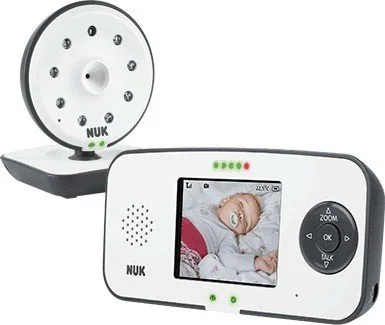
Power supply unit, Battery, 1x Transmitter, 1x Receiver
Product Description
NUK Eco Control 550VD Video Baby Monitor: Smart, Calm, and Built for Everyday Peace of Mind
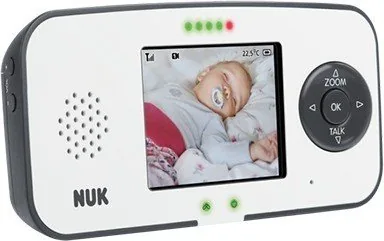
The NUK Eco Control 550VD Video Baby Monitor is designed for parents who want more than basic sound alerts. It combines video, audio, temperature tracking, and energy-saving features into one practical system that helps you keep an eye on your baby without being tied to the nursery. If you’re looking for the NUK Eco Control 550VD Video Baby Monitor Manual, the main idea is simple: this monitor is built to make supervision easier, quieter, and more flexible.
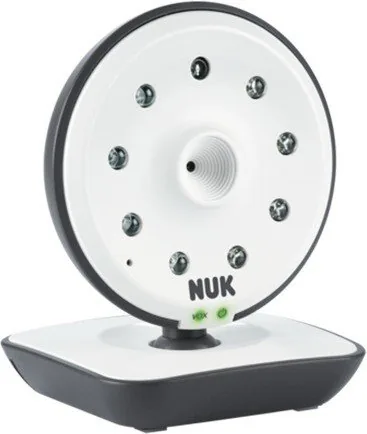
At its core, this monitor uses a camera unit in the baby’s room and a portable parent unit with a rechargeable battery. That means you can move around the home while still checking live video, listening for crying, and reacting quickly when something changes. The system also includes infrared night vision, so even in a dark room you can see your child clearly without disturbing sleep.
One of the standout features is the Eco-Mode with Full-Eco-Control. When your baby is sleeping quietly, the monitor reduces transmission and helps lower energy use and radio activity in the nursery. As soon as the selected sound threshold is exceeded, the system wakes back up and resumes monitoring. That makes it feel responsive without being constantly active.
The NUK Eco Control 550VD also adds thoughtful comfort tools. You can play lullabies or soothing nature sounds, switch on a soft night light, and even use the talk-back function to comfort your baby from another room. For added awareness, the parent unit shows room temperature and can alert you when limits are exceeded. Zoom, patrol mode for multiple cameras, mute mode, and vibration alerts round out the experience.
For families managing different routines, these features can be genuinely useful. The monitor supports audio-only or video monitoring, so you can save battery when a screen isn’t needed. It also works with multiple cameras, making it a strong option for homes with more than one child or multiple viewing angles.
Notes
- Best for parents who want a feature-rich monitor with clear visual supervision.
- Eco-Mode helps balance battery life and reduced nursery transmission.
- The menu system offers many options, so initial setup may take a little time.
Search for 67,706 Manuals online


Type-in Brand or Model