
Noxon Nova S Manual
PDF manual · 25 Pages
English



Quick check
Incorrect answer, please try again.
Chat with your Noxon Nova S manual using AI
Get instant AI answers from your Noxon Nova S manual
Ask anything about the Noxon Nova S. Answers come from this manual, with the pages they are based on.
Ask a Question
Do you recommend Nova S?
Yes NoFrequently Asked Questions
Press Mode to select Bluetooth, then long‑press Mode until the blue LED goes off and the green LED flashes rapidly. Search for "NOXON NOVA S" on your smartphone/tablet/PC and pair. A steady green LED indicates a successful connection.
Is this answer helpful?
You can use WPS by pressing the WPS button until the blue LED lights, join the temporary NOXON access point (NOXON_NOVA_S_xxx) and configure via a browser at 172.24.0.15, or use the Nova app’s guided setup to select your region, scan networks and enter your Wi‑Fi password.
Is this answer helpful?
In the Nova app you can drag devices into groups, create named groups and toggle 'synchronize volumes'. With synchronization off, each device has individual volume control; with it on, a Master Volume (equal to the group’s highest device volume) controls all devices simultaneously.
Is this answer helpful?
If the Nova S has been exposed to strong temperature fluctuations, let it stand unplugged for about one hour to allow any internal condensation to evaporate before connecting power, preventing functional issues.
Is this answer helpful?
Use the device indoors on a dry, level surface, keep it away from liquids, heat sources and direct sunlight, use only the supplied power adapter, unplug during thunderstorms or long idle periods, and clean only with a dry or slightly damp lint‑free cloth.
Is this answer helpful?
Press and hold the WPS button until the blue LED lights to reset the device’s network configuration and restore default network/station presets. After resetting, reconfigure Wi‑Fi via WPS, the app or the web setup page.
Is this answer helpful?
Visit the official support site (http://www.noxonradio.de/en/support) for firmware updates, downloads of the extended manual and contact options; check the support hotline if local phone numbers are provided.
Is this answer helpful?
Advantages and Disadvantages
Advantages

- Multiple streaming modes: Bluetooth, internet radio and DMR/music player for flexible playback.
- Multiroom support via Nova app with grouping, drag & drop management and master volume control.
- Simple setup options: WPS, Access Point mode, app-guided setup and PC web interface (172.24.0.15).
- Clear LED indicators (green/blue) that show power, connection state and pairing modes.
- Compact design with essential physical controls: Volume +/-, Mode, WPS/reset and power switch.
Disadvantages

- Initial configuration requires network knowledge (router, SSID, Wi‑Fi password) for some users.
- App and firmware changes may alter setup flow; users must verify settings after updates.
- Limited weather/environment restrictions: indoor use only and avoid liquids and direct heat.
- Reset and network restore require holding WPS button — may be non‑intuitive for some users.
- No mention of battery operation — relies on mains power, limiting portable use.
Product Specification
Power
15W Peak
Tuner
Internet Radio
Voice Assistants
no
Audio Connections
no
Wireless
Bluetooth, Wi-Fi 3 (WLAN 802.11b/g)
Power Supply
Mains Operation
Color
black
Dimensions
9.80x5.51x5.51in (WxHxD)
Weight
4.25lb
Product Description
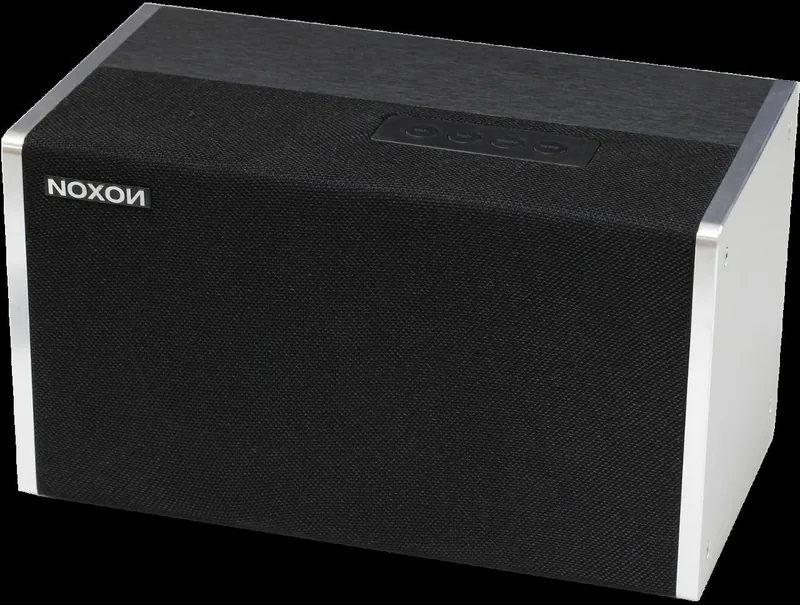
Noxon Nova S — Compact Multiroom Bluetooth Speaker
The Noxon Nova S is a compact wireless speaker designed to bring flexible streaming and multiroom audio to home networks. It supports Bluetooth streaming, internet radio, DMR/music playback and integrates into Wi‑Fi networks via WPS or a guided setup through the Nova app. LED indicators on the unit show power, connection state and active modes in green and blue, making status and pairing straightforward.
Setting up the Nova S is aimed at both casual users and pros: connect the included power adapter, use WPS or the device's Access Point mode to configure Wi‑Fi, or follow the app workflow to name the speaker, select your region, choose a network and enter the password. The speaker creates a temporary NOXON_NOVA_S_xxx network for initial configuration and offers a local web interface (172.24.0.15) for PC-based setup. Once on your network the Nova S can stream internet radio, receive Bluetooth audio, or act as part of a multiroom group.
The Nova app adds multiroom features: discover devices, group speakers by drag & drop, create named groups, rescan the network and manage playback. Volume control supports per‑device levels or a synchronized Master Volume for grouped playback; the master value adopts the highest member volume. The app shows helpful overlays during first use and provides grouping controls and volume synchronization toggles for flexible setups.
Physical controls include dedicated Volume +/–, Mode (cycles Bluetooth, Internet Radio, DMR/Music Player), WPS/reset and a power switch. Long‑press Mode enters Bluetooth pairing; WPS held resets network settings. Important safety and care guidelines emphasize indoor use, avoiding liquids and heat, unplugging during storms or long idle periods, and cleaning only with a dry or slightly damp lint‑free cloth. The package includes the Nova S speaker, power cable and a quick start guide in multiple languages.
Overall the Nova S targets users who want a small footprint speaker with multiple streaming options and multiroom capability, controlled either from mobile devices or a PC. Firmware and app versions can change workflows, so verifying settings after updates is recommended.
Notes
- Use only the supplied power adapter and follow regional voltage guidance on the adapter.
- Allow the unit to reach room temperature after large temperature changes to avoid condensation issues before powering on.
- Dispose of batteries and the device according to local EU directives; do not throw in household waste.
- During firmware updates, never remove the power cable until the update completes.
Search for 67,732 Manuals online


Type-in Brand or Model
Maja Krueger
8 months ago
I bought a Noxon speaker, but Noxon stopped support and the mobile app is no longer available. My Bluetooth connection also fails. Can I still use the speaker, and what should I do to set it up?
Manual.ly
7 months ago
At the moment, the original Noxon mobile app (Wi-Fi control) is no longer supported, so functions that require the app may not work. The speaker can still be used via its non-app modes, depending on your model (for example Bluetooth audio or any available direct audio input). If Bluetooth pairing does not work: restart the speaker, put it into pairing mode again, and on your phone remove the speaker from the paired devices list before re-pairing. Make sure the speaker is within close range and that no other device is connected. If you need LAN or PC control: that is not supported on this model. For model-specific setup and any firmware options, please share the exact device name/version.