
Noxon iRadio 410+ Manual
PDF manual · 62 Pages
English



Quick check
Incorrect answer, please try again.
Chat with your Noxon iRadio 410+ manual using AI
Get instant AI answers from your Noxon iRadio 410+ manual
Ask anything about the Noxon iRadio 410+. Answers come from this manual, with the pages they are based on.
iRadio 410+ Maintenance Schedule
Turn off the device before cleaning. Use only a dry, soft cloth or one slightly moistened with water for heavy dirt. Ensure it is completely dry before use.
Manually check for updates or set the radio to check automatically. Ensure a reliable power source during upgrade to prevent permanent damage.
Ask a Question
Do you recommend iRadio 410+?
Yes NoFrequently Asked Questions
It supports Internet radio, podcasts, DAB+, and analog FM radio. Internet stations can be browsed by location, genre, popularity, new additions, or keyword search.
Is this answer helpful?
Yes. Music can be played from USB storage or streamed from compatible shared media servers on the same network through UPnP and DLNA.
Is this answer helpful?
The iRadio 410+ supports MP3, WMA, WAV, AAC/AAC+, and FLAC for streaming and USB playback, within the stated bitrate and sampling limits.
Is this answer helpful?
Use the setup wizard to select your wireless network and enter its security key. WPS push-button and PIN methods are also supported when available on the router.
Is this answer helpful?
Yes. The UNDOK app for iOS and Android can control supported modes when the mobile device and radio are connected to the same Wi-Fi network.
Is this answer helpful?
Yes. It has two independently configurable alarms with buzzer, Internet radio, DAB+, or FM options, plus snooze functionality and 15, 30, 45, or 60 minute sleep timer settings.
Is this answer helpful?
Advantages and Disadvantages
Advantages

- Combines Internet radio, DAB+, FM, USB playback, UPnP, and DLNA streaming in one receiver.
- Provides access to worldwide stations and podcasts, with search, favorites, and ten presets per radio mode.
- Supports common music formats including MP3, WMA, WAV, AAC/AAC+, and FLAC.
- Offers flexible control through physical buttons, remote control, navigation dial, and the UNDOK mobile app.
- Includes dual alarms, sleep timer, adjustable equalizer, headphone output, and line-out connection.
Disadvantages

- Internet radio, portal favorites, app control, and network streaming require a stable Wi-Fi connection.
- DAB+ and FM reception quality depends on local coverage, placement, and antenna position.
- Keeping Wi-Fi active in standby increases power consumption.
- Factory reset removes stored network settings, time settings, and locally saved presets.
- Some USB hard drives need external power, and not every MP3 player is directly supported.
Product Specification
Power
10 W RMS
Audio formats
AAC, AAC+, FLAC, MP3, WAV, WMA
Tuner
FM, DAB, DAB+, Internet radio
Display
2.4 in LCD
Audio connections
Stereo line out (3.5 mm jack), headphones (3.5 mm jack)
Other connections
Antenna
Wireless
Wi-Fi 4 (WLAN 802.11a/b/g/n)
Power supply
AC power
Features
App control (Undok), sleep timer, alarm function
Color
black
Dimensions
9.45 x 5.2 x 5.63 in (W x H x D)
Weight
3.64 lb
Product Description
Noxon iRadio 410+ - Read, Download & Print Free
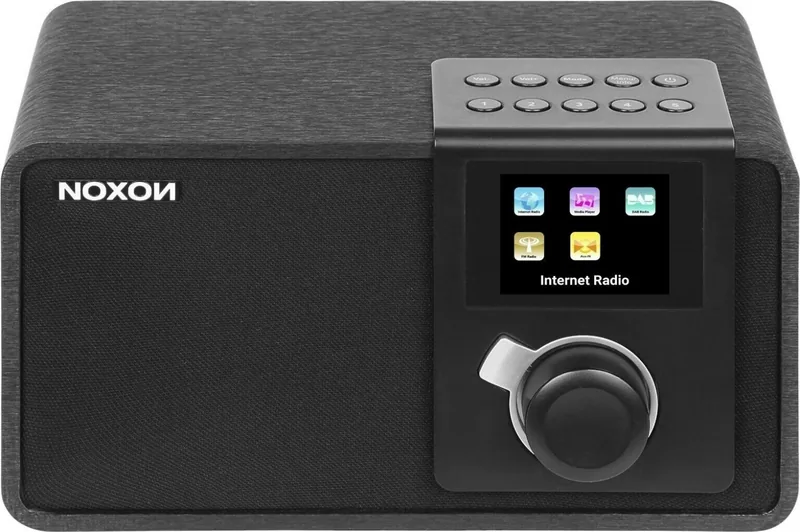
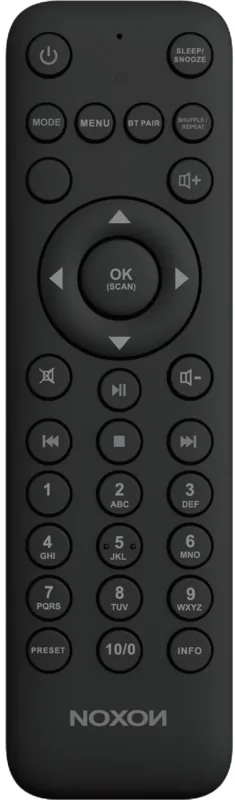
The Noxon iRadio 410+ is a versatile home audio receiver designed for listeners who want more than traditional radio. Combining Internet radio, DAB+, FM, network streaming, USB playback, and app-based control, it brings a broad choice of music, talk, podcasts, and personal media into one compact unit. Its 2.4-inch color display provides clear station, track, and menu information, while the navigation dial, preset buttons, remote control, and UNDOK app offer several convenient ways to operate it.
Radio Listening Without Limits
With a Wi-Fi connection, the iRadio 410+ gives access to thousands of Internet radio stations and podcasts from around the world. Stations can be explored by location, genre, popularity, new additions, or keyword search. Favorite stations can be managed through the Internet radio portal, and ten presets are available for quick access. Five physical preset buttons on the unit make it especially easy to return to frequently played stations.
For local broadcasting, the receiver includes both DAB+ and FM tuners. DAB+ offers digital station information and flexible station sorting, while FM reception supports RDS details when broadcasters provide them. A telescopic antenna helps optimize reception, and users can choose scan settings that focus on stronger stations when signal conditions are difficult.
Stream Music Your Way
The Noxon iRadio 410+ supports UPnP and DLNA streaming from compatible computers, phones, and tablets on the same network. It can play shared music libraries and accepts USB storage for direct playback. Supported audio formats include MP3, WMA, WAV, AAC/AAC+, and FLAC, providing useful compatibility with a wide range of music collections.
The device can also be selected as a DLNA player from a computer or mobile app, allowing playback to be managed from another device. The UNDOK app adds remote control for Internet radio, DAB+, FM, media playback, presets, standby mode, and equalizer settings.
Everyday Convenience
A built-in equalizer includes presets for jazz, rock, classical, pop, news, and more, plus adjustable bass and treble. Two independently configurable alarms, snooze support, and a sleep timer make the iRadio 410+ suitable for bedrooms, kitchens, and offices. Headphone and 3.5 mm line-out connections provide flexible listening options with headphones, active speakers, or a stereo system.
Notes
- A 802.11 b/g/n Wi-Fi network is required for Internet radio and network streaming.
- WEP, WPA, WPA2, and WPS connection methods are supported.
- Use the supplied 12 V power adapter for safe operation.
- Keep the radio connected to reliable power during software updates.
Search for 67,732 Manuals online


Type-in Brand or Model