
Noxon A580 CD Manual
PDF manual · 21 Pages
English



Quick check
Incorrect answer, please try again.
Chat with your Noxon A580 CD manual using AI
Get instant AI answers from your Noxon A580 CD manual
Ask anything about the Noxon A580 CD. Answers come from this manual, with the pages they are based on.
A580 CD Maintenance Schedule
Switch off the device. Use a dry soft cloth or slightly damp cloth for heavy dirt. Ensure the device dries completely before use.
Remove dust and dirt by blowing on the CD and wiping with a soft lint-free cloth in a straight line from center to edge.
Ask a Question
Do you recommend A580 CD?
Yes NoFrequently Asked Questions
Navigate to the Menu and select System Settings. Choose Software Update and follow the prompts. You can set it to check regularly or update manually. Ensure a stable network connection before starting to avoid damage.
Is this answer helpful?
Yes, you can use Spotify Connect with a Premium account. Connect your phone or tablet and select the Noxon Tuner from the device list to play music directly. This allows control via your mobile device.
Is this answer helpful?
The device includes two alarms with snooze functions. You can set them to activate in specific modes like DAB, FM, or Internet radio. You can choose buzz, frequency, or station as the alarm tone type.
Is this answer helpful?
Select WiFi setup in the menu or use the Setup Assistant. Choose your network SSID and enter the key. The device remembers up to four networks and reconnects automatically if available.
Is this answer helpful?
The CD player supports CD-DA, MP3, and WMA formats up to 48kHz. It does not support WMA Lossless or DRM protected files. Ensure discs are 12 cm and not scratched or flexible.
Is this answer helpful?
Without WiFi active, standby consumption is 0.97W. With network standby active, it is 0.23W. Ensure the switch on the back is engaged to turn it completely off for lowest power use.
Is this answer helpful?
The warranty period is 24 months from the purchase date. You must keep the receipt. If a manufacturing defect occurs, contact the service center for repair or replacement within this period.
Is this answer helpful?
Advantages and Disadvantages
Advantages

- Versatile input options including USB, Bluetooth, Aux-In, and CD player support MP3 and WMA formats.
- Clear 2.8-inch TFT display shows track titles, station info, and system settings easily.
- DAB+ and FM receivers provide crisp sound quality with RDS data support for context.
- Internet radio function allows global station access via WiFi or LAN with simple setup.
- Spotify integration and UNDOK App control allow seamless playlist management and remote operation.
Disadvantages

- Mini-CDs or discs without full metallic reflection layers may not be recognized or ejected properly.
- Power consumption in network standby is 0.23W which may be slightly higher than average.
- WMA Lossless files are not supported despite support for standard MP3 and WMA formats.
- Remote control navigation requires battery replacement which adds minor maintenance over time.
- Network settings may require manual PIN entry for secure connections on certain networks.
Product Specification
Type
Streaming Amplifier
Power
2 x 30W
Tuner
FM, DAB, DAB+, Internet Radio
Streaming Clients
Deezer, Spotify
Audio Connections
Digital Audio In (Coaxial), Digital Audio In (Optical), Stereo Line In (RCA), Pre Out (RCA), Headphones (3.5mm Jack)
Additional Connections
USB-A 2.0, RJ-45
Wireless
Bluetooth, Wi-Fi
Features
Speaker Outputs, CD Player, Remote Control
Color
Black
Dimensions
16.93 x 2.56 x 10.63 inches (WxHxD)
Weight
7.05 lbs
Product Description
Noxon A580 CD Overview
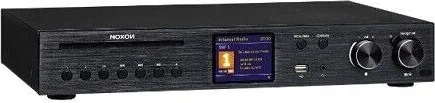
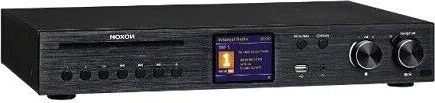
Welcome to the era of high fidelity audio with the Noxon A580 CD. This versatile HiFi Tuner seamlessly combines traditional music formats with modern streaming capabilities. Whether you are into classic Compact Discs or prefer the convenience of Internet radio and DAB+, this unit handles it all effortlessly. The device features a sleek design with a 2.8-inch color display that provides clear information about track titles and station details for every session. The physical dimensions are compact yet robust, fitting easily on shelves or desks while maintaining a professional look.
Features Overview
Users appreciate the flexibility offered by the various input options available on this system. Connect external devices via USB, Bluetooth, or Aux-In to play your favorite playlists directly through the main speakers. The built-in CD player supports MP3 and WMA formats, ensuring compatibility with vast burned collections from your personal library. For radio enthusiasts, the DAB+ and FM receivers deliver crisp sound quality with comprehensive RDS data support for extra context. The Internet radio function allows access to thousands of stations globally when connected via WiFi or LAN for true broadband engagement.
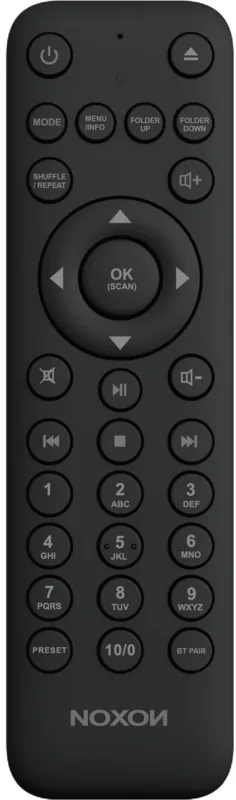
Podcast enthusiasts can also connect via streaming ports to access spoken word content from around the world. Spotify integration allows phone control for seamless playlist management across devices. Setup is remarkably straightforward for most users. The initial wizard guides you through network configuration and time settings with simple prompts. You can customize audio preferences using the built-in Equalizer or create your own My EQ profile for tailored listening experiences. System settings allow adjustments for language preferences, display backlight intensity, and software updates to ensure longevity. The remote control offers convenient navigation for volume, mode switching, and playback controls to keep hands free from clutter.
Safety and maintenance are prioritized in every design phase. Ensure proper ventilation and avoid moisture to protect the sophisticated electronic components inside. Refer to the Noxon A580 CD Manual for comprehensive details to unlock every feature without frustration or confusion during use. Regular cleaning with a soft cloth keeps the device looking pristine and functional for years. With a two-year warranty, true peace of mind comes included with your purchase. The UNDOK App provides remote control functionality for enhanced convenience. Power consumption is efficient at roughly 0.23W in standby without active network connections.
Enjoy premium sound in any room of your home or office space. The tuner supports line outputs for connecting external amplifiers or high-quality speakers for an extended range. Wake up to your favorite stations with customizable alarm settings, or use the sleeptimer to power down automatically after listening sessions. This equipment represents a blend of functionality and performance for the modern audio listener seeking clarity. Integrate it into your home theater or personal music collection today to experience true high fidelity audio standards.
Search for 67,732 Manuals online


Type-in Brand or Model