
Nox Xtreme H-240 ARGB Manual
PDF manual · 20 Pages
English



Quick check
Incorrect answer, please try again.
Chat with your Nox Xtreme H-240 ARGB manual using AI
Get instant AI answers from your Nox Xtreme H-240 ARGB manual
Ask anything about the Nox Xtreme H-240 ARGB. Answers come from this manual, with the pages they are based on.
Ask a Question
Do you recommend Xtreme H-240 ARGB?
Yes NoFrequently Asked Questions
The H-240 ARGB supports a wide range of sockets including Intel LGA1150/1151/1155/1156/1200/1366 and LGA20xx series, plus AMD sockets AM4, AM3(+)/AM2(+), FM1/FM2(+) and TR4/TRX4 for high-end platforms.
Is this answer helpful?
You can connect ARGB to a compatible motherboard header (ASUS ADD_HEADER, MSI JRAINBOW, GIGABYTE D_LED, ASROCK ADDR_LED) and use vendor RGB sync software, or use the included internal RGB controller and splitter cable to link pump and fan RGB cables.
Is this answer helpful?
Work in an ESD-safe environment or use an anti-static wrist strap, use only the provided screws and hardware, tighten screws carefully, ensure pump and fans are connected to power before booting, and avoid moving the cooler after installation.
Is this answer helpful?
The kit includes radiator and fan screws, Intel and AMD brackets, LGA2066/TR4 standoffs, long screws, backplate, washers, knurled nuts, tightening nuts and a tube of thermal grease to cover most installation needs.
Is this answer helpful?
Warranty coverage is typically two years from purchase (subject to local laws). For warranty claims and support contact Nox Xtreme distribution partners listed at www.nox-xtreme.com or email [email protected].
Is this answer helpful?
Yes, in rare cases the cooler may cause interference with certain motherboards. If interference is observed during installation, stop and contact support or consult compatibility guidance before continuing.
Is this answer helpful?
Clean the CPU surface thoroughly and apply a thin, even layer of thermal paste before placing the pump block. Too much or too little paste can reduce cooling efficiency, so use a small rice-grain or pea-sized amount depending on CPU size.
Is this answer helpful?
Advantages and Disadvantages
Advantages

- Wide socket compatibility including Intel LGA20xx and AMD TR4/TRX4
- ARGB pump and fans support motherboard sync and internal controller
- Complete accessory kit: backplate, standoffs, screws, washers and thermal paste
- 240mm radiator offers solid cooling capacity for gaming and workstation CPUs
- Clear installation steps minimize user error when followed carefully
Disadvantages

- Improper installation risks CPU or radiator damage—requires careful handling
- Potential interference with some motherboards; may prevent installation
- Requires correct ARGB header type or controller to fully use lighting features
- Moving the cooler after installation can damage the CPU, limiting maintenance freedom
- Warranty limited regionally and subject to local laws (2 years typical)
Product Specification
Type
internal (closed system)
Heatsink
CPU, Copper
Compatibility
1150, 1151, 1155, 1156, 1200, 2011-0, 2011-1, 2011-3, 2066, AM2, AM2+, AM3, AM3+, AM4, FM1, FM2, FM2+, TR4, sTRX4, sWRX8, SP3
Radiator
9.45in (Radiator Class), 1.06in (Radiator Height), Aluminum
Fan
2x 4.72x4.72in, 700-1500rpm, 61.98 CFM, 61.97 CFM, 18-26.4dB(A), 0.09inH2O
Reservoir
N/A
Pump
12V
Connections
N/A
Lighting
LED (RGB)
Product Description
Nox Xtreme H-240 ARGB — Powerful, Stylish Liquid Cooling
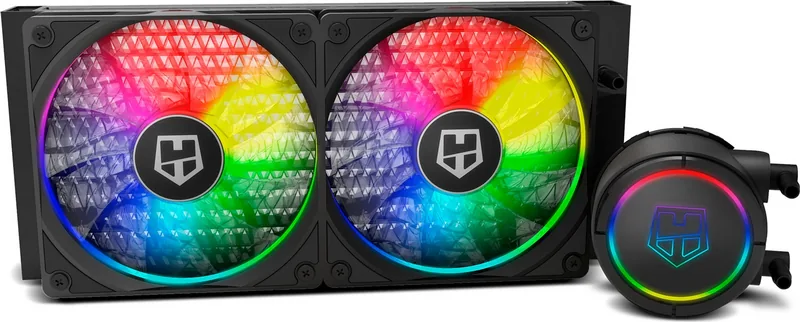
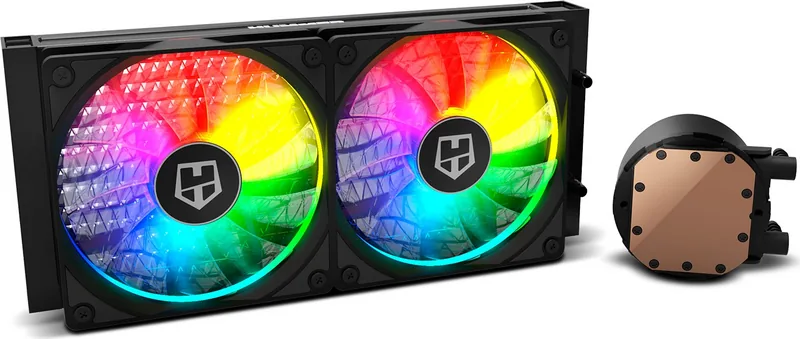
The Nox Xtreme H-240 ARGB is a 240mm all-in-one liquid CPU cooler designed for users who want reliable thermal performance with customizable RGB lighting. It pairs a dual-fan radiator with an ARGB-enabled pump head and comes with multi-socket mounting support for modern Intel and AMD platforms. Built-in mounting hardware covers LGA series including LGA115x, LGA1200, LGA1366 and high-end LGA20xx, plus AMD AM4 and TR4/TRX4 compatibility, making it a versatile choice for gaming rigs and workstation builds.
Installation is straightforward when following the provided steps: attach the backplate, choose the correct bracket and standoffs for your CPU socket, apply thermal paste, secure the pump block, and mount the radiator and fans to the case. The kit includes all necessary screws, washers, knurled nuts and thermal grease. The radiator accepts two ARGB fans fastened with the included hardware, and the pump/fans support motherboard ARGB headers (ASUS ADD_HEADER, MSI JRAINBOW, GIGABYTE D_LED, ASROCK ADDR_LED) or an internal RGB controller using a splitter cable.
Thermal safety and proper handling are emphasized: ensure all power connections are attached before powering the system, avoid moving the cooler after installation, and take electrostatic discharge (ESD) precautions while handling components. The manual warns that incorrect installation can damage the CPU or the radiator, and advises using included screws and careful tightening to avoid physical damage.
Lighting and control are flexible: connect to motherboard RGB sync software to customize colors and modes or use the included controller and buttons to cycle modes, change color and adjust speed. The guide cautions users to verify correct wiring, as improper connections can cause malfunction or damage.
Warranty and support are provided through Nox Xtreme distribution partners with a standard two-year warranty (subject to local laws). For firmware, software or support queries, contact [email protected] or visit www.nox-xtreme.com.
Notes
- Ensure compatibility with your motherboard’s RGB header type before connecting.
- Clean CPU surface and apply a thin, even layer of thermal paste for best results.
- Do not power on the system until pump and fans are connected to the motherboard power connectors.
- If interference occurs between the cooler and your motherboard, stop installation and contact support.
Search for 67,706 Manuals online


Type-in Brand or Model