

Noveen PR150 Manual
PDF manual · 88 Pages
English



Quick check
Incorrect answer, please try again.
Chat with your Noveen PR150 manual using AI
Get instant AI answers from your Noveen PR150 manual
Ask anything about the Noveen PR150. Answers come from this manual, with the pages they are based on.
PR150 Maintenance Schedule
Replace the batteries if the audio becomes low, fluctuates, or sounds distorted to ensure proper operation.
Take out all batteries if the radio will not be used for a long time to prevent damage from leakage and corrosion.
Use a soft cloth moistened with a mild detergent solution to clean the device exterior. Do not use harsh chemicals.
Ask a Question
Do you recommend PR150?
Yes NoDo you recommend PR150?
Yes NoFrequently Asked Questions
Locate the band switch on the side or top of the unit. Rotate or slide the switch to select FM, AM, or SW depending on your preference. Use the tuning knob to find your desired station on the chosen band. Refer to the setup guide for specific switch locations.
Is this answer helpful?
Yes, select models within the series support AC power adapters. Connect the cable to the AC socket and plug it into a standard wall outlet. Always verify the voltage switch matches your local power standards to avoid damage.
Is this answer helpful?
First, replace the batteries if the device is battery powered. Weak batteries often cause distortion. If batteries are new, check the antenna positioning and ensure no interference exists nearby. Clean contacts if corrosion is visible.
Is this answer helpful?
Tune to the desired station. Hold the memory or memo button until the indicator flashes. Select the memory slot number using tuning buttons or the select button. Press the button again to confirm and save the station for future use.
Is this answer helpful?
No, keep the device away from water and moisture to prevent electrical damage. Do not use it near bathtubs, sinks, or outdoors in rain. If it gets wet, disconnect power immediately and let it dry completely.
Is this answer helpful?
Advantages and Disadvantages
Advantages

- Versatile power options including battery and AC adapters for different usage scenarios.
- Clear audio output optimized for both speech and music clarity.
- Simple physical controls reduce learning curve for new users effectively.
- Telescopic antenna allows manual adjustment for better signal reception.
- Compact and lightweight design fits easily in bags or on desks.
Disadvantages

- Telescopic antennas may be fragile if dropped or handled roughly.
- Battery life depends on usage frequency and quality of batteries installed.
- Larger models are bulkier compared to basic portable radio units.
- External audio cables are often not included with the device unit.
- No automatic sleep timer on the basic models in the base range.
Product Specification
Tuner
FM, AM
Display
No
Power Supply
AAA Battery
Features
Telescopic Antenna
Color
Black
Dimensions
4.09x2.28x0.94in (WxHxD)
Weight
0.66 lbs
Product Description
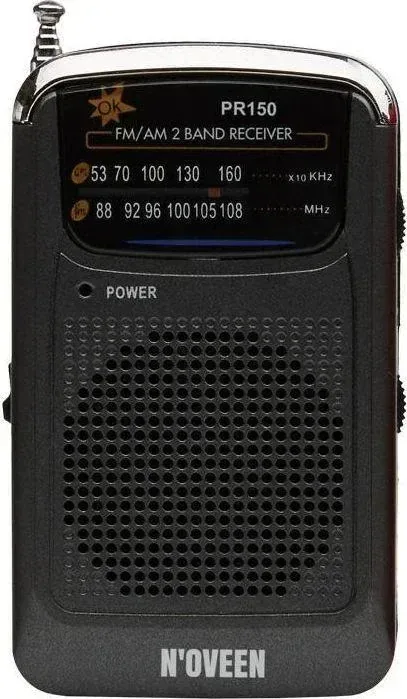
Embrace the Classic Radio Experience with Noveen PR150
The Noveen PR150 represents a blend of traditional radio technology and modern portability needs. This device is designed for users who value simplicity and reliability in their audio equipment. Whether you are at home or traveling, it ensures you stay connected to local news, music, and emergency updates. The compact design makes it easy to carry in a bag or place on a desk. When setting it up for the first time, utilizing the Noveen PR150 Manual ensures you understand all safety guidelines and operational features. The physical interface is straightforward, allowing anyone to start listening immediately without technical expertise.
Power and Reception Capabilities
Battery efficiency is a key feature for portable devices. This unit supports standard batteries for long-lasting usage away from power outlets. Several models in the series offer AC adapter compatibility for continuous home listening sessions. The radio captures standard FM bands alongside AM frequencies for broader coverage. Some advanced versions within this range include shortwave capabilities for international broadcasts. Tuning stations is done via a dedicated knob that provides precise frequency control. The antenna can be extended manually to improve signal strength during poor reception periods. This adaptability makes it suitable for various environments and conditions.
User Features and Safety
Audio quality is optimized for both speech clarity and music enjoyment. A built-in speaker delivers sound suitable for personal use. Many models in the lineup include digital displays showing time or battery status. Advanced units feature alarm functions to wake you with radio signals. For safety, the casing is built to withstand minor drops and handling. Always keep the device away from water and heat sources to prevent damage. Cleaning should be performed with a soft cloth and mild detergent to avoid scratches. If the device is not used for a long time, remove the batteries to prevent corrosion inside the unit.
Modern Connectivity and Usage
Newer variants of this product line integrate Bluetooth technology for streaming. This allows users to connect smartphones and play audio wirelessly alongside traditional broadcasts. Switching between sources is simple with a dedicated mode button. The overall construction prioritizes durability without sacrificing ease of use. Troubleshooting is generally easy as many issues relate to battery levels or antenna positioning. By keeping the device in dry storage when not in use, you ensure its longevity. This radio bridges the gap between vintage charm and contemporary connectivity features.
Final Thoughts on Portability
Owning this device provides a reliable audio source for daily entertainment. It combines robust engineering with user-friendly controls for maximum satisfaction. For specific troubleshooting steps or detailed comparison between models, refer to the official instructions provided with the purchase. This ensures you utilize every function correctly and safely. Enjoy clear sound and stable connections with this practical addition to your daily gear collection. It remains an excellent choice for those who prioritize functionality over complexity.
Search for 67,732 Manuals online


Type-in Brand or Model