
Noctua NM-AM5/4-MP78 Manual
PDF manual · 2 Pages
English



Quick check
Incorrect answer, please try again.
Chat with your Noctua NM-AM5/4-MP78 manual using AI
Get instant AI answers from your Noctua NM-AM5/4-MP78 manual
Ask anything about the Noctua NM-AM5/4-MP78. Answers come from this manual, with the pages they are based on.
Ask a Question
Do you recommend NM-AM5/4-MP78?
Yes NoFrequently Asked Questions
The kit supports AMD Socket AM5 and Socket AM4 motherboards. The mounting process is the same for both platforms and uses the motherboard's original AMD backplate.
Is this answer helpful?
It is intended only for compatible Noctua coolers with a 78 mm mounting pitch, including models such as the NH-D12L, NH-L12S, NH-U9S, NH-U12A, NH-U12S, NH-U12S redux, and NH-U14S.
Is this answer helpful?
No. Coolers with an 83 mm mounting pitch require the NM-AM5/4-MP83 kit. Confirm the mounting pitch of the cooler before choosing a mounting kit.
Is this answer helpful?
No. Leave the standard AMD backplate in place. The mounting bridges are secured to its threaded studs after the original retention module has been removed.
Is this answer helpful?
Tighten both screws gradually in alternating 2-3 turn intervals until they reach their stops. Do not use excessive force, and keep tightening torque at or below 0.6 Nm.
Is this answer helpful?
Apply five drops after cleaning the CPU: four drops about 2 mm wide near the corners and one 3-4 mm drop in the center. Too much paste can reduce heat transfer performance.
Is this answer helpful?
Advantages and Disadvantages
Advantages

- Supports both AMD AM5 and AM4 motherboards with the same installation process.
- Lets owners reuse compatible Noctua coolers instead of replacing proven cooling hardware.
- Uses the standard AMD backplate for a secure SecuFirm2 mounting arrangement.
- Includes the required bridges, spacers, and long mounting screws for installation.
Disadvantages

- Works only with Noctua coolers that use a 78 mm mounting pitch.
- Case, RAM, PCIe, and fan-clip clearance must be checked before installation.
- Some cooler models require fan removal to reach the mounting screws.
- Care is required to avoid exceeding the recommended 0.6 Nm tightening torque.
Product Specification
Type
Mounting kit
Compatibility
NH-L12 Ghost S1 Edition, NH-L12S, NH-U9S, NH-U9S chromax.black, NH-U12A, NH-U12A chromax.black, NH-U12S, NH-U12S SE-AM4, NH-U12S chromax.black, NH-U12S redux, NH-U14S
Product Description
Noctua NM-AM5/4-MP78 Mounting Kit [Socket AM5/AM4] Manual
The Noctua NM-AM5/4-MP78 Mounting Kit [Socket AM5/AM4] Manual highlights a practical upgrade solution for owners of compatible Noctua CPU coolers moving to modern AMD platforms. Designed for AMD AM5 and AM4 motherboards, this SecuFirm2 mounting set helps extend the useful life of established cooling hardware instead of requiring a complete cooler replacement. Installation follows the same process on both socket types and uses the motherboard's standard AMD backplate.
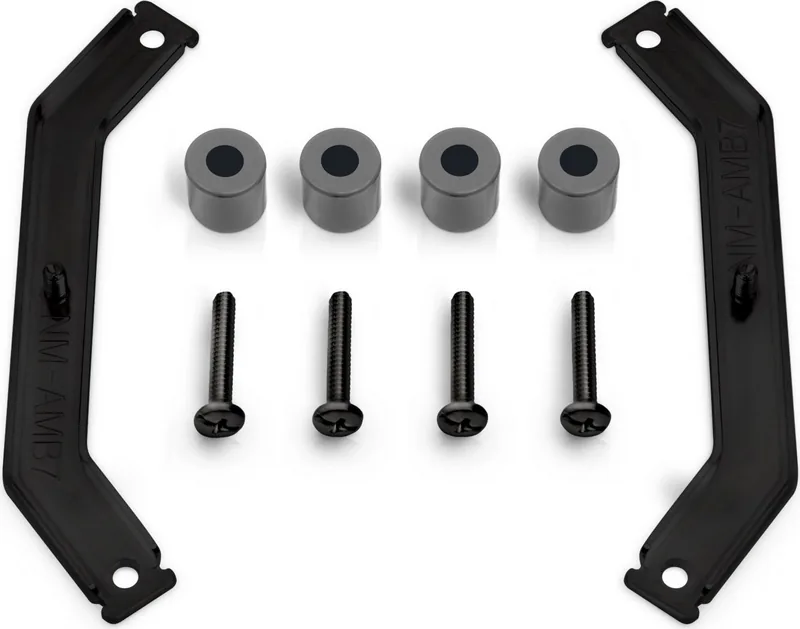
The kit includes two NM-AMB7 mounting bridges, four gray NM-APS4 plastic spacers, and four long NM-ALS1 screws. After removing the pre-installed CPU cooler retention module, the spacers sit on the threaded studs of the original backplate. The mounting bridges are then secured with the long screws, with their bends facing outward. This creates a stable mounting base for the heatsink while preserving the proven AMD backplate arrangement.
Compatibility is the most important consideration. The NM-AM5/4-MP78 is made exclusively for Noctua coolers with a 78 mm mounting pitch. Supported examples include the NH-D12L, NH-L12S, NH-U9S, NH-U12A, NH-U12S, NH-U12S redux, and NH-U14S. Coolers using an 83 mm mounting pitch require the separate NM-AM5/4-MP83 kit, so confirming the cooler model and mounting pitch before installation is essential.
For effective thermal performance, the CPU should be cleaned of old thermal compound before applying fresh paste. The recommended pattern uses four small drops near the corners and one slightly larger drop in the center. Position the cooler on the CPU and tighten both mounting screws gradually, alternating between them in short turns until they reach their stops. Noctua advises a maximum torque of 0.6 Nm to prevent overtightening.
System builders should also check case clearance, RAM height, PCIe card clearance, and fan-clip placement before final assembly. Some cooler designs may require temporarily removing one or more fans to access the mounting screws. Once the heatsink is installed, reinstall the fans and connect them according to the cooler's intended fan configuration.
Notes
- Keep the standard AMD backplate installed during the entire process.
- Remove coolers heavier than 700 g before transporting a system for added safety.
- The kit is supported by Noctua's six-year warranty and direct technical support.
Search for 67,706 Manuals online


Type-in Brand or Model