
Noctua NM-AM4-UxS Manual
PDF manual · 2 Pages
English



Quick check
Incorrect answer, please try again.
Chat with your Noctua NM-AM4-UxS manual using AI
Get instant AI answers from your Noctua NM-AM4-UxS manual
Ask anything about the Noctua NM-AM4-UxS. Answers come from this manual, with the pages they are based on.
Ask a Question
Do you recommend NM-AM4-UxS?
Yes NoFrequently Asked Questions
This SecuFirm2 Mounting Kit for AM4 is compatible with the NH-U14S, NH-U12S and NH-U9S models. For detailed, up to date compatibility information please visit www.noctua.at/am4 to verify your specific unit.
Is this answer helpful?
No, the SecuFirm2 mounting system will install directly to the stock backplate. However, you must remove the motherboard stock CPU cooler retention module by unscrewing it from the backplate first. If your motherboard does not include a stock backplate, please contact customer support.
Is this answer helpful?
You must gently tighten the screws until they stop, but do not use excessive force. The maximum torque is 0.6 Nm. Exceeding this limit may damage the motherboard or mounting components.
Is this answer helpful?
If the weight of the heatsink without fan is below 700g and the total weight including fan is above 700g, we recommend taking off the fan. If the total weight exceeds 700g, take off the cooler. Noctua is not responsible for damage during transport if you keep it installed.
Is this answer helpful?
Clean off any residual traces first. Press a small drop about 4-5mm diameter of thermal compound onto the centre of the heatspreader. Applying too much thermal paste will lower heat conductivity and cooling performance, so be careful.
Is this answer helpful?
Even with high-grade products and strict quality control, we aim to provide the highest possible level of reliability by offering a warranty period of 6 years and direct, fast and straightforward RMA service.
Is this answer helpful?
Advantages and Disadvantages
Advantages

- Compatible with multiple Noctua cooler models like NH-U14S, NH-U12S and NH-U9S
- Offers a long warranty period of 6 years for high reliability
- Uses SecuFirm2 design for a secure fit without complex modifications
- Includes all necessary mounting bars and screws in the kit
- Backs up installation with detailed online manuals and support resources
Disadvantages

- Weight over 700g requires removal of cooler before transporting system
- Compatibility with motherboard backplate must be verified beforehand
- Torque limits are strict and require careful application to avoid damage
- Requires manual assembly steps without automated mounting mechanisms
- Does not include installation service, relying on user skill level
Product Specification
Type
Mounting Kit
Compatibility
Noctua NH-U14S, NH-U12S, NH-U9S
Product Description
Upgrade Your Cooling Setup
Congratulations on choosing a Noctua cooler for your AMD AM4 system. We always like to think of our coolers as safe long-term investments. Not only are they built to last, we also provide upgrade kits so that you can keep using your trusty Noctua heatsink when you do a system upgrade. Enjoy your Noctua cooler on AM4. This Socket AM4 Mounting Kit Manual provides the necessary guidelines for your setup.
Compatibility and Planning
This SecuFirm2 Mounting Kit for AM4 is compatible with the NH-U14S, NH-U12S and NH-U9S. For detailed, up to date compatibility information please visit the official website. It is crucial to verify that your PC case offers sufficient clearance for the cooler and that there are no compatibility issues with any other components like tall RAM modules. Double check that the heatsink and fan clips do not make contact with the VGA card. Noctua cannot be held responsible for any damage or losses caused by compatibility issues. Check compatibility on the website first.
Backplate and Bar Installation
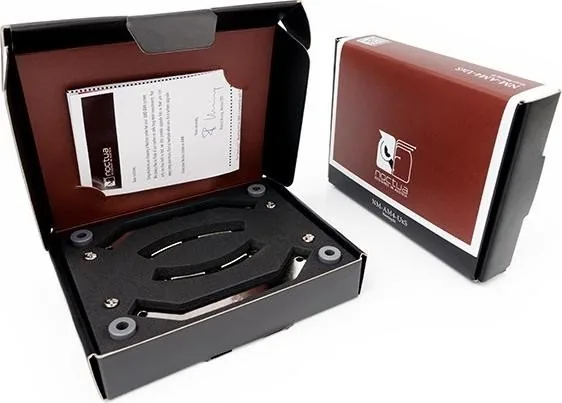
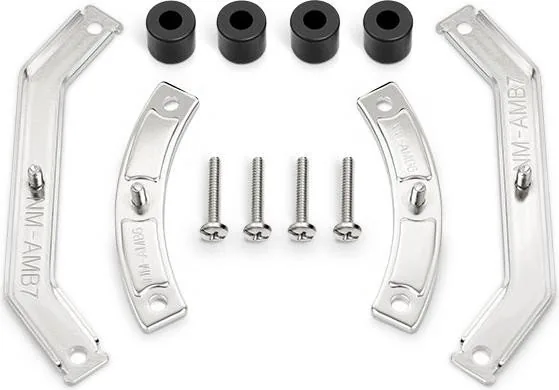
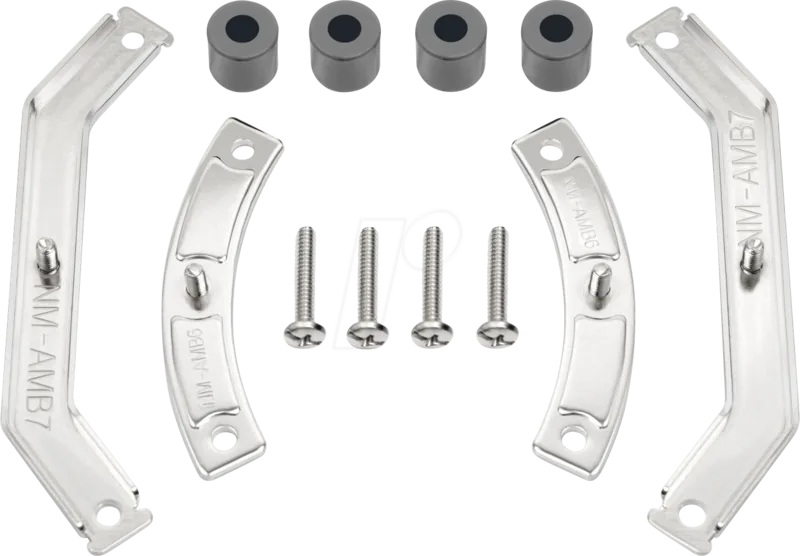
Prior to installing, remove the motherboard stock CPU cooler retention module by unscrewing it from the backplate. The SecuFirm2 mounting system will install directly to the stock backplate, so keep it in place. Choose either the short NM-AMB6 or the long NM-AMB7 mounting bars according to the desired orientation. First put the plastic spacers onto the screw threads. Then fix the mounting bars using the four long screws. Use a torque of 0.6 Nm maximum.
Thermal Paste and Final Steps
Applying thermal paste requires care. If there are residual traces on your CPU on the base of the heatsink, please clean them off first. Then press a small drop of thermal compound onto the centre of the heatspreader. Caution about applying too much thermal paste will lower heat conductivity. Even with high-grade products, the possibility of defects cannot be eliminated. Therefore, we offer a warranty period of 6 years. We recommend taking off coolers with a total weight of more than 700g for safety reasons during transport.
This Noctua NM-AM4-UxS Mounting Kit ensures you get the most out of your hardware investment. We support our community through direct service options. Enjoy the performance and stability your system deserves with this reliable mounting solution designed for the modern PC enthusiast. Always wear anti-static wristbands when working inside your computer chassis to protect sensitive electronics. Installation requires precision and patience.
Ensure all parts are clean before assembly. Do not skip the torque specification steps. This ensures the longevity of the mounting structure. The SecuFirm2 design provides a secure fit. Follow every instruction carefully. Read the manual thoroughly before beginning. If you are not confident in your ability to install the hardware, seek professional assistance before proceeding. Incorrect installation may void the warranty or cause immediate failure of the cooling apparatus. Contact [email protected] for help.
Search for 67,706 Manuals online


Type-in Brand or Model
Thomas Mueller
6 months ago
Do I need to buy thermal paste separately for this mounting kit?
Manual.ly
6 months ago
Most user reviews state that thermal paste is not included in the box. You should purchase a high quality paste like WM-Paste before you start. The kit fits current sockets and boards such as the Asus ROG Strix B350-F Gaming. Installation is simple and reviews rate the quality highly. Please ensure you have paste ready for the CPU cooler before attaching the mount. If you need an older socket adapter, contact Noctua directly.