
Noctua NH-U9B SE2 Manual
PDF manual · 4 Pages
English



Quick check
Incorrect answer, please try again.
Chat with your Noctua NH-U9B SE2 manual using AI
Get instant AI answers from your Noctua NH-U9B SE2 manual
Ask anything about the Noctua NH-U9B SE2. Answers come from this manual, with the pages they are based on.
Ask a Question
Do you recommend NH-U9B SE2?
Yes No
Lisa Weber
8 months ago
Will this cooler fit my board with tall RAM sticks, and is it quiet without adapters?

Manual.ly
7 months ago
Fan height may interfere with some tall RAM modules, so verify clearance using motherboard specs. For noise, the standard fans run quietly enough for idle, but we recommend using the included Low-Noise or Ultra-Low-Noise adapters for silent operation under load. This ensures optimal cooling performance without excessive sound.
Frequently Asked Questions
It guides installation for Intel and AMD sockets such as LGA1366 and AM3. You must verify the cooler is fully compatible with your specific motherboard before starting.
Is this answer helpful?
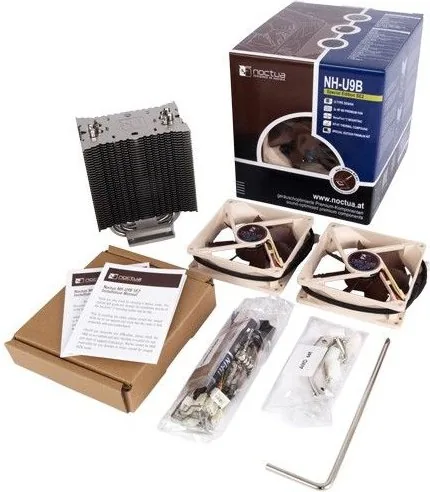
Two NF-B9 fans are typically included in the box. This allows for dual-fan operation without needing to purchase extra components separately.
Is this answer helpful?
For Intel LGA1366 and LGA1156, the backplate installs over the stock one. Do not take off the stock backplate on these models.
Is this answer helpful?
Yes, using the included Low-Noise Adapter or Ultra-Low-Noise Adapter. Please use one adaptor per fan when running two fans.
Is this answer helpful?
The warranty period is 72 months. Direct RMA service is available with a proof of purchase like an invoice.
Is this answer helpful?
Yes, NT-H1 is supplied with the cooler. Apply a small drop to the center of the heat-spreader for best performance.
Is this answer helpful?
Tightly screw them to the base of the heatsink using short screws. Ensure brackets are in the correct position before tightening.
Is this answer helpful?
Advantages and Disadvantages
Advantages

- Simple SecuFirmtm 2 mounting system for easy installation.
- Includes NT-H1 thermal paste for better heat transfer.
- Low-noise adapters available to reduce RPM and fan noise.
- Two NF-B9 fans included for enhanced cooling performance.
- Long warranty period ensures customer peace of mind.
Disadvantages

- Requires motherboard removal for some Intel socket installations.
- Backplate compatibility varies significantly between socket types.
- Dual fan setup needs space on both sides of the heatsink.
- Rubber inlay removal required for specific Intel sockets.
- Thermal speed throttling risk when using noise adapters.
Product Specification
Type
Tower Cooler
Dimensions with Fan
3.74x4.92x4.72in (Width x Height x Depth), alternative mounting: 3.74x4.92x3.74in (1 fan)
Dimensions without Fan
3.74x4.92x2.80in (Width x Height x Depth)
Fan
2x 3.62x3.62x0.98in, 300-1600rpm, 37.85 CFM, 17.6dB(A), 0.06 inH2O (NF-B9)
Weight with Fan
1.41lbs, 1.21lbs (1 fan)
Connector
3-Pin
AMD Socket
AM2/AM2+/AM3/AM3+, FM1/FM2/FM2+
Intel Socket
1356/1366, 1150/1151/1155/1156/1200, 775
Note AMD Socket
AM5/AM4 mounting kit available separately, AM5/AM4 mounting kit available separately
Note Intel Socket
1851/1700/1200/115x mounting kit available separately, 1700 mounting kit available separately
Features
4 Heatpipes, nickel-plated
Manufacturer Warranty
6 Years
Note
Please note motherboard compatibility (Noctua Compatibility Centre)
Product Description
Product Overview
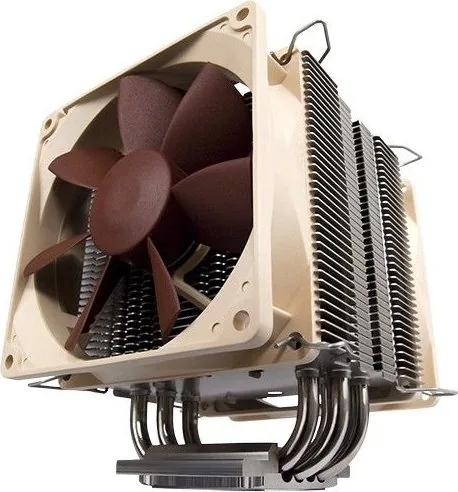
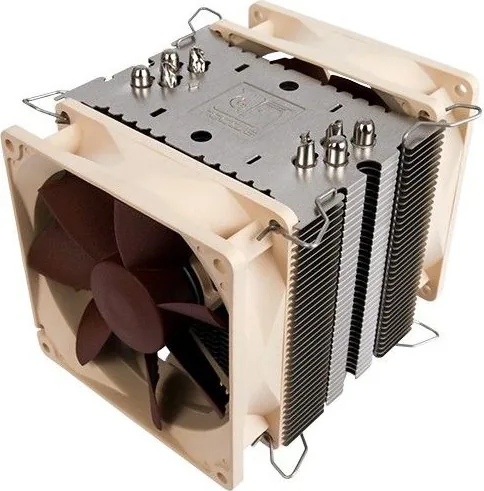
The Noctua NH-U9B SE2 cooling system delivers exceptional performance for PC enthusiasts who value silence and efficiency. When users consult the Noctua NH-U9B SE2 Manual, they gain access to comprehensive instructions for assembly. This cooler supports a wide range of processor sockets across Intel and AMD platforms. It utilizes the SecuFix mounting system which simplifies the mechanical attachment process significantly. The design prioritizes low noise levels while maintaining stable operating temperatures under load.
Installation Steps
Installing this unit requires careful attention to detail. For Intel systems specifically, you may need to handle the mainboard with extra care. Remove the motherboard if necessary to attach the backplate correctly underneath. Do not remove the stock backplate on specific older sockets like LGA1366 or LGA1155. The kit provides four bolts and mounting bars for maximum stability and rigidity. Ensure the plastic spacers sit securely on the bolts before adding the bars to the system. Additional caution regarding the backplate alignment for LGA1366 and LGA1156 is mentioned. You must verify all four bolts are fully engaged in the mainboard holes. This ensures the cooling block does not wobble during operation.
Fans and Adapters
The system includes two NF-B9 fans for dual-fan performance and better airflow. You can connect them using the convenient Y-split cable provided. For quieter operation, use the Low-Noise Adapter or the Ultra-Low-Noise Adapter. Be cautious when applying these adapters as CPU temperatures may rise slightly over time. Monitor the heat using software tools to detect any potential issues early. If the CPU throttles due to heat, adjust the case airflow or remove the adapter immediately.
Final Notes
Always use the provided NT-H1 thermal paste for optimal heat transfer efficiency. Apply a small drop to the center of the processor heat spreader directly. Do not use too much paste as this actually reduces conductivity between parts. Check all screw tightness regularly to prevent loose components over time. Ensure fastening brackets are aligned correctly on the base of the heatsink. The manufacturer offers extensive warranty support for all registered owners. Refer to the website for updated compatibility lists before you begin.
Compatibility Warnings
The mounting bars have specific orientations for correct alignment and fitment. Ensure the curved sides point outwards for Intel and inwards for AMD systems. This prevents interference with surrounding components on the motherboard. The backplate rubber inlay must be placed correctly on specific sockets to function as intended. Follow the provided diagrams to avoid installation errors that might damage the hardware.
Warranty and Support
The company stands by this cooler with a lengthy warranty period of seventy-two months. Direct RMA service is available for eligible products with proof of purchase. Modifications to the cooler will void the warranty so keep it unaltered. Keep your invoice safe as proof of purchase is required. The website offers detailed RMA information. You can contact the support team for further help if needed. Multilingual versions of the instructions are also online for your reference.
Search for 67,706 Manuals online


Type-in Brand or Model
Marcus Weber
8 months ago
Will this cooler work with high profile RAM sticks or will it block any memory slots?
Manual.ly
8 months ago
The NH-U9B SE2 is compact for most cases, but clearance depends on your motherboard. Typically, tall RAM sticks may block the first slot, meaning you may need to use slots two and four. We supply all necessary mounting hardware. If you need to remove a fan to clear space, that is an option available for this model. Please check our compatibility list for your specific board and RAM height to ensure a perfect fit. We recommend verifying dimensions against your case before finalizing the installation.