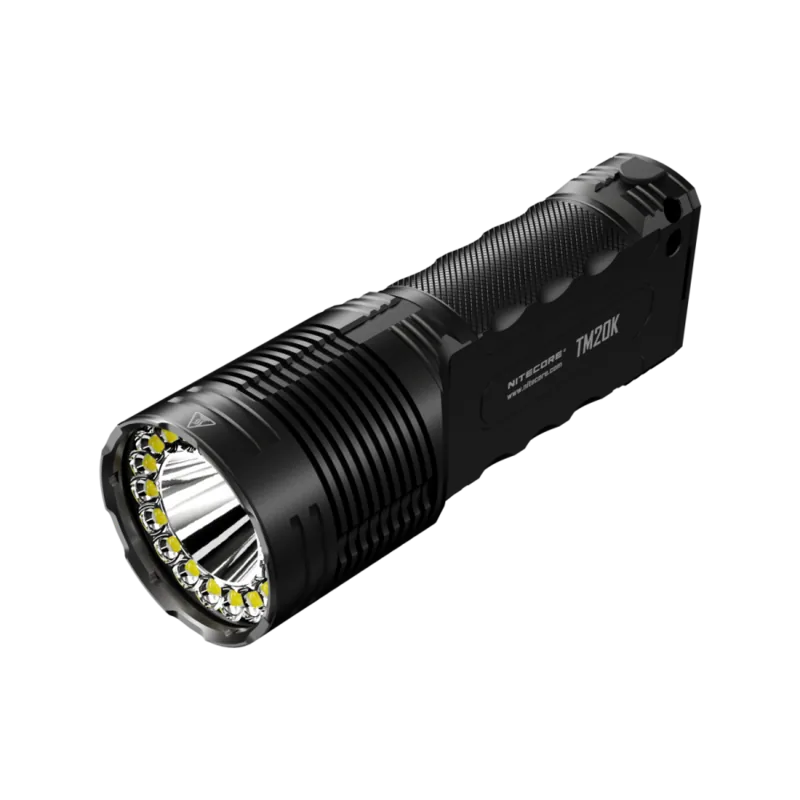
Ultra High Performance Tactical Searchlight
• 20000 Lumens Max output
• STROBE READY™ and TurboReady™
• USB-C Rechargeable
TM20K
USER MANUAL
WARNINGS
1.
massive heat rapidly during long-time activation. T
overheating and prevent accidental damage, DO NO
TURBO repeatedly if the light becomes too hot to handle.
2.
objects when turned on to avoid accidents.
3.
Doing so may cause irreparable damage to the light due to the
dierenceofairpressureinsideandoutsideofthetube.
4.
May be dangerous for your eyes.
The default setting for TM20K is Lockout Mode,
pleaseunlocktheashlightbeforetherstuse.
• Utilizes 19 x CREE XP-L2 LEDs with a max output of 20,000 lumens
• Max peak beam intensity of 22,200cd and max throw of 290 meters
• Lightweight, rigid and fast cooling tube built from unibody CNC technology
• Built-in 2 x 21700 rechargeable Li-ion batteries (9,600mAh in total)
• Intelligent Li-ion battery charging circuit with USB-C charging port
• Ambidextrous tactical buttons specially designed for tactical activities
• Interchangeable STROBE READY™ (Patent No
T
• STROBEModeusesrandomlychangingfrequenciesforstrongerdizzying
eects
• Highlyecientconstantcurrentcircuitprovidesstableoutputupto13
hours
• Integrated Advanced T
(Patent No. ZL201510534543.6)
• Optical lenses with double-sided scratch resistant coating
• Constructed from aero grade aluminum alloy
• HAIIImilitarygradehard-anodizednish
• Waterproof and dustproof r
(2 meters submersible)
• Impact resistant to 1 meter
• T
Features
Specications
Accessories
Length: 145.5mm (5.73")
Head Diameter: 50mm (1.97")
T 50mm×26mm (1.97"×1.02")
Weight: 422g (14.89oz) (Clip Included)
USB-C Charging Cable, Holster
Technical Data
Warranty Service
TURBO HIGH MID LOW
UL SPOTLIGHT FLOODLIGHT
STROBE
Brightness
20,000
Lumens
3,100
Lumens
1,900
Lumens
1,050
Lumens
320
Lumens
1,200
Lumens
1,800
Lumens
20,000
Lumens
Runtime ─ *45min
1h
45min
4h
15min
13h
3h
30min
2h ─
Beam
Distance
290m 270m 260m 190m 120m 260m 73m ─
Peak Beam
Intensity
22,200cd 18,500cd 17 9,500cd 3,900cd 17 1,340cd ─
Impact
Resistance
1m
Water
Resistance
IP68, 2m (Waterproof and Submersible)
Note: The stated data is measured using 2 x 21700 Li-ion Battery (3.6V
4,800mAh) under laboratory conditions. The data may v
duetodierentbatteryusageorenvironmentalconditions.
* The data is tested without temperature regulation.
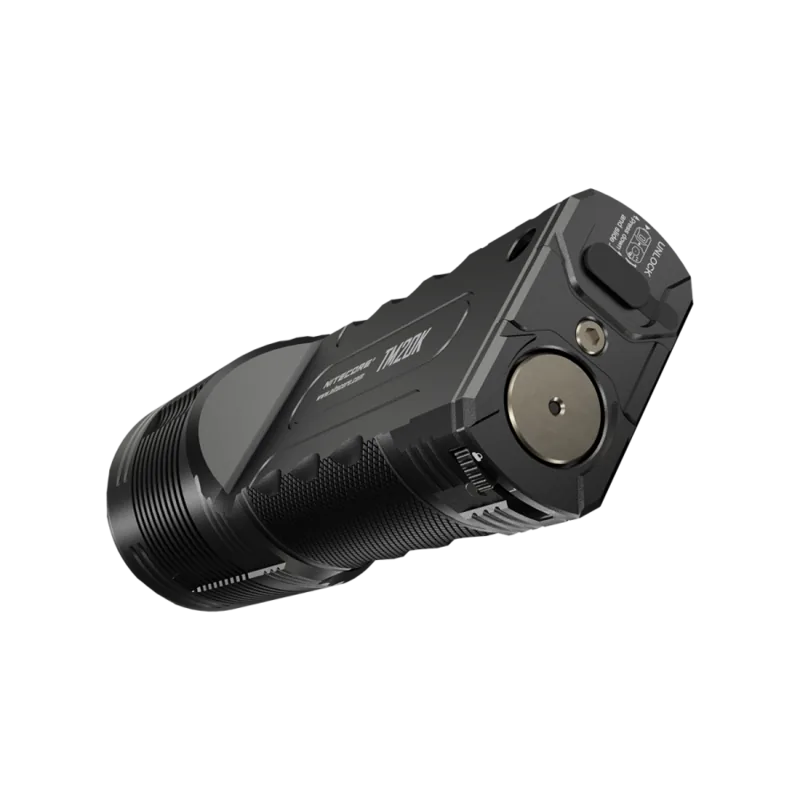
USB-C Charging P
Mode Button
Power But
User Mode Selection T
(on the back)
T
(English)
(Deutsch)
(Francais)
Charging Function
TheTM20Kisequippedwithanintelligentchargingfunction.Pleaserechar
theashlightbeforetherstuse.
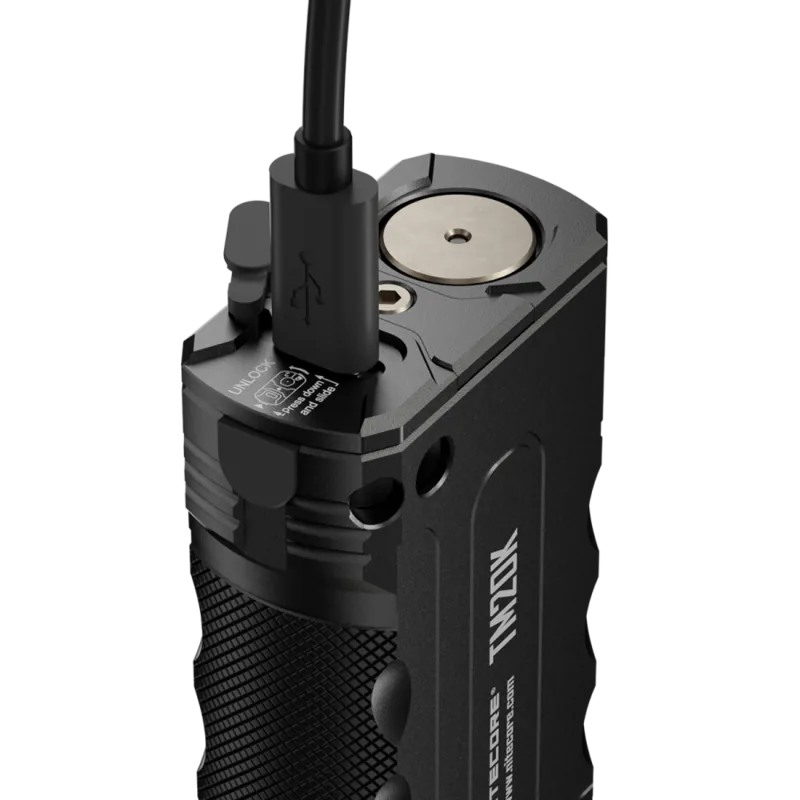
The TM20K is available for both Standard Charging Mode and Quick Charging
(QC) Mode. As illustrated, uncap the charging port and connect it with the
USB adapter (available as an optional accessory) via the USB cable.
• When charging via a QC adapter
modeandthepowerindicatorwillashquicklytoinformtheuser;when
chargingviaanon-QCadapter
• When the product is fully charged, it will automatically cease the charging
process and the power indicator will become steadily turned on to inform
the user
• When the light is on, connecting a charging cable will automatically turn
thelighto.Thelightwillreturntoitspreviousmemorizedbrightness
level when the charging cable is disconnected.
• The charging time in QC Mode is approx. 4 hours 30 minutes. The
charging time in Standard Charging Mode is approx. 7 hours 30 minutes.
(Charged via the 5V / 2A adapter)
• When fully charged, the standby time is approx. 12 months.
Lockout / Unlock
Lockout: (Default Setting)
• Slide the T
the Lockout Mode.
• InLockoutMode,activatingtheashlightisunav
Switch is slid to any position. When sliding the T
or pressing any button while the T
indicatorwillash5timesquicklytoindicatethelockoutstatus.
• When the light is on, accessing the Lockout Mode will automatically turn it
o.
Unlock:
1.
2.
Release to select the desired user mode.
3.
User Mode Selection
The TM20K is available with 2 user modes: Daily Mode (Mode 1), and
T
betweendierentusermodes.
• Daily Mode (Mode 1): In this user mode, all brightness levels and
special modes are available. The P
illumination.
•
T
tactical momentary-on illumination of the memorized brightness level or
special mode.
Note: The TM20K has a memory function. When reactivated, it will
automatically access the previous memorized brightness level or special
mode.
Daily Mode (Mode 1)
On / O
On:Whenthelightiso,shortpressthePowerButtontoturniton.
O:Whenthelightison,shortpressthePowerButtontoturnito.
Brightness Levels
When the light is on, short press the Mode Button to cycle through the
following brightness levels: UL
Special Modes (FLOODLIGHT / SPOTLIGHT)
• When the light is on, press and hold the Mode Button to switch between
FLOODLIGHT and SPOTLIGHT
• When FLOODLIGHT / SPOTLIGHT is on, short press the Mode Button to
return to the previously memorized brightness level.
Tactical Mode (Mode 2)
Tactical Momentary-on
Whenthelightiso,pressandholdthePowerButtontoaccessthe
previouslymemorizedbrightnesslevel.Releasetoturnito.
Brightness Levels
Short press the Mode Button while holding the Power Button to cycle
through the following brightness levels: UL
TurboReady™ / STROBE READY™
TheTM20Kisequippedwith2T
function with ambidextrous activation of T
(The default setting is T
• DailyMode(Mode1):Whenthelightison/o,pressandholdeither
T
previous status.
• T
T
• Daily Mode (Mode 1) / T
Mode Button while holding either T
T
Power Indication
• WhenthelightisoinDailyMode(Mode1)/T
shortpresstheModeButton,andthepowerindicatorwillashtoshow
the battery voltage (±0.1V). For example, when the battery v
4.2V
and2moreashes.
• When the light is on, the power indicator will indicate the battery
remaining power:
1. Being steadily turned on indicates that the power is above 50%.
2. Flashing slowly indicates that the power is below 50%.
3.Flashingquicklyindicatesthatthepowerisbelow10%.
Note: Theashlightshouldberechargedwhentheoutputappearstobe
dim or the light becomes unresponsive due to the low power
ATR (Advanced Temperature Regulation)
The integrated A
to the working condition and ambient environment to maintain the optimal
performance.
Warnings
1.
The TURBO Brightness Level of 20,000 lumens will produce massive heat
rapidly during long-time activation. T
Low power Full power
3.5V 3.7V 3.9V 4.2V
Fonction de charge
LaTM20Kestéquipéed’unefonctiondechargeintelligente.V
recharger la lampe de poche avant la première utilisation.
Le TM20K est disponible pour le mode de charge standard et le mode
de charge rapide (QC). Comme illustré, décapsulez le port de charge et
connectez-leàl’adaptateurUSB(disponibleenoption)vialecâbleUSB.
●
LorsdelachargeviaunadaptateurQC,ilaccèdeautomatiquementaumode
QCetl’indicateurd’alimentationclignoterapidementpourinformerl’utilisateur;
lorsdelachargeviaunadaptateurnon-QC,l’indicateurd’alimentation
clignote lentement.
●
leprocessusdechargeetl’indicateurd’alimentations’allumera
régulièrementpourinformerl’utilisateur
●
automatiquementlalumière.Lalumièrereviendraàsonniveaude
luminositémémoriséprécédentlorsquelecâbledechargeestdéconnecté.
●
tempsdechargeenmodedechargestandardestd’environ7heures30
minutes.(Chargévial’adaptateur5V/2A)
●
Verrouillage / Déverrouillage
Verr
●
secondes pour accéder au mode de verrouillage.
●
l’interrupteurcoulissantestglissédansn’importequelleposition.Lorsque
vousfaitesglisserl’interrupteurcoulissantsur«1»ou«2»,ouappuyez
surunboutonalorsquel’interrupteurcoulissantestà«1»ou«2»,
l’indicateurd’alimentationclignotera5foisrapidementpourindiquerl’état
de verrouillage.
●
automatiquement.
Déverrouillage :
1.
verrouillage en mode de verrouillage.
2.
maintenantleboutonModeenfoncé.Relâchezpoursélectionnerlemode
utilisateur souhaité.
3.
déverrouillage.
Sélection du mode utilisateur
LaTM20Kestdisponibleavec2modesutilisateur:lemodequotidien(mode
1)etlemodetactique(mode2).Faitesglisserl’interrupteurcoulissantsurle
côtéarrièrepourbasculerentrelesdiérentsmodesutilisateur
• Modequotidien(mode1):Danscemodeutilisateur
luminositéetlesmodesspéciauxsontdisponibles.Leboutond’alimentation
accède à un éclairage constant.
• Modetactique(Mode2):Danscemodeutilisateur
accéderaàl’éclairagetactiquemomentanéduniveaudeluminosité
mémorisé ou du mode spécial.
Remarque : La TM20K a une fonction de mémoire. Une fois réactivée, elle
accèdeautomatiquementauniveaudeluminositémémoriséprécédentouau
mode spécial.
Mode quotidien (Mode 1)
ON / OFF
ON:Lorsquelevoyantestéteint,appuyezbrièv
d’alimentationpourl’allumer
OFF:Lorsquelevoyantestallumé,appuyezbrièv
d’alimentationpourl’éteindre.
Ladefunktion
Die TM20K ist mit einer intelligenten Ladefunktion ausgestattet. Bitte laden Sie die
Lampe auf
Die TM20K kann im normalen Lademodus als auch im Schnelllademodus (QC)
geladenwerden.ÖnenSiedenLadeanschluss-wieabgebildet-undverbindenSie
den USB-Adapter (als optionales Zubehör erhältlich) mit dem USB-Kabel.
● BeimLadenübereinenQC-AdapterwirdautomatischaufdenQC
zugegrien.DieLeistungsanzeigeLEDblinktschnell.BeimLadenübereinen
Nicht-QC-
● WenndieTM20Kvollständiggeladenist,wirdderLadev
beendet. Die Leistungs-LED leuchtet stetig.
● WenndasLichteingeschaltetist,schaltetessichautomatischaus,wennein
Ladekabel angeschlossen wird. Das Licht kehrt zu seiner vorherigen gespeicherten
Helligkeitsstufezurück,wenndasLadekabelabgezogenwird.
● DieLadezeitimQC-Modusbeträgtca.4Stunden30Minuten.DieLadezeitim
Standard-Lademodus beträgt ca. 7 Stunden und 30 Minuten (aufgeladen mit einem
5V/2A-Adapter).
● BeivollständigerAuadungbeträgtdieStandby-Z
Sperren / Entsperren
Sperren: (Standardeinstellung)
●
Sekunden, um in den Sperr-Mode zu gelangen.
●
wenn der Schalter in eine beliebige Position geschoben wird. W
denSchalterauf"1"oder"2"schiebenodereinebeliebigeT
während der Schalter auf "1" oder "2" steht, blinkt die Betriebsanzeige
fünfmalschnell,umdenSperrstatusanzuzeigen.
●
automatisch ausgeschaltet.
Entsperren:
1.
steht.
2.
gedrückthalten.LassenSielos,umdengewünschtenBenutzermodus
auszuwählen.
3.
Auswahl des Benutzermodus
Die TM20K hat 2 einstellbare Benutzermodi: Daily-Mode (Mode 1) und T
Mode(Mode2).BetätigenSiedenSchalteranderRückseite,umzwischen
den verschiedenen Benutzermodi zu wechseln.
●
In diesem Benutzermode sind alle Helligkeitsstufen und Sondermodi
verfügbar
●
In diesem Benutzermode wird mit der Ein/Aus-
Beleuchtung der gespeicherten Helligkeitsstufe oder des Spezialmodus
aktiviert.
Hinweis: DieTM20KverfügtübereineSpeicherfunktion.Beierneuter
Aktivierung wird automatisch die zuvor gespeicherte Helligkeitsstuf
Spezial-Mode aufgerufen.
Daily-Mode (Mode 1)
Ein / Aus
Ein:WenndasLichtausgeschaltetist,drückenSiekurzdieEin/A
einzuschalten.
Aus:WenndasLichteingeschaltetist,drückenSiekurzaufdieEin/A
auszuschalten.
Helligkeitsstufen
WenndasLichteingeschaltetist,drückenSiekurzaufdieMode-
folgenden Helligkeitsstufen zu wechseln: "UL
Spezial-Modi (FLOODLIGHT / SPOTLIGHT)
● HaltenSiebeieingeschaltetemLichtdieMode-
FLOODLIGHTundSPOTLIGHTzuwechseln.Loslassen,umdengewünschten
Spezial-Mode auszuwählen.
● WennFLOODLIGHT/SPO
T
Taktik-Mode (Mode 2)
Taktisches Momentlicht - Ein
WenndasLichtausgeschaltetist,haltenSiedieEin/Aus-
gespeicherte Helligkeitsstufe aufzurufen. Loslassen, um sie auszuschalten.
Helligkeitsstufen
DrückenSiekurzdieMode-
zwischen den folgenden Helligkeitsstufen zu wechseln: "UL
- "HIGH".
TurboReady™ / STROBE READY™
DieTM20Kistmit2T
wobei T
Standardeinstellung ist T
● Daily-Mode(Mode1):W
T
Statuszurückzukehren.
●
T
gedrückt,umzuTURBO/STROBEzugelangen.Loslassen,umesauszuschalten.
● Daily-Mode(Mode1)/T
währendSieeinederbeidenT
Einstellungen T
Restleistungsanzeige
•
Wenn die Lampe im Daily
All NITECORE
®
productsarewarrantedforqualit
product can be exchanged for a replacement through a local distributor/
dealer within 15 days of purchase. After that, all defective / malfunctioning
NITECORE
®
products can be repaired free of charge within 24 months
from the date of purchase. Beyond 24 months, a limited warrant
covering the cost of labor and maintenance, but not the cost of accessories
or replacement parts.
Thewarrantywillbenulliedif
1.
unauthorizedparties;
2.
For the latest information on NITECORE
®
products and services, please contact
a local NITECORE
®
※
for reference purposes only
thismanualandinformationspeciedonwww.nitecor
Innovations Co.
content of this document at any time without prior notice.
SYSMAX Innovations Co., Ltd.
TEL: +86-20-83862000
FAX: +86-20-83882723
Web: www
Address: 24/F
Guangzhou, 510335, Guangdong, China
Please nd us on facebook : NITECORE Flashlight
Thanks for purchasing NITECORE!
TM080320K22
Made in China
accidental damage, DO NOT activate TURBO repeatedly if the light becomes
too hot to handle.
2.
when turned on to avoid accidents.
3.
maycauseirreparabledamagetothelightduetothedierenceofair
pressure inside and outside of the tube.
4.
the Lockout Mode.
5.
dangerous for your eyes.
6.
adapter or a QC adapter
7
8.
time.
9.
drückenSiekurzdieMode-
anzuzeigen. Wenn die Batteriespannung z. B
gefolgtvoneiner2-sekündigenPauseund2weiterenBlitzen.
•
Wenn das Licht eingeschaltet ist, zeigt die Leistungsanzeige die v
1.StändigesLeuchtenzeigtan,dassdieBatteriespannungüber50%liegt.
2. Langsames Blinken zeigt an, dass die Leistung unter 50 % liegt.
3. Schnelles Blinken zeigt an, dass die Leistung unter 10 % liegt.
Hinweis: Die T
erscheint oder die Lampe aufgrund der geringen Leistung nicht mehr reagiert.
ATR
Mit dem integrierten "Advanced T
TM20K ihre Leistung und passt sich den Umgebungsbedingungen an, um so die
optimale Leistung zu erhalten. Die Helligkeitsstufe "TURBO" (20000 Lumen) erzeugt
extreme Hitze während einer Daueraktivierung und ist daher auf maximal 7 Sekunden
pro Aktivierung begrenzt, um versehentliche Schäden zu vermeiden.
Vorsichtsmaßnahmen
1. Die Helligk
Langzeitaktivierung eine starke Hitzeentwicklung. Um eine Überhitzung zu
vermeiden, aktivieren Sie den "TURBO"-Mode NICHT wiederholt nacheinander
wenn die Lampe zu heiß wird, um sie sicher zu halten!
2.
Decken Sie den Kopf der T
Nähe anderer Gegenstände, wenn sie eingeschaltet sind, um Unfälle zu vermeiden.
3.T
DieskannzuirreparablenSchädenanderLampeführen,daderLuftdruck
innerhalb und außerhalb des Gehäuses unterschiedlich ist.
4.W
bitte den Sperr-Mode.
5. VORSICHT! Gefährliche Str
Augen.DieskannzuschwerenSchädenamAugeführen!
6. Bitte laden Sie das Pr
oder einem QC-Adapter auf (QC = Quick Char
7
8.
Bitte laden Sie die TM20K alle 6 Monate auf
9. Der Akku ist f
Entsorgung von Elektro- und Elektronikgeräten
DiedurchgestricheneMülltonnebedeutet,dassSiegesetzlichverpichtet
sind, diese Geräte einer vom unsortierten Siedlungsabfall getrennten
Erfassungzuzuführen.DieEntsorgungüberdieRestmülltonneoderdie
gelbe T
dienichtfestverbautsind,müssendiesevorderEntsorgungentnommen
und getrennt als Batterie entsorgt werden.
Low power Full power
3.5V 3.7V 3.9V 4.2V
Niveaux de luminosité
Lorsquelalumièreestallumée,appuyezbrièvementsurlebouton«Mode»
pour parcourir les niveaux de luminosité suivants : UL
– HIGH.
Modes spéciaux (FLOODLIGHT / SPOTLIGHT)
●
»pourbasculerentreFLOODLIGHTetSPOTLIGHT
sélectionner le mode spécial souhaité.
●
le bouton “Mode” pour revenir au niveau de luminosité précédemment
mémorisé.
Mode tactique (Mode 2)
Tactique Momentary-on
Lorsquelevoyantestéteint,maintenezenfoncéleboutond’alimentationpour
accéderauniveaudeluminositéprécédemmentmémorisé.Relâchezpour
l’éteindre.
Niveaux de luminosité
Lorsquelalumièreestallumée,appuyezbrièvementsurlebouton«Mode»
pour parcourir les niveaux de luminosité suivants : UL
– HIGH.
TurboReady™ / STROBE READY™
LeTM20Kestéquipéde2boutonstactiquesquiremplissentlamême
fonction avec activation ambidextre de T
paramètre par défaut est T
●
appuyezetmaintenezenfoncél’undesboutonstactiquespouraccéderà
TURBO/STROBE.Relâchezpourreveniràl’étatprécédent.
●
Modetactique(Mode2):Lorsquelalumièreestéteinte,maintenez
enfoncél’undesboutonstactiquespouraccéderàTURBO/STROBE.
Relâchezpourl’éteindre.
●
surleboutonModetoutenmaintenantl’undesboutonstactiques
enfoncés pour basculer entre les paramètres T
READY™.
Indication de puissance
●
tactique(mode2),appuyezbrièvementsurleboutonmodeetl’indicateur
d’alimentationclignoterapouracherlatensiondelabatterie(±0,1V).
Parexemple,lorsquelatensiondelabatterieestà4
d’alimentationclignotera4foissuivid’unepausede2secondesetde2
autresashs.
●
puissance restante de la batterie:
1.Êtrealluméencontinuindiquequelapuissanceestsupérieureà50%.
2.Clignoterlentementindiquequelapuissanceestinférieureà50%.
3.Clignoterrapidementindiquequelapuissanceestinférieureà10%.
Remarque: Lalampedepochedoitêtrerechargéelorsquelasortiesemble
faibleouquelalumièrenerépondplusenraisondelaf
ATR (Advanced Temperature Regulation)
La technologie A
conditionsdetravailetdel’en
performances optimales.
Avertissements
1.
unechaleurmassivelorsd’uneactivationprolongée.P
surchaueetprévenirlesdommagesaccidentels,N’
MODE TURBO à plusieurs reprises si la lumière devient trop chaude pour
êtremanipulée.
2.
objetslorsqu’elleestalluméepouréviterlesaccidents.
3.
peut causer des dommages irréparables à la lampe en raison de la
diérencedepressiond’airàl’intérieuretàl’extérieurdutube.
4.
en mode verrouillage.
5.
lumièreenface!Peutêtredanger
6.
adaptateur 5V / 2A ou un adaptateur QC.
7
8.
pendant une longue période.
9.
Low power Full power
3.5V 3.7V 3.9V 4.2V