
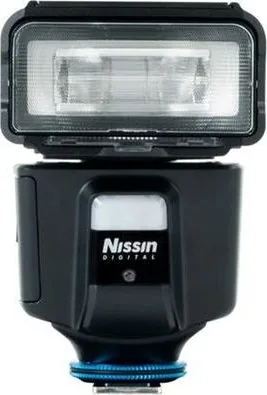
Nissin MG60 Manual
PDF manual · 31 Pages
English



Quick check
Incorrect answer, please try again.
Chat with your Nissin MG60 manual using AI
Get instant AI answers from your Nissin MG60 manual
Ask anything about the Nissin MG60. Answers come from this manual, with the pages they are based on.
MG60 Maintenance Schedule
Remove the batteries when they are not in use for a period of time to prevent leakage or damage.
It is recommended to replace all 4 batteries at once when they are low. Use batteries of the same brand and type.
Ask a Question
Do you recommend MG60?
Yes NoFrequently Asked Questions
The Nissin MG60 is designed specifically for Canon, Nikon, and Sony cameras. It utilizes their built-in NAS systems for controlling the flash. It does not support TTL operations on other branded cameras.
Is this answer helpful?
Download the firmware file from the official website onto a FAT32 formatted USB drive. Insert the drive into the MG60 while it is powered off, then turn it on. The pilot light will blink yellow during the process and turn green when complete.
Is this answer helpful?
The flash unit accepts four 14500 Li-ion batteries, four AA rechargeable batteries, or four AA Alkaline batteries. Using four batteries of the same brand and type is recommended for optimal performance.
Is this answer helpful?
Yes, the MG60 supports both Optical Wireless and Radio Wireless (NAS) slave modes. You can synchronize it with a master flash commander to create multi-light setups from various directions.
Is this answer helpful?
No, the flash unit is not water-resistant. You should keep it away from rain, snow, and high humidity to prevent damage to the internal electronics.
Is this answer helpful?
At ISO 100, the Guide Number is 60 at 200mm and 32 at 35mm. This provides significant reach and power for various photography situations.
Is this answer helpful?
Advantages and Disadvantages
Advantages

- Seamless compatibility with Canon, Nikon, and Sony cameras via NAS system
- Versatile wireless options including Optical and Radio slave modes
- Motorized zoom head covers 24mm to 200mm automatically
- High-speed continuous shooting support up to 10 shots per second
- Built-in video light with adjustable brightness levels
Disadvantages

- Not compatible with TTL operations on non-Canon, Nikon, or Sony cameras
- Requires four batteries which may increase weight and bulk
- No water resistance; must be kept away from rain and humidity
- Firmware updates require a USB OTG drive and computer access
- Overheat protection may cause temporary shutdowns during heavy use
Product Specification
Guide Number
60 (ISO 100, 200mm), 32 (ISO 100, 35mm)
Focal Length
24-79 in
Wide-angle Focal Length
0.63 in
AF Assist Light
yes
Power Supply
AA Battery, Rechargeable Battery
Features
Radio, Slave Mode, Video Light
Dimensions
2.87x3.86x4.57 in (WxHxD)
Weight
0.86 lbs (without battery)
Product Description
Nissin MG60: The Ultimate Flash Companion for Canon, Nikon, and Sony
The Nissin MG60 stands as a versatile and powerful flash unit designed specifically for photographers using Canon, Nikon, or Sony cameras. This device integrates advanced technology to ensure seamless operation with the built-in NAS system found in compatible camera bodies, allowing for precise control over lighting conditions. Whether you are capturing fast-paced action or delicate portraits, the MG60 adapts instantly to your needs.
One of the standout features is its comprehensive TTL (Through-The-Lens) automation. In automatic modes, the flash communicates directly with the camera to determine the perfect exposure, adjusting power levels from 1/256 to full output without manual intervention. For creative control, users can switch to Manual mode to set specific power ratios or utilize the Multi-flash mode to create stunning stroboscopic effects. The inclusion of wireless capabilities via Optical and Radio NAS systems allows photographers to set up complex multi-light setups from a distance, synchronizing slave units effortlessly.
The MG60 also excels in low-light scenarios with its built-in AF-assist light emitter, ensuring your subject remains sharp even in darkness. The motorized zoom head automatically adjusts coverage from 24mm to 200mm based on your lens focal length, though manual zoom options provide further customization. Additional accessories like the soft box, color gels, and diffusers expand the creative possibilities, enabling soft, professional lighting that minimizes harsh shadows. With a robust build and safety features protecting against overheating and electrical hazards, the Nissin MG60 is an essential tool for serious enthusiasts and professionals alike.
Search for 67,706 Manuals online


Type-in Brand or Model