
NextBase 422GW Manual
PDF manual · 49 Pages
English



Quick check
Incorrect answer, please try again.
Chat with your NextBase 422GW manual using AI
Get instant AI answers from your NextBase 422GW manual
Ask anything about the NextBase 422GW. Answers come from this manual, with the pages they are based on.
Ask a Question
Do you recommend 422GW?
Yes No
Lukas R.
8 months ago
My Nextbase 422GW sometimes freezes in the app/software and shows SD card errors (even with different cards). What SD card specs and setup steps should I follow to make recording reliable?

Manual.ly
8 months ago
Sorry about the trouble. For reliable recording, use a supported microSD card (Class 10/U3, V30 preferred, up to the device limit) from a reputable brand, and format the card in the dashcam (or via the camera menu) rather than on a PC. Make sure the card is fully seated and try a fresh format if errors reappear. Install the latest camera firmware and, if using the app, update the app as well, then reboot the camera and phone/PC. If the rear camera is used, confirm you have the correct compatible SD setup required for that mode. If freezing persists after a supported card, contact support with the exact SD card model and any error text so we can advise the next steps.
Frequently Asked Questions
Mount it in the center of the windscreen when possible, ideally behind the rear-view mirror. Keep the camera lens area clean and within the wiper zone, and avoid dashboard reflections. Do not obstruct the driver view or airbag deployment.
Is this answer helpful?
Use a quality branded Class 10 or U1 type MicroSD card, with fast speeds suitable for high-resolution recording. Recommended capacity depends on your settings; the device supports up to 128GB. For stability, format the card inside the dash cam.
Is this answer helpful?
Yes. The camera records in short loop files (typically 1-minute clips). When the card fills, it automatically deletes the oldest unprotected files to make space for new recordings. Protected incident files are not overwritten.
Is this answer helpful?
The dash cam can automatically protect files on detected impact. You can also press the Protect button while recording to manually protect the current event. Protected clips are stored so they remain available for review and export.
Is this answer helpful?
Emergency SOS is managed through the MyNextbase Connect app. If a crash is detected and you do not cancel the countdown, the app can send your last known GPS location and key medical and vehicle details to emergency services, depending on internet, Bluetooth pairing, and mobile signal.
Is this answer helpful?
Yes. MyNextbase Connect and MyNextbase Player support viewing, protecting, downloading, editing, and sharing. You can create edited exports, and share via secure links through MyNextbase Cloud where available. Uploads expire after 30 days.
Is this answer helpful?
Firmware updates can improve functionality and fix issues. The camera firmware can be updated using MyNextbase Player on supported computers, or by loading an update file onto the MicroSD card via a card reader. The dash cam restarts after updating.
Is this answer helpful?
Advantages and Disadvantages
Advantages

- 1440p HD recording up to 30fps for detailed front-road evidence, day and night.
- Automatic loop recording and impact-based file protection to prevent overwriting key incidents.
- Inbuilt GPS for journey tracking, location stamps, and speed data in supporting features.
- Quick installation and removal with Click and Go Pro powered magnetic mounting system.
- Emergency SOS via MyNextbase Connect and support for Alexa voice control when paired.
Disadvantages

- Video playback and some usage behaviors may be restricted by local laws.
- MicroSD formatting is required periodically, and formatting deletes unprotected files.
- Emergency SOS effectiveness depends on app setup, internet, mobile signal, and supported coverage.
- Editing and protecting functions are easiest when the vehicle is stationary and menus are not recording.
Product Specification
Effective Megapixels
4.0 Megapixel
Sensor
CMOS
Removable Storage
microSD/microSDHC/microSDXC
Video Function
MPEG-4, 2560x1440@30p (16:9), 1920x1080@60p (16:9)
Viewing Angle
140°
Display
2.5" LCD, 0.53 M Pixels
Connections
USB 2.0
Wireless
Wi-Fi (WLAN), Bluetooth 4.2, GPS
Features
Motion Sensor
Dimensions
3.23x1.81x1.85in (WxHxD)
Weight
0.23 lb
Product Description
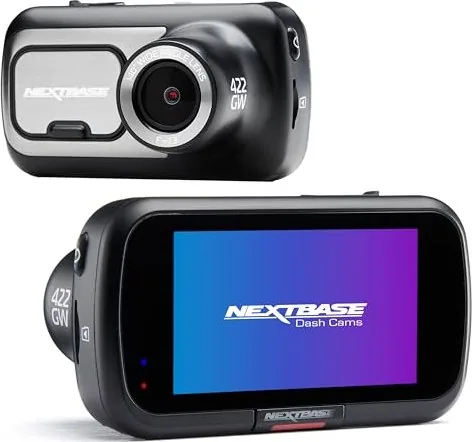
NextBase 422GW Dash Cam Overview
The NextBase 422GW is built for everyday drivers who want clear front-road footage, reliable incident saving, and practical in-car features. With 1440p HD recording at up to 30fps, the camera captures sharp detail day and night, while its 2.5-inch IPS touch panel makes setup and review straightforward. Designed for ease of use, it records in 1-minute clips so videos stay manageable for quick downloads and insurance sharing.
If you want to get the most from your setup, the NextBase 422GW Manual highlights best practices like mounting the camera centrally behind the rear-view mirror, keeping the lens area clean and within the wiper sweep, and minimizing unnecessary dashboard items that could create windshield reflections. The manual also covers stable MicroSD performance, including formatting every 2-3 weeks (after backing up any important files).
Key results you can expect
- 1440p HD front recording at up to 30fps, designed for clear, detailed evidence.
- Automatic loop recording with file protection on impact, so key moments are not overwritten.
- Inbuilt GPS for journey tracking and location stamps on saved footage.
- Automatic start/stop tied to ignition, plus options like parking mode and screen saver.
Smarter recording and smoother sharing
The 422GW includes an inbuilt GPS module and automatic Start/Stop Technology, so it begins recording when the vehicle is powered and shuts down when ignition is off. For parking-time security, Intelligent Parking Mode can trigger recording when motion is detected, saving protected clips while the car is unattended.
For convenience, the Click and Go Pro powered magnetic mount allows fast removal and reattachment. On the software side, the MyNextbase Connect app and MyNextbase Player help manage clips, edit exports, and share footage securely. The workflow supports protected incident files, plus password-protected sharing via MyNextbase Cloud where available, with uploaded videos expiring after 30 days.
Emergency SOS and voice control
The NextBase 422GW also supports Emergency SOS through the MyNextbase Connect app. If a crash is detected and you do not cancel the countdown, the system can send your last known GPS position and key vehicle and medical details to emergency responders, subject to coverage and requirements. Alexa voice control is supported as well, letting you manage compatible functions hands-free using a connected smartphone.
Notes
- Use a quality Class 10 MicroSD card (recommended for best performance) and format using the dash cam for proper structure.
- Protect what you need before formatting, because formatting wipes unprotected content.
- Always follow local laws on windshield placement and whether in-car display viewing is permitted.
Search for 67,706 Manuals online


Type-in Brand or Model
Lea Schneider
9 months ago
I read some reviews about the Nextbase 422GW freezing or showing SD card errors. Is this a known issue, and what SD card and setup steps do you recommend?
Manual.ly
9 months ago
Thanks for checking. Some users experience recording issues if the SD card is not compatible or if the camera is not fully set up. We recommend using a Nextbase-supported SD card (or a high-quality endurance model) with the correct capacity, then formatting it in the dashcam. Make sure the camera firmware and the Nextbase app are up to date, and restart the device after updates. If audio/video playback looks odd, re-formatting the card and re-testing can help. If freezing or SD errors continue after using a recommended card and formatting in-camera, please contact our support with the SD card model and the exact error so we can troubleshoot and advise next steps.