
NextBase 312GW Manual
PDF manual · 40 Pages
English



Quick check
Incorrect answer, please try again.
Chat with your NextBase 312GW manual using AI
Get instant AI answers from your NextBase 312GW manual
Ask anything about the NextBase 312GW. Answers come from this manual, with the pages they are based on.
312GW Maintenance Schedule
Format the MicroSD card using the camera's Setup menu to ensure stable performance. Download any files you wish to keep before formatting as all content is erased.
Use a soft dry cloth for general cleaning. For tough dirt, use neutral detergent diluted in water. Clean the glass lens carefully with spectacle lens fluid on a soft cloth.
Ask a Question
Do you recommend 312GW?
Yes No
Julia Schmidt
4 months ago
Is the menu navigation in German and can the camera be mounted on the dashboard?

Ari Miller
5 months ago
Does this dashcam support night recording and work with a 128GB SD card?

Manual.ly
4 months ago
Yes, the camera delivers good image quality during both day and night. It has been tested and confirmed to function properly with a 128GB memory card. The device also features automatic file overwriting for unsaved recordings and includes a parking surveillance mode.
Julia Klein
6 months ago
Is the menu easy to navigate and does it come with a German manual?
Frequently Asked Questions
The lithium-ion battery is designed to support the auto power-off feature during brief power losses. It typically lasts around 30 minutes of continuous recording but is not intended to replace the main car power adapter.
Is this answer helpful?
No, you should use a branded Class 10 MicroSD card with a speed rating of at least 48MB/s. Cards between 8GB and 128GB are recommended for stable performance and loop recording.
Is this answer helpful?
Yes, the NextBase 312GW has a built-in microphone and speaker. Audio recording is enabled by default in the video menu settings but can be toggled on or off as needed.
Is this answer helpful?
Press and hold the WiFi button for three seconds when not recording. Connect your phone to the camera's network using the password displayed on the screen, then open the Cam Viewer app.
Is this answer helpful?
The camera uses loop recording. Once the card is full, it automatically deletes the oldest unprotected video files to make space for new recordings, ensuring you always have recent footage.
Is this answer helpful?
Yes, the camera sets the time and date automatically via satellite data in Greenwich Mean Time. You can manually adjust the timezone and daylight savings settings in the setup menu for local accuracy.
Is this answer helpful?
Advantages and Disadvantages
Advantages

- Automatic start and stop recording synchronized with vehicle ignition
- Integrated Wi-Fi allows easy smartphone connectivity and file transfer
- Built-in G-sensor protects critical footage during impacts or sudden stops
- High-definition 1080p video recording with wide 140-degree angle lens
- Parking mode activates upon detecting motion or vibration while parked
Disadvantages

- Internal battery provides limited backup power for short outages only
- Screen saver feature may cause display to blank shortly after startup
- Requires specific Class 10 SD cards for best loop recording performance
- Wi-Fi connection requires stopping recording before activation
- AV output cable is sold separately and not included in the package
Product Specification
Effective Megapixel
3.0 MP
Sensor
CMOS
Storage Type
microSD/microSDHC/microSDXC
Video Function
MOV, 1920x1080@30p (16:9)
Viewing Angle
140 degrees
Display
2.7-inch LCD, 0.69 million pixels
Connections
USB 2.0
Wireless
GPS
Features
Motion sensor, Loop recording
Dimensions
3.62 x 2.24 x 1.46 inches (WxHxD)
Weight
3.04 oz
Product Description
NextBase 312GW: Your Ultimate Driving Companion
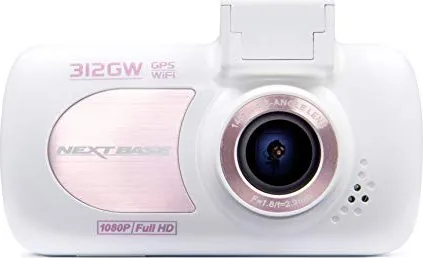
The NextBase 312GW is a sophisticated in-car camera designed to provide peace of mind and high-quality evidence for drivers. Engineered with ease of use as the primary goal, this device automatically records your journey without requiring constant manual intervention. It captures video in crisp 1080p resolution at 30 frames per second, ensuring that every detail on the road is preserved clearly. The camera features a wide-angle 140-degree lens that covers multiple lanes, minimizing blind spots while maintaining image quality.
One of the standout features of the NextBase 312GW is its intelligent parking mode. When the vehicle ignition is turned off, the camera enters standby but remains vigilant. If it detects physical movement or an impact via its built-in G-sensor, it instantly activates to record a 30-second clip, protecting vital footage from being overwritten. This ensures that incidents occurring while your car is parked are documented effectively.
Connectivity is seamless with the integrated Wi-Fi module. Users can connect their smartphones or tablets to view live feeds, download recordings, or manage files directly through the dedicated Cam Viewer app. This eliminates the need for cables during daily file transfers. Additionally, the powered GPS mount keeps the power cable connected to the vehicle while allowing quick removal of the camera unit itself.
Installation is straightforward thanks to the suction cup mount with a locking lever. Positioning the camera behind the rearview mirror ensures a clear view without obstructing the driver's line of sight. The device includes automatic start-stop technology, beginning recording as soon as the engine starts and shutting down safely when the car turns off. With a 2.7-inch LCD screen, users can easily review footage or adjust settings on the go.
Important Notes
- Always format the memory card every few weeks for optimal performance.
- Ensure the windscreen area is clean and free of glare before mounting.
- Use only Class 10 MicroSD cards rated for 48MB/s or higher.
- Do not attempt to save external files to the card while the camera is active.
Search for 67,706 Manuals online


Type-in Brand or Model
Theresa Simpson
6 months ago
Does this dashcam support night recording and work with a 128GB memory card?
Manual.ly
6 months ago
Yes, the camera features excellent night recording capabilities and has been confirmed to function properly with a 128GB card. It also offers adjustable recording lengths between 2 and 5 minutes, automatic file overwriting for unsaved clips, and a parking surveillance mode.