

NexiGo N660P Manual
PDF manual · 16 Pages
English


Quick check
Incorrect answer, please try again.
Chat with your NexiGo N660P manual using AI
Get instant AI answers from your NexiGo N660P manual
Ask anything about the NexiGo N660P. Answers come from this manual, with the pages they are based on.
Ask a Question
Do you recommend N660P?
Yes NoFrequently Asked Questions
The NexiGO N660P supports 1920x1080@60fps, 1280x720@60fps, and 640x480@60fps. Actual frame rate may drop under low light or limited bandwidth conditions.
Is this answer helpful?
On Windows use the built-in Camera app or third-party apps (AMCap). On macOS use Photo Booth or select the camera in System Preferences > Security & Privacy > Camera. Ensure the device appears under USB in System Information on Mac.
Is this answer helpful?
Flicker/banding often stems from lighting frequency mismatches. Change your video capture software frequency to 50Hz or 60Hz depending on your region, avoid pointing the camera at direct light sources, and use stable indoor lighting.
Is this answer helpful?
Select the NexiGo webcam as the default input/output in OS sound settings (Windows: Control Panel > Sound; macOS: System Preferences > Sound) and in-app audio settings. Adjust microphone levels and disable other devices to reduce echoes.
Is this answer helpful?
The N660P supports auto-focus; to disable it, enable Pro mode in the Camera app and manually adjust the focus control. Manual focus is available on models with a focus ring or via app controls.
Is this answer helpful?
Linux is supported if your distribution includes UVC driver support. If not, you may need to install Linux UVC drivers manually to enable the camera.
Is this answer helpful?
Try a different USB port or PC, check Device Manager (Windows) or USB section in System Information (Mac), reinstall by unplugging and replugging after uninstalling the device, and ensure OS privacy settings allow camera access.
Is this answer helpful?
Advantages and Disadvantages
Advantages

- Full HD 1080p up to 60fps with a 90° field of view for clear, wide-angle captures.
- Built-in noise-reduction microphone simplifies audio during calls and recordings.
- Flexible clip and tripod attachment allow secure mounting on monitors or desks.
- Privacy cover and power indicator provide security and clear status feedback.
- Broad app compatibility (Skype, Zoom, FaceTime, OBS, XSplit) and plug-and-play on modern OS.
Disadvantages

- 1080p/60fps performance can drop in low light or with limited network bandwidth.
- Windows 7 and unsupported legacy systems may require manual drivers or may not work.
- Color casts and flicker may occur under non-standard lighting without manual adjustments.
- Microphone volume or echo issues may need manual OS and app configuration to resolve.
- Some features rely on third-party apps for advanced controls (AMCap, PotPlayer, etc.).
Product Specification
Type
Webcam
Image Sensor
1x 1/2.7" CMOS 2.0 MP
Resolution
1920x1080 Pixel (60fps)
Viewing Angle
90° (horizontal)
Pan
360°
Wireless
N/A
Focus
Autofocus
Camera Cover
Slider
Microphone
integrated (stereo, omnidirectional)
Speaker
N/A
Lighting
N/A
Cable Length
6.56 ft
Power Supply
via USB
Mount
Mounting Clip, with 1/4" thread
Product Description
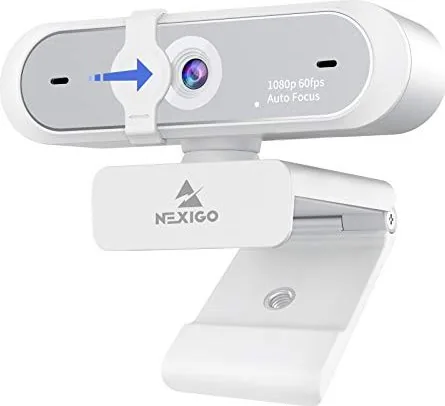
NexiPC NexiGO N660P USB Webcam 1080P Manual
The NexiPC NexiGO N660P USB Webcam 1080P is a compact full-HD webcam designed for clear video calling, streaming, and content capture. Equipped with a 2.0MP 1/2.7" CMOS sensor, the N660P supports up to 1920x1080 resolution at 60fps (also 1280x720 and 640x480 at 60fps), a 90° field of view, and includes an adaptable clip base plus tripod attachment for flexible placement. It features an HD lens, built-in noise-reduction microphone, power indicator, and a privacy cover for added security. The webcam connects via USB 2.0/3.0 and is plug-and-play on most modern systems, with broad support for chat and streaming apps such as Skype, Zoom, FaceTime, OBS, and XSplit.
Setup is straightforward: mount or place the webcam, plug it into a USB port, and allow the operating system to recognize it. Windows users can preview and adjust settings using the Camera app (or third-party tools like AMCap or PotPlayer), while macOS users can use Photo Booth or system preferences. The N660P includes auto-focus functionality for hands-free clarity and manual focus adjustments when precise framing is required.
Performance depends on lighting, bandwidth, and system resources. In well-lit conditions the camera can capture smooth 1080p footage; lower lighting or limited bandwidth may reduce effective frame rates. Image parameters—brightness, contrast, frequency (50Hz/60Hz)—can be tuned within compatible apps to reduce flicker, color cast, or banding. Audio is handled by the built-in microphone, selectable in OS sound settings and in-app audio menus.
The package includes the full HD webcam, a flexible clip/base with tripod mount, a privacy cover, and a quick-start guide. NexiGo provides customer support via email and a one-year manufacturer warranty.
Notes
- Ensure apps are granted camera access in OS privacy settings (Windows: Settings > Privacy > Camera; macOS: System Preferences > Security & Privacy > Camera).
- For best video quality, use adequate lighting and a high-bandwidth connection; close other camera-using apps to prevent conflicts.
- Linux support depends on UVC drivers included in the distribution.
Search for 67,706 Manuals online


Type-in Brand or Model