
NexiGo HelloCam Pro N930W Manual
PDF manual · 87 Pages
English


Quick check
Incorrect answer, please try again.
Chat with your NexiGo HelloCam Pro N930W manual using AI
Get instant AI answers from your NexiGo HelloCam Pro N930W manual
Ask anything about the NexiGo HelloCam Pro N930W. Answers come from this manual, with the pages they are based on.
HelloCam Pro N930W Maintenance Schedule
Wipe the device with a soft, dry cloth. Use only mild detergent if necessary.
Use a dry microfiber cloth or a lens cleaner. Do not use strong or corrosive detergents.
Ask a Question
Do you recommend HelloCam Pro N930W?
Yes NoFrequently Asked Questions
It adds Windows Hello facial recognition, an automatic privacy cover, dual noise-reduction microphones, and optional camera settings software. These features make it better suited for security, meetings, and daily use than a standard webcam.
Is this answer helpful?
Yes. It is designed to be plug-and-play, so most users can connect it and start using it right away. The software is optional and mainly useful for adjusting brightness, exposure, saturation, and focus.
Is this answer helpful?
Yes. It works with common meeting and streaming apps, including tools like Zoom, OBS, Skype, and similar platforms. Its smooth 1080p video and built-in microphones make it practical for both calls and live content.
Is this answer helpful?
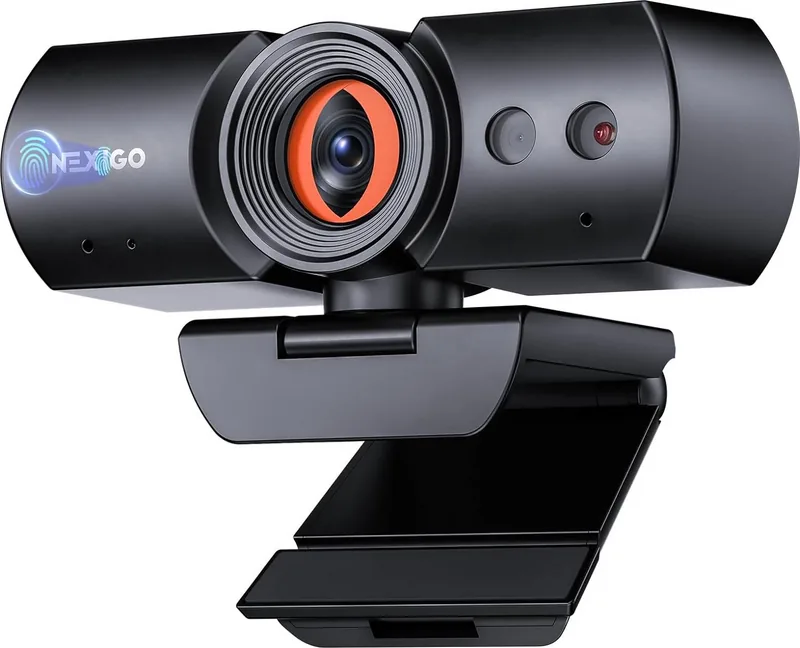
The privacy cover opens automatically when the camera is active and closes when it is not. Users can also control it manually through the touch area on the webcam, giving extra control over when the lens is exposed.
Is this answer helpful?
Yes. You can place it on a flat surface, clip it to a laptop or monitor, or mount it on a tripod using the 1/4-inch thread. That makes it flexible for different desk setups and recording angles.
Is this answer helpful?
The webcam supports Windows 7, 8, 10, and 11, macOS 10.6 or above, and Chrome OS versions that meet the listed requirements. Windows Hello facial recognition requires a compatible Windows system.
Is this answer helpful?
Try a different USB port, restart the computer, and confirm that camera and microphone permissions are enabled in your operating system and app settings. If the issue continues, NexiGo customer support is the next step.
Is this answer helpful?
Advantages and Disadvantages
Advantages

- Windows Hello support adds fast, secure face-based sign-in on compatible Windows PCs.
- Automatic privacy cover helps protect your camera when it is not in use.
- 1080p video at 60fps delivers smooth, detailed calls and recordings.
- Dual noise-reduction microphones improve voice clarity in busy environments.
Disadvantages

- Windows Hello features are limited to compatible Windows systems.
- Best facial recognition results may require proper lighting and positioning.
- Some advanced image adjustments need the optional settings software.
- Manual setup may still be needed for app permissions and device selection.
Product Specification
Type
Webcam
Image Sensor
1x 1/2.8" CMOS
Resolution
1920x1080 Pixels (60fps)
Viewing Angle
80.5° (horizontal), 49.5° (vertical), 89.5° (diagonal)
Compression/Codecs
MJPEG, YUY2
Connections
1x USB-C (Female)
Wireless
N/A
Focusing
Autofocus
Camera Cover
Slider
Microphone
integrated (stereo), 3.28 ft range
Speaker
N/A
Illumination
IR Illumination
Power Supply
via USB
Mount
Mounting clip, with 1/4" thread
Dimensions (WxHxD)
5.12x2.09x1.97 in
Weight
0.44 lb
Package Contents
Camera, USB-C to USB-A cable
Special Features
Facial Recognition (Windows Hello), Status LED
Manufacturer Warranty
2 years
Product Description
NexiGo N930W Pro: A Smarter Webcam for Work and Everyday Use
The NexiGo N930W Pro Manual points to a webcam designed for users who want more than a basic plug-and-play camera. Built for meetings, sign-ins, streaming, and casual video chats, the NexiGo N930W Pro blends convenience with privacy-focused features and a clean, modern setup. It is especially appealing for anyone who values secure access and reliable image quality without needing a complicated installation.
One of the standout strengths of this webcam is its support for Windows Hello facial recognition, which helps make logins faster and more secure. Instead of typing passwords repeatedly, users can unlock compatible Windows devices with a quick face scan. That small upgrade can make a big difference in daily workflow, especially for remote workers and frequent multitaskers.
The camera also includes an automatic privacy cover, a thoughtful feature that adds peace of mind. It opens when the camera is active and closes when it is not, reducing the chance of accidental exposure. For extra control, the cover can also be managed manually through touch controls, which is useful during meetings or when switching between apps.
In terms of image and audio, the NexiGo N930W Pro aims to deliver a solid all-around experience. Its 1080p video at 60fps creates smooth footage, while facial enhancement helps balance light exposure for clearer visuals. The dual noise-reduction microphones are designed to pick up speech more cleanly and reduce distracting background noise, making the webcam suitable for Zoom calls, livestreams, and online classes.
Another advantage is flexibility. The webcam can sit on a flat surface, clip onto a monitor or laptop, or mount on a tripod using the built-in thread. Since it is plug-and-play, setup is straightforward for most users, and optional software gives more control over brightness, saturation, exposure, and focus for those who want fine-tuning.
Overall, the NexiGo N930W Pro feels like a practical choice for people who want a webcam that balances security, ease of use, and everyday performance. It is not overly flashy, but it focuses on features that matter most: clear video, dependable audio, privacy protection, and simple compatibility across popular apps and operating systems.
Notes
- Best suited for Windows Hello users and frequent video callers.
- Optional software adds deeper control, but the camera works well out of the box.
- The privacy cover and tripod support make it a versatile desk companion.
Search for 67,706 Manuals online


Type-in Brand or Model