
Neumann KH 150 Manual
PDF manual · 21 Pages
English



Quick check
Incorrect answer, please try again.
Chat with your Neumann KH 150 manual using AI
Get instant AI answers from your Neumann KH 150 manual
Ask anything about the Neumann KH 150. Answers come from this manual, with the pages they are based on.
Ask a Question
Do you recommend KH 150?
Yes NoFrequently Asked Questions
The MA 1 Automatic Monitor Alignment software is required. It is available for macOS and Windows and offers advantages like precise adaptation to listening preferences and calibration to the listening environment.
Is this answer helpful?
Connect the digital AES3id or S/PDIF output signal of your audio source to the DIGITAL S/PDIF INPUT socket on the first loudspeaker. Use unbalanced cables with a characteristic impedance of 75 ohms.
Is this answer helpful?
Solid white means the loudspeaker is ready. Solid red means it is booting up. Red flashing indicates a firmware error or protection activation. Pink indicates firmware updates or calibration.
Is this answer helpful?
Yes, you can use the BASS, LOW-MID, and HI switches on the backplate to adapt the frequency response to the acoustical conditions of your room and the speaker position.
Is this answer helpful?
The loudspeaker switches into power saving mode after 90 minutes without an input signal. This applies to both analog and digital input modes unless customized via the control software.
Is this answer helpful?
Advantages and Disadvantages
Advantages

- Advanced DSP acoustic controls and MMD waveguide ensure precise sound reproduction.
- Network controllability via MA 1 software allows for detailed automatic alignment and calibration.
- Supports multiple input types including Analog XLR and Digital S/PDIF for versatility.
- Automatic standby mode saves energy after 90 minutes of inactivity.
- Includes mounting hardware options for flexible installation in studios or wall mounts
Disadvantages

- Standby function can be sensitive to noise peaks from audio sources preventing sleep mode.
- Strict positioning is required to avoid low frequency comb filtering near solid walls.
- Ground lift switch is needed if grounding issues cause buzzing noise in the system.
Product Specification
Tweeter
1x 1"
Woofer
1x 6.5"
Frequency Range
39Hz-20.4kHz (+/-3dB)
Power
100W/145W RMS (HF/LF)
Sensitivity
95dB
SPL Max.
108dB
Features
LAN, S/PDIF In/Out
Dimensions
8.86" x 13.58" x 10.75" (WxHxD)
Weight
17.64 lbs
Product Description
Neumann KH 150 Studio Monitor Overview
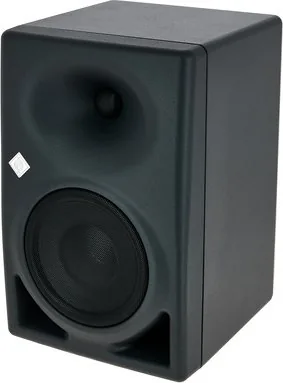
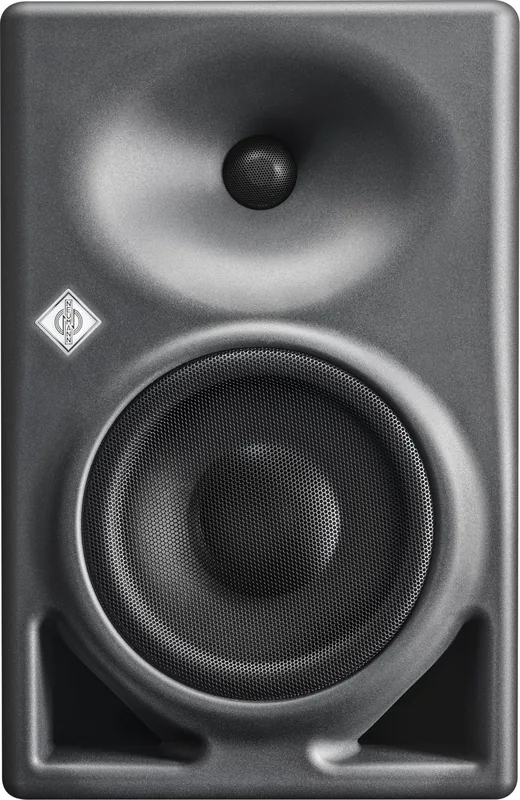
The Neumann KH 150 studio monitor represents a significant leap in acoustic engineering designed for professionals who demand precision. Built with advanced technology, this two-way active loudspeaker integrates a Mathematically Modeled Dispersion Waveguide to ensure consistent sound coverage across the listening area. Whether you are working in a small project studio or a large broadcast facility, the KH 150 adapts seamlessly to various environments.
One of the standout features is the extensive digital control capabilities. The unit supports network management, allowing engineers to utilize the MA 1 Automatic Monitor Alignment software for precise calibration. This software helps match amplitude and phase to subwoofers while compensating for suboptimal listening situations. Users can switch between local backplate controls and network mode instantly via the settings panel.
Connection versatility is another highlight. The loudspeaker accepts both analog signals through XLR inputs and digital S/PDIF signals via RCA sockets. This flexibility ensures compatibility with any source equipment. Additionally, the device includes ground lift switches to eliminate humming noises caused by grounding issues. Installation is straightforward, with threaded inserts for mounting hardware, self-adhesive feet for protection, and clear guidelines for positioning relative to walls and listening positions.
The Neumann logo itself serves a functional purpose, indicating boot states, firmware updates, and error conditions through various light patterns. This visual feedback helps users quickly identify the status of the system. Power consumption is managed efficiently, with automatic standby modes activating after ninety minutes of inactivity to save energy. Cleaning is simple, requiring only a soft dry cloth, and the device is designed to withstand operation temperatures between ten and forty degrees Celsius. It is a reliable choice for professionals globally.
To ensure maximum accuracy, the manual recommends specific distances for placement. Avoid positioning the loudspeaker too close to solid walls to prevent comb filtering effects in the low frequency response. The acoustic axis must point directly at the listening position for the best transient response. Users can adjust acoustical levels using switches for bass, low-mid, and high frequencies to compensate for room loading. Firmware updates are handled easily through the network connection, keeping the device current. For safety, users must connect power correctly and avoid covering cooling vents. The system supports both stereo and multi-channel configurations. Accessories like wall brackets and tripod adapters are available for custom installations. It consumes up to three hundred twenty watts at full load while drawing minimal power in standby. Troubleshooting sections guide users through common issues like buzzing noise or silence. Proper cabling with balanced connections reduces interference risks.
Key Notes
- Always check cable lengths for signal integrity.
- Follow safety warnings regarding power and heat.
- Use MA 1 software for best alignment.
Search for 67,706 Manuals online


Type-in Brand or Model