
Neomounts WL15-625BL1 Manual
PDF manual · 8 Pages
English



Quick check
Incorrect answer, please try again.
Chat with your Neomounts WL15-625BL1 manual using AI
Get instant AI answers from your Neomounts WL15-625BL1 manual
Ask anything about the Neomounts WL15-625BL1. Answers come from this manual, with the pages they are based on.
Ask a Question
Do you recommend WL15-625BL1?
Yes NoFrequently Asked Questions
Yes, the instructions provide steps for drilling into solid brick or concrete. You will need appropriate anchors for this material type to ensure stability.
Is this answer helpful?
The mount supports tablets ranging from 7.9 to 11 inches in screen size. This covers most standard mid-sized tablets on the market today.
Is this answer helpful?
No, adhesive pads are included in the package for alternative mounting without drilling. Just ensure the surface is clean before applying them.
Is this answer helpful?
Select padding from C, D, or E based on your specific tablet depth measurements. This ensures a snug fit without stress on the frame.
Is this answer helpful?
The manual indicates a 360 measurement capability allowing flexible positioning. You can adjust to the desired position securely for any view.
Is this answer helpful?
Yes, tightening clamps are included to lock the tablet in place. Secure them tightly to ensure safety during use and prevent movement.
Is this answer helpful?
Yes, medical facilities benefit from hygiene-friendly mounting near patient beds. It keeps screens accessible without compromising the sterile environment.
Is this answer helpful?
Advantages and Disadvantages
Advantages

- Versatile mounting supports stud, brick, and adhesive options for flexible installation scenarios.
- Secure locking mechanism prevents tablets from slipping or falling during use or movement.
- Adjustable rotation allows users to minimize glare and find optimal viewing angles easily.
- Compatible with tablet sizes ranging from 7.9 to 11 inches covering common device ranges.
- Includes necessary hardware like screws and spacers for varying tablet thicknesses provided.
Disadvantages

- Installation on concrete or brick requires drilling which may not suit renters easily.
- Adhesive pads may lose strength over time requiring replacement or reapplication periodically.
- Tablet depth must be measured precisely to select correct padding spacers for fit.
- Not suitable for tablets larger than 11 inches or smaller than 7.9 inches specified.
- Manual installation requires tools and time unlike simple adhesive stick on solutions.
Product Specification
Type
Tablet Wall Mount
Compatibility
Tablets from 7.9 to 11"
Cooling
N/A
Dimensions
7.13x9.69x1.46" (WxHxD)
Features
Security Lock
VESA
100x100
Material
Steel
Product Description
Transform Your Workspace With the Neomounts Tablet Solution
Enhancing Productivity Through Flexible Placement
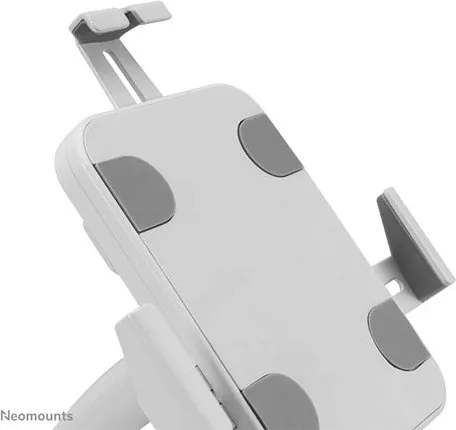
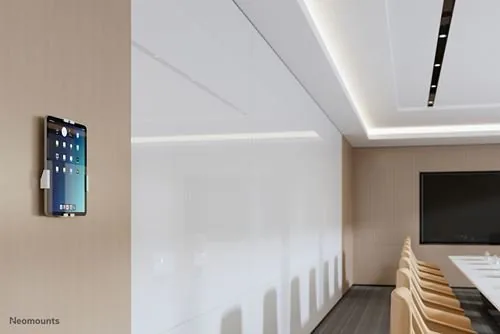
In todays digital environment, finding the perfect spot for your tablet can be challenging. The Neomounts Neomounts Tablet-Wall Mount, 7.9-11" Manual describes a versatile solution that transforms how you interact with your device. By mounting your tablet securely on a wall, you save valuable desk space and reduce clutter. This allows for a cleaner environment, which is essential for focused work or multitasking at home or in an office. Many professionals utilize this setup to keep reference materials within easy eye level without bending over screens. It creates a dedicated zone for digital tools that do not compete with keyboard usage.
Installation Versatility
One of the standout features is the flexible installation process. Whether you have a stud wall, solid brick, or concrete surface, there is a method to secure the wall plate effectively. For those who prefer not to drill, adhesive pads offer an alternative solution. The kit includes necessary screws and adapters to ensure a stable fit. This adaptability ensures that users can upgrade their setup without major renovations or damaging existing surfaces unnecessarily. You can drill holes into wood or use chemical anchors for harder materials like brick.
Security and Adjustability
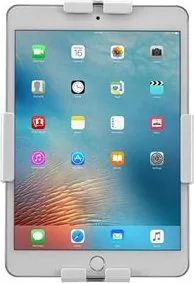
Safety is paramount when hanging valuable electronic devices. The mount features a locking mechanism that firmly secures the tablet once placed inside. Users can adjust the view angle to their desired position. This dynamic capability ensures that glare is minimized and visibility is maximized from various standing or seated positions. The clamps provide additional tightening to prevent slippage during movement.
Important Notes for Optimal Experience
Ensure you measure your tablet depth before selecting the adjustment pads. Incorrect pad selection may result in a loose fit. Always refer to the specific steps for your chosen wall type. Regular checks on screw tightness help maintain stability longer. This product fits a range of sizes from 7.9 to 11 inches, making it suitable for most popular mid-sized tablets.
Medical facilities benefit from hygiene-friendly mounting near patient beds. The design accommodates varying thicknesses using specific plastic spacers. These spacers align with depth measurements of 7.5 mm or deeper. Proper alignment prevents stress on the tablet frame. Long-term use depends on adhering to weight limits and installation guidelines provided in the manual.
Final Thoughts on Ergonomics
Proper ergonomics contribute to long term health. Mounting a device eliminates neck strain associated with holding or viewing tablets at awkward angles. The rotating joint allows for vertical and horizontal adjustments. This means you can switch between landscape and portrait modes easily. It is an investment in your physical well-being alongside your workflow efficiency.
Search for 67,732 Manuals online


Type-in Brand or Model