
Neomounts TABLET-S200SILVER Manual
PDF manual · 8 Pages
English



Quick check
Incorrect answer, please try again.
Chat with your Neomounts TABLET-S200SILVER manual using AI
Get instant AI answers from your Neomounts TABLET-S200SILVER manual
Ask anything about the Neomounts TABLET-S200SILVER. Answers come from this manual, with the pages they are based on.
Ask a Question
Do you recommend TABLET-S200SILVER?
Yes NoFrequently Asked Questions
This floor stand is designed to hold tablets ranging from 7.9 inches up to 10.5 inches in size. It features universal sizing brackets to accommodate various brands within this dimension range.
Is this answer helpful?
Yes, the unit supports installation on concrete or solid brick flooring. You will need appropriate anchors and tools suited for masonry surfaces to ensure a secure and safe mounting experience.
Is this answer helpful?
Yes, there is a built-in locking mechanism that operates with a key. This feature helps secure the tablet against removal, making it suitable for high traffic environments like stores.
Is this answer helpful?
The mount provides extensive flexibility. It allows for a 360-degree swivel rotation and tilts plus or minus 90 degrees. This ensures optimal visibility for different users and settings.
Is this answer helpful?
Yes, a dedicated cable cover is provided. This allows you to route power and data cables neatly through the pole, keeping the area clean and reducing tripping hazards.
Is this answer helpful?
You will need a drill and other standard workshop tools. The package includes labeled parts like screws and brackets, but heavy-duty tools like drills are typically user supplied.
Is this answer helpful?
Advantages and Disadvantages
Advantages

- Adjustable height from 630mm to 1080mm for ergonomic placement
- 360-degree rotation allows easy access from multiple angles
- Includes security key lock to prevent theft in public areas
- Integrated cable cover keeps wiring neat and hidden from view
- Supports installation on both wood and concrete flooring types
Disadvantages

- Requires a drill for floor mounting which may damage existing surfaces
- Limited to tablets sized between 7.9 and 10.5 inches only
- Manual adjustment means changing height requires physical work
- Base adjustment range may be tight for very large tables
- Drill accessories must be purchased separately or sourced locally
Product Specification
Type
Tablet Stand
Compatibility
Tablets from 7.9 to 10.5 inches
Cooling
N/A
Dimensions
24.8x17.4x13.78 inches
Ergonomics
Height Adjustable (24.8-42.52 inches), Tiltable (180 deg), Rotation (360 deg)
Pole Height
24.8-42.52 inches
Material
Steel
Product Description
Revolutionize Your Digital Display Experience
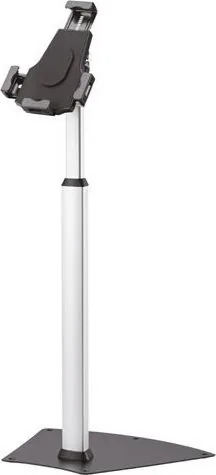
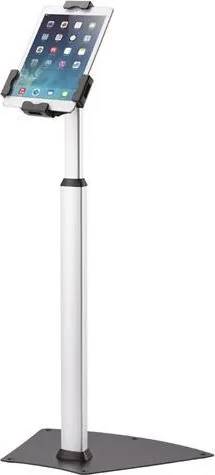
Managing digital information in public spaces often requires robust solutions that balance flexibility with security. The Neomounts TABLET-S200SILVER Tablet Floor Stand addresses this need perfectly. Designed specifically for tablets ranging from 7.9 to 10.5 inches, this unit offers stability and ease of use in retail environments, showrooms, and offices.
Comprehensive Adjustability
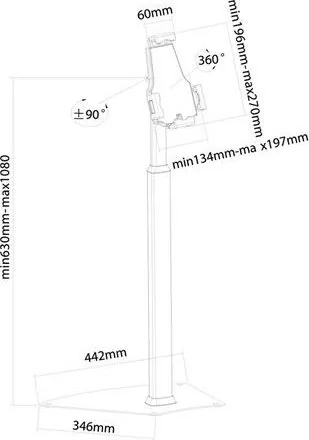
One of the standout features of this manual system is its vertical reach. Users can easily adjust the height between 630 mm and 1080 mm. This versatility ensures that screens are positioned at eye level for optimal engagement regardless of user height. Additionally, the swivel capability allows for a full 360-degree rotation. This feature is crucial when multiple users access the device from different angles. Tilt functionality extends up to plus or minus 90 degrees, providing further customization for viewing comfort. The design prioritizes user interaction while maintaining physical security.
Secure and Durable Installation
Stability is paramount for floor-standing units. This Neomounts model supports installation directly onto wooden floors using specific tools included in the package. For more permanent setups, it accommodates concrete or solid brick flooring as well. The base dimensions adjust from 196 mm to 270 mm, ensuring a stable footprint without occupying excessive space. Security is also integrated via a locking mechanism operated by a key. This prevents unauthorized removal of the tablet, making it ideal for high-traffic areas where theft prevention is essential. Cable management is streamlined through a dedicated cover, keeping wires organized and hidden from view.
Maintenance and Usability
Protecting the finish of your flooring is another priority during setup. Protective adhesive strips are included to prevent scratching during installation. Once mounted, the tablet slides into the holder and locks securely into place. The design prioritizes user interaction while maintaining physical security. Whether used for point-of-sale systems, wayfinding, or interactive kiosks, this silver-finished stand complements modern aesthetics effectively. It represents a solid choice for businesses seeking reliable hardware support for mobile computing devices.
The manual process ensures simplicity without needing power sources for lifting mechanisms. Assembly requires standard tools found in most workshops. Part identification is clear with labeled components ranging from A through O. The drill is required for floor mounting, so planning ahead saves time during deployment. The silver color adds a professional touch compared to basic black plastics. It fits a wide array of tablet brands due to universal sizing brackets. Overall, integrating this stand into your workflow enhances presentation quality significantly. It handles daily wear well thanks to sturdy construction materials designed for longevity in commercial settings. Users appreciate the intuitive adjustment levers that require minimal effort to change positions. This balance of durability and flexibility makes it a top contender in its category. Note that you should always consult the manual before drilling to ensure safety compliance. Regular maintenance checks on the locking mechanism will extend the product lifespan indefinitely. The installation kit is comprehensive. Every screw and bracket is accounted for in the detailed diagram. This reduces assembly frustration significantly for first-time users. Clear instructions guide the attachment of the pole to the base first. Then the mount installs firmly. Finally, the tablet goes in. It is a logical flow.
Notes
Always wear safety gear when drilling. Keep the manual for reference during future maintenance cycles. Check bolts monthly to ensure tightness.
Search for 67,732 Manuals online


Type-in Brand or Model