

Neomounts NSLS085BLACK Manual
PDF manual · 4 Pages
English



Quick check
Incorrect answer, please try again.
Chat with your Neomounts NSLS085BLACK manual using AI
Get instant AI answers from your Neomounts NSLS085BLACK manual
Ask anything about the Neomounts NSLS085BLACK. Answers come from this manual, with the pages they are based on.
Ask a Question
Do you recommend NSLS085BLACK?
Yes NoFrequently Asked Questions
This stand is designed to accommodate screens ranging from ten inches up to seventeen inches diagonally, covering most standard laptop models.
Is this answer helpful?
You can manually adjust the height vertically between 78 and 124 millimeters to find the most comfortable viewing angle for your specific posture needs.
Is this answer helpful?
Yes, the construction supports a maximum load of 5 kilograms, ensuring stability without wobbling even during active typing sessions.
Is this answer helpful?
No, setup is quick and involves basic placement without requiring extensive tools or complicated steps before first use.
Is this answer helpful?
While primarily for laptops, compatible devices within the size range can sit securely on the frame depending on their base flatness.
Is this answer helpful?
Advantages and Disadvantages
Advantages

- Adjustable height range between 78 to 124 millimeters for customizable ergonomics
- High weight capacity supporting up to 5 kilograms of device load safely
- Compatible with a wide range of devices from 10 inches to 17 inches
Disadvantages

- Does not include built-in cooling fans for thermal management of devices
- Finish may show dust accumulation quickly due to matte surface texture
- Lacks dedicated cable management slots along the frame edges
Product Specification
Type
Notebook Stand
Compatibility
Notebooks up to 17"
Dimensions
9.25 x 8.78 x 3.07 in
Product Description
Elevate Your Workspace Experience Today
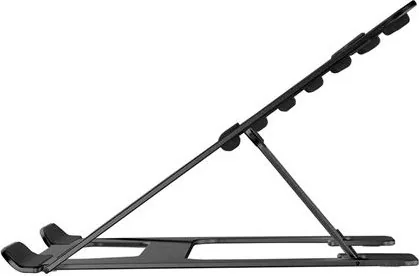
In today's fast-paced digital environment, maintaining proper posture while working on your laptop is absolutely crucial for long-term health. The Neomounts NSLS085 Notebook Stand 10 to 17 inches offers a highly practical solution for professionals and students who seek both comfort and maximum efficiency during their daily tasks. This comprehensive guide covers everything you need to know about setting up your new equipment effectively to ensure years of reliable service. By utilizing the ergonomic design principles embedded deeply within this hardware, users can significantly reduce neck and shoulder strain during extended work sessions using the Neomounts NSLS085 Notebook Stand 10" to 17" Manual guidelines for reference.
Why Choose This Laptop Stand Over Others
Many users often overlook the critical importance of screen height, leading to significant unnecessary physical stress and potential injury risks over time. The Neomounts NSLS085 Notebook Stand 10 to 17 inches allows for smooth vertical adjustment ranging precisely between 78 and 124 millimeters. This incredible flexibility ensures that whether you own a compact ultrabook or a larger gaming rig, you always achieve an optimal viewing angle for your eyes. The robust construction supports a maximum load of 5 kilograms, providing exceptional stability for heavier machines without any wobbling issues during intense typing activities.
Quick Setup and Usage Insights
Getting started with your new setup requires minimal effort and tools on hand. The components included are surprisingly straightforward, and initial assembly takes only a few minutes to complete successfully. You simply place the sturdy unit firmly on your desk and gently rest your computer securely on the frame provided. Afterward, adjust the height carefully until your eyes align comfortably with the very top of the screen bezel. This simple process helps actively mitigate eye fatigue and promotes a much healthier sitting position throughout the entire workday routine.
Durability and Material Quality
Build quality is a primary concern for anyone purchasing peripheral devices for their workstation. The materials used in the manufacturing process ensure longevity and resistance to wear and tear caused by daily handling. Each joint moves smoothly without becoming loose after repeated adjustments. This attention to detail reflects the brand commitment to delivering premium products that withstand rigorous daily use. Users appreciate the solid feel when placing laptops of various sizes onto the platform without fear of tipping or slipping.
Broad Device Compatibility
One of the standout features includes universal compatibility with most modern portable computers. As noted in the specifications, the stand accommodates screens ranging from ten inches to seventeen inches diagonally. This wide range means it fits nearly every category of user regardless of their preferred computing device brand. You do not need to worry about finding a separate accessory for different machines as one unit suffices for almost all configurations found in households today.
Search for 67,732 Manuals online


Type-in Brand or Model