
Neomounts NSLS010 Manual
PDF manual · 4 Pages
English



Quick check
Incorrect answer, please try again.
Chat with your Neomounts NSLS010 manual using AI
Get instant AI answers from your Neomounts NSLS010 manual
Ask anything about the Neomounts NSLS010. Answers come from this manual, with the pages they are based on.
Ask a Question
Do you recommend NSLS010?
Yes NoFrequently Asked Questions
Yes, this model supports notebook sizes ranging from 11 inches up to 17 inches in diagonal screen size. It provides stable support for larger displays commonly found in gaming and workstations.
Is this answer helpful?
The unit is engineered to sustain a maximum load of 5 kilograms. This ensures safety even with heavier laptops equipped with large batteries or internal upgrades.
Is this answer helpful?
The mechanism allows for continuous or step-adjustable height positioning depending on the lock type. You can select the optimal viewing angle for comfort and posture alignment.
Is this answer helpful?
Absolutely. The open frame design facilitates natural convection. Air flows underneath the device more freely than on a solid desk, helping to dissipate heat generated by processors.
Is this answer helpful?
No, the process is straightforward and typically requires no tools. Most users can set it up and begin using it immediately within a few minutes of opening the package.
Is this answer helpful?
The coating is designed to be durable and resistant to minor scratches. However, using caution near sharp keys or rough surfaces will maintain the pristine aesthetic longer.
Is this answer helpful?
Yes, it is relatively compact and lightweight. While sturdy, it is manageable to pack in a backpack or sleeve along with your laptop for mobile working environments.
Is this answer helpful?
Advantages and Disadvantages
Advantages

- Ergonomic lifting improves posture and reduces neck strain
- Universal compatibility fits 11 to 17 inch notebooks
- High weight capacity supports up to 5kg safely
- Open design enhances airflow and cooling efficiency
- Stable build prevents wobbling during active use
Disadvantages

- Takes up additional desk surface area
- Does not offer screen tilt angle adjustments
- Manual instructions may be dense for quick setup
- Single color option may not suit all preferences
- Base could slip on polished surfaces without pads
Product Specification
Type
Laptop Stand
Compatibility
Laptops up to 17"
Dimensions
11.38" x 1.26" x 1.06"
Product Description
Transforming Your Workspace Efficiency
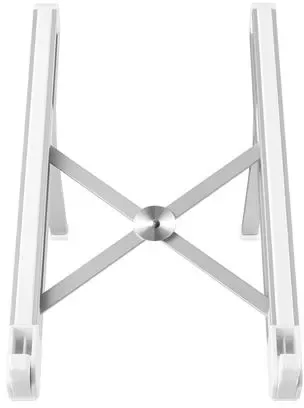
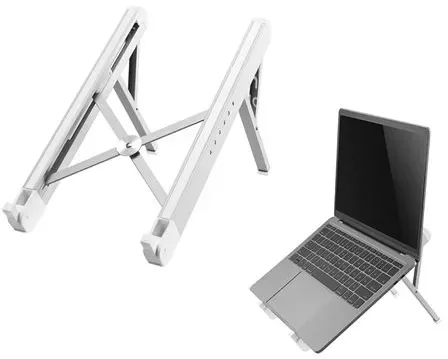
In the modern digital landscape, maintaining good physical posture is critical for sustained performance. Working on a laptop placed directly on a desk surface often results in poor neck alignment. Users frequently bend forward, which causes strain over extended periods. The Neomounts 11" to 17" Notebook Stand, silver Manual provides an elegant solution to this problem. It elevates the screen to a comfortable eye level. This simple elevation reduces tension in the cervical spine and promotes better blood flow.
Key Features Explained
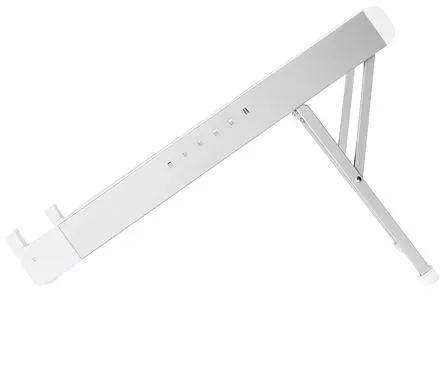
One primary benefit is the universal size support. Whether you own a compact ultrabook or a bulky workstation machine, this stand adapts. It accommodates devices ranging from eleven inches to seventeen inches comfortably. The adjustable mechanism allows for personalized height settings. This customization ensures that every user finds the optimal angle for their vision. It eliminates the need to hunch over small screens during long coding sessions or data entry tasks.
Build Quality and Thermal Management
The device features a premium silver finish that looks professional. Durability is high because it supports loads up to five kilograms securely. Heavy laptops sit firmly without wobbling during typing or trackpad usage. Additionally, the open design promotes significant airflow. Heat escapes faster from the chassis compared to closed bags or flat surfaces. This cooling effect protects internal components from overheating and extends battery life. Maintenance is minimal since the smooth surfaces resist dust accumulation easily.
Installation and Integration
Setup takes very little time with no specialized tools required. It integrates smoothly into any room decor style. The footprint is compact enough to save valuable desk real estate. If you travel frequently, the unit remains lightweight and portable. You can carry it in a briefcase without adding bulk. For professionals who value health and organization, this accessory is a worthy investment. It encourages a healthier lifestyle while boosting overall workflow speed. Enjoy a cleaner environment with fewer distractions and better ergonomics daily.
Comprehensive Usage Guide
Using the included guidelines helps maximize performance. Although the stand is intuitive, reading instructions ensures longevity. It clarifies how to adjust locks and stabilize bases. Following these steps prevents accidental drops or slippage. It also informs you about weight distribution tips. Proper usage guarantees that the stand performs reliably for years. Regular inspections keep the mechanism functioning correctly without degradation over time.
Ideal Scenarios for Adoption
This tool suits remote workers, students, and creative freelancers equally. Video conferencing looks better when the camera faces upward naturally. Presentations require steady platforms that do not shift unexpectedly. Gamers benefit from the improved view and cooling. Writers enjoy reduced eye strain while typing documents. The versatility covers almost every computing scenario imaginable. It turns a basic setup into a pro-grade workstation station.
Aesthetics and Brand Trust
The silver color reflects light subtly without being distracting. Neomounts is known for quality engineering standards globally. Their reputation precedes this item regarding reliability. Buying from a trusted source ensures genuine parts are used. The design avoids clutter and maintains a minimalist vibe. It does not clash with other peripherals like monitors or keyboards. Ultimately, this stand represents a smart choice for anyone prioritizing well-being in their career. Investing in your physical health is investing in your future success.
Search for 67,732 Manuals online


Type-in Brand or Model
NemoMollitia36
7 months ago
Does this stand handle 3kg laptops well? Reviews mention slight wobble during typing. Is that normal?
Manual.ly
7 months ago
Hi there, thanks for asking. This stand focuses on ergonomics and cooling rather than heavy-duty construction. With a 3kg laptop, some light vibration might occur when typing aggressively. Using a firm table surface solves most issues. The design allows air to flow freely underneath, which keeps temperatures low. We suggest testing it on a flat desk first. If you need extra stability, we also sell rubber mats to prevent slipping.