
Neomounts NMPRO-C12 Manual
PDF manual · 11 Pages
English



Quick check
Incorrect answer, please try again.
Chat with your Neomounts NMPRO-C12 manual using AI
Get instant AI answers from your Neomounts NMPRO-C12 manual
Ask anything about the Neomounts NMPRO-C12. Answers come from this manual, with the pages they are based on.
Ask a Question
Do you recommend NMPRO-C12?
Yes NoFrequently Asked Questions
The NMPRO-C12 is a modular system designed to accommodate a wide range of TV widths and heights; segment lengths (e.g., 480 mm, 800 mm, 1000 mm) and adjustable arms allow fitting many common display sizes. Check VESA and weight limits for specific compatibility.
Is this answer helpful?
Kits include M5, M6, M8 screws, lag bolts and anchor hardware. The manual specifies anchors for wood, brick and concrete and recommends using the indicated anchor type and hole diameters to ensure safe load-bearing installation.
Is this answer helpful?
Installers should have basic construction or installation knowledge. While an experienced DIYer can install it, the manual advises having an assistant to lift and position equipment and to follow torque recommendations to avoid over-tightening.
Is this answer helpful?
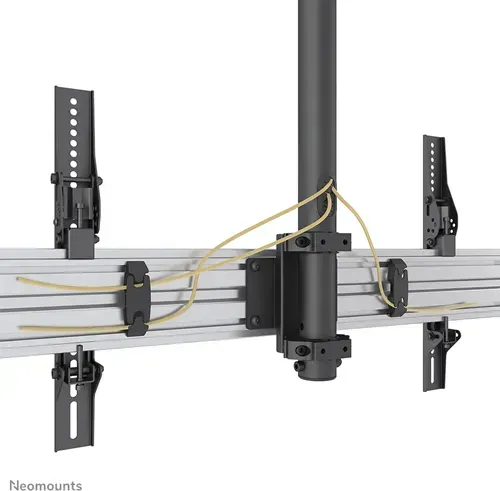
The system includes cable management channels and plastic covers to route and conceal wiring. These components help protect cables and maintain a tidy appearance; ensure covers are installed after routing cables to prevent snagging.
Is this answer helpful?
Avoid over-tightening screws which can damage parts or reduce holding capacity; do not use incorrect anchors for the substrate; confirm the wall or structure can bear the load; and follow the manual’s torque and spacing guidance for safe mounting.
Is this answer helpful?
Yes, the documentation provides detailed parts lists for NMPRO-C12, C22, C32 and C33 variants including quantities and part identifiers to assist ordering replacements or assembling different configurations.
Is this answer helpful?
The assembly includes locking points to secure displays once aligned. Follow the installation steps to engage locks after positioning to prevent unintended movement and improve long-term stability.
Is this answer helpful?
Advantages and Disadvantages
Advantages

- Modular design supports multiple TV sizes and easy configuration adjustments.
- Comprehensive parts lists for C12/C22/C32/C33 improve planning and installation.
- Includes appropriate fasteners and guidance for wood, brick and concrete anchors.
- Cable management and plastic covers maintain a clean, professional installation.
- Robust construction with locking hardware for secure, long-term mounting.
Disadvantages

- Requires basic construction knowledge; not ideal for users with no installation experience.
- Multiple small parts and fasteners increase assembly complexity and installation time.
- Proper anchors and torque are critical — mistakes can compromise safety and load capacity.
- May need additional tools or helpers for safe lifting and positioning of larger displays.
- Manual formatting is dense and can be difficult to parse without careful review.
Product Specification
Type
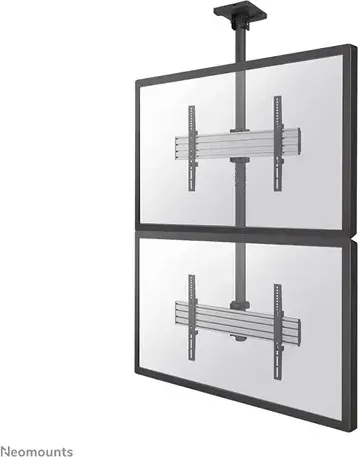
Ceiling mount
Number of monitors
2
Screen size
32-65"
Mobility
tiltable (21.20°F, +59.00°F), swivel (180°), height adjustable
Max. load capacity
132.28 lb
VESA
100x100, 100x150, 100x200, 200x100, 200x200, 200x300, 200x400, 300x100, 300x200, 300x300, 400x200, 400x300, 400x400, 400x600, 440x400, 500x400, 600x200, 600x300, 600x400
Special features
Cable management
Color
black, silver
Product Description
Neomounts NMPRO-C12 Manual
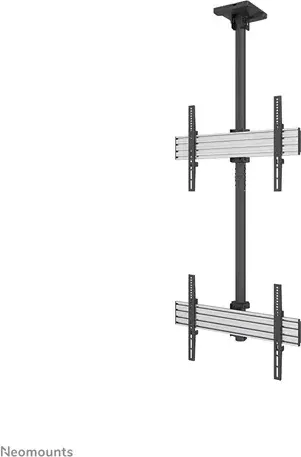
The Neomounts NMPRO-C12 is a robust, modular mounting system designed for secure installation of displays and AV equipment. Built from heavy-duty materials and offered alongside related NMPRO series models, it supports varied configurations and TV sizes. The design emphasizes safety, rigidity and adaptability for professional or serious DIY installations.
Product overview
The NMPRO-C12 features a multi-piece pole-and-arm assembly with pre-defined parts lists and fasteners. Components include M5, M6 and M8 screws, anchors and lag bolts, plastic caps, spacers and mounting arms sized to fit common TV widths and heights. The kit supplies torque guidance for secure fastening and recommends an assistant for safe lifting and positioning.
Installation uses base poles, cross-arms and locking hardware to affix displays to walls or sturdy structures (wood, brick or concrete). The manual details measurements (e.g., 480 mm, 800 mm, 1000 mm segments), drill hole sizes and anchor placements for repeatable, stable mounting. Cable management channels and plastic covers keep wiring tidy and protect connections.
Key features and usage notes
- Multi-model compatibility across the NMPRO range for consistent deployment in multi-screen setups.
- Comprehensive parts lists for each model (C12, C22, C32, C33) to aid inventory and planning.
- Adjustable arm and pole segments allow different TV lengths and widths to be accommodated.
- Clear guidance on fastener sizes, recommended torque and anchor selection (wood, brick, concrete).
- Includes tools and common consumables such as Allen keys and open wrenches; spare caps and spacers are listed.
Installers should have basic construction and installation knowledge, follow torque recommendations, avoid over-tightening, and always use a helper when lifting. The assembly includes locking points to secure the mounted displays once aligned.
Notes
- Verify wall or structure load capacity before installation.
- Use specified anchors and lag bolts for the substrate type.
- Keep plastic caps and cable covers in place to prevent moisture ingress and maintain appearance.
Search for 67,706 Manuals online


Type-in Brand or Model