
Neomounts NM-D335DBLACK Manual
PDF manual · 4 Pages
English



Quick check
Incorrect answer, please try again.
Chat with your Neomounts NM-D335DBLACK manual using AI
Get instant AI answers from your Neomounts NM-D335DBLACK manual
Ask anything about the Neomounts NM-D335DBLACK. Answers come from this manual, with the pages they are based on.
Ask a Question
Do you recommend NM-D335DBLACK?
Yes NoFrequently Asked Questions
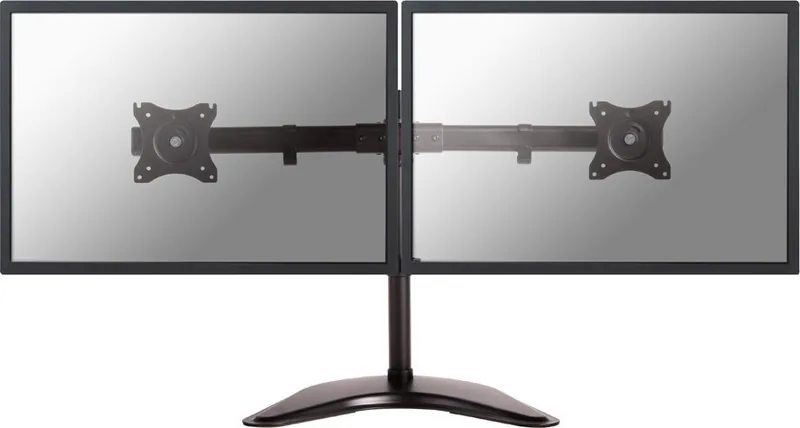
The mount is designed to hold two monitors on a central desk-mounted pole and arm system.
Is this answer helpful?
Each monitor can weigh up to 8 kg. Check the weight of each display without its original stand before installation.
Is this answer helpful?
The NM-D335DBLACK supports 75 x 75 mm and 100 x 100 mm VESA mounting patterns.
Is this answer helpful?
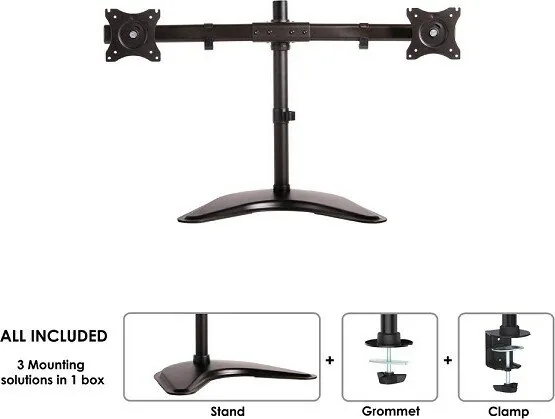
Yes. In addition to the desk clamp, the mount includes a grommet mounting method for installation through a suitable desk hole.
Is this answer helpful?
The mount supports desk thicknesses from 10 mm to 88 mm. Confirm the desktop is strong enough to support the mount and both monitors.
Is this answer helpful?
Yes. The monitor arms can be positioned as needed, and the adjustment knob can be tightened or loosened to change resistance.
Is this answer helpful?
Advantages and Disadvantages
Advantages

- Supports two monitors up to 8 kg each for an efficient dual-screen workspace.
- Compatible with 75 x 75 mm and 100 x 100 mm VESA mounting patterns.
- Includes desk clamp and grommet mounting options for flexible installation.
- Adjustable arms and torque settings help tailor screen placement and resistance.
- Raises displays off the desk to free surface space and improve organization.
Disadvantages

- Monitor compatibility depends on VESA holes and the 8 kg per-screen weight limit.
- Grommet installation requires a suitable hole in the desktop.
- A strong desk edge or desktop surface is needed for secure mounting.
- Installation requires careful assembly and tightening of multiple components.
Product Specification
Type
Desk
Number of monitors
2
Screen size
10-30"
Mobility
tiltable (-45 degrees, +45 degrees), rotatable, swivel (180 degrees), height-adjustable
Max. load capacity
22.05 lb
VESA
75 x 75, 100 x 100
Shelves
0
Special features
Cable management
Color
black
Dimensions (W x H x D)
17.09 x 18.35 x 12.44 in
Product Description
Neomounts NM-D335DBLACK - Read, Download & Print Free
The Neomounts NM-D335DBLACK is a practical dual-monitor desk mount designed to create a cleaner, more flexible workspace. Its black finish gives it a professional appearance that suits home offices, shared desks, study areas, and business environments. By lifting two displays above the desktop, this mount helps free up valuable surface space for keyboards, notebooks, accessories, and everyday work essentials.
Built for a More Organized Dual-Screen Setup
This desk mount supports two monitors, with a maximum load of 8 kg per screen. It is compatible with 75 x 75 mm and 100 x 100 mm VESA mounting patterns, making it suitable for many common monitor models. Before installation, users should confirm that each display has the correct VESA holes and stays within the stated weight limit.
The NM-D335DBLACK uses a central rod with two monitor arms, allowing screens to be positioned side by side. This arrangement can help users build a more comfortable multi-screen workspace for office tasks, design projects, spreadsheets, research, customer support, or entertainment. Raising monitors off the desk can also make cleaning and cable routing easier.
Clamp or Grommet Installation
Installation can be adapted to the desk layout. The mount includes a desk clamp option for attaching the base to the desk edge. It also offers a grommet installation option for desks with a suitable cable hole. The supported desk thickness range is 10 to 88 mm, giving the mount compatibility with many standard desktop surfaces.
The installation process involves securing the chosen base to the rod, fitting the monitor arms, and attaching the displays using the supplied mounting hardware. The monitor connection uses a practical hanging-style arrangement, while a crossbar adds support to the pole assembly. Carefully tightening all fasteners is important for a stable result.
Positioning and Torque Adjustment
Once installed, the arms can be adjusted to place each screen in a preferred working position. An adjustment knob allows the mount to be tightened or loosened as needed. Torque adjustment helps tailor the arm resistance to the weight of the monitor, supporting more controlled movement and helping the displays remain where they are set.
Notes
- Check monitor weight, VESA compatibility, and desk thickness before mounting.
- Use the clamp only on a strong, stable desk edge.
- Follow the recommended screw spacing when attaching the monitor brackets.
- Recheck all screws after positioning both screens.
The Neomounts NM-D335DBLACK is a useful choice for anyone looking to upgrade a dual-display desk with a space-saving, adjustable mounting solution.
Search for 67,732 Manuals online


Type-in Brand or Model