
Neomounts DS70-450BL1 Manual
PDF manual · 8 Pages
English



Quick check
Incorrect answer, please try again.
Chat with your Neomounts DS70-450BL1 manual using AI
Get instant AI answers from your Neomounts DS70-450BL1 manual
Ask anything about the Neomounts DS70-450BL1. Answers come from this manual, with the pages they are based on.
Ask a Question
Do you recommend DS70-450BL1?
Yes NoFrequently Asked Questions
The DS70-450 supports monitors approximately 28.1–55 cm (about 11–22") and VESA mounting patterns 75x75 mm and 100x100 mm. Ensure your monitor's weight falls within 1–15 kg (2.2–33.1 lbs).
Is this answer helpful?
Yes, it offers both clamp and grommet mounting. The clamp fits desk edges 10–45 mm thick; the grommet option fits holes ø10–60 mm. Confirm desk thickness or hole diameter before installation.
Is this answer helpful?
Adjust the gas spring tension by tightening or loosening the designated fastener until the monitor moves smoothly without drifting. Set tension based on your monitor’s weight; make small adjustments and test movement incrementally.
Is this answer helpful?
A limiting screw controls the 180° lock. Removing or loosening the screw allows full rotation; tightening it restricts movement and enables a 180° stop. Remove the lower cable cover before adjusting the limiting screw and reattach afterward.
Is this answer helpful?
The mount includes removable cable covers that route cables along the arms. Remove covers to place cables, then snap them back to conceal wiring and prevent strain on connectors.
Is this answer helpful?
Common fasteners (various M4/M5 screws and washers) are supplied and Allen keys are provided and stored in an onboard holder for future use. A drill or screwdriver may be needed for grommet installation.
Is this answer helpful?
Do not over-tighten screws to avoid damaging joints. Securely fasten clamp or grommet base, match gas tension to monitor weight, and tighten limiting screws appropriately. Keep Allen keys in the holder for maintenance.
Is this answer helpful?
Advantages and Disadvantages
Advantages

- Wide adjustability: ±90° tilt and ±180° rotation accommodate many viewing positions.
- Dual mounting options: clamp and grommet fit most desks and thicknesses.
- Gas spring support provides smooth height adjustments with tension control.
- Integrated cable management and Allen key storage for a tidy, convenient setup.
- Supports standard VESA 75x75 and 100x100 mm for broad monitor compatibility.
Disadvantages

- Weight limit of 15 kg restricts use with heavier ultrawide or large monitors.
- Assembly requires tools and some manual adjustment of gas spring tension.
- Over-tightening screws can damage joints; careful torque control needed.
- Grommet installation requires an existing or drilled desk hole up to ø60 mm.
- 180° lock setup and limiting-screw adjustments add complexity for some users.
Product Specification
Type
Desk mount
Number of monitors
1
Screen size
17-42"
Mobility
tiltable (-35°, +45°), rotatable (360°), swivel (180°), extendable, height adjustable
Max. load capacity
33.07lbs
VESA
75x75, 100x100
Special features
Gas spring, Cable management
Product Description
Neomounts DS70-450 Manual
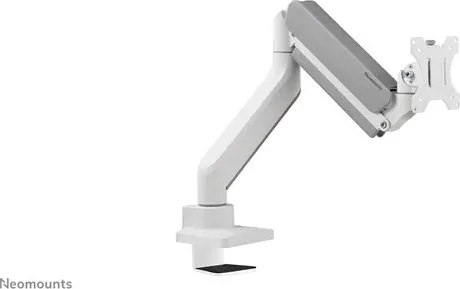
The Neomounts DS70-450 is a versatile desk monitor mount engineered to deliver secure, flexible monitor positioning for home offices, workplaces, and multimedia setups. Designed for monitors with VESA patterns 75x75 and 100x100 mm, it supports screens from 28.1 to 55 cm (approximately 11–22") and handles weights between 1–15 kg (2.2–33.1 lbs). The mount fits desks with thicknesses from 10–45 mm or grommet holes of ø10–60 mm, offering both clamp and grommet installation options to suit varied desk types.
Key features and build
The DS70-450 features a dual-arm design with an upper and lower arm that assemble to a stable base. A gas spring provides smooth height adjustment, while tilt, swivel and rotation ranges—±90° tilt, ±180° rotation, and a 180° lock system—enable comfortable ergonomic positioning. The mount includes cable management covers to tidy wiring, and Allen keys are stowed in an onboard holder for maintenance.
Assembly is straightforward: attach the clamp or grommet base to the desk, connect the lower arm to the base, secure the upper arm, mount the VESA plate to the monitor, and fasten the monitor to the arm. Fine-tune gas-spring tension to match your monitor weight and adjust limiting screws to enable or restrict the 180° rotation lock. The instructions emphasize not over-tightening screws and to remove the lower cable cover when adjusting the limiting screw.
Usage and adjustment
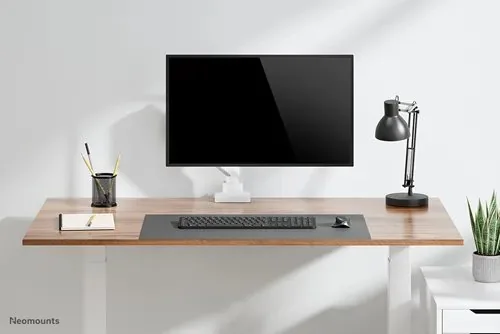
Once installed, the DS70-450 allows fluid repositioning for sitting, standing, or multi-user setups. The gas spring delivers effortless vertical movement; tilt and swivel adjustments let you optimize viewing angles and reduce glare. Cable routing under removable covers keeps desks neat and prevents strain on connectors. The mount is compatible with most standard monitors within its specified size and weight ranges.
Who it’s for
This mount suits remote workers, designers, gamers, and office environments that need a compact, adjustable solution for 11–22" monitors. Its combination of clamp and grommet mounting, plus wide movement ranges, makes it adaptable for varied desks and workflows.
Notes:
- Supports VESA 75x75 and 100x100 mm.
- Desk thickness: 10–45 mm (clamp) or hole ø10–60 mm (grommet).
- Weight capacity: 1–15 kg (2.2–33.1 lbs).
- Keep screws snug but do not over-tighten.
- Remove lower cable cover before adjusting the limiting screw.
Search for 67,706 Manuals online


Type-in Brand or Model