1.To ensure safety, please read this manual carefully before installation and follow the instructions. Store this manual in a secure place for future reference.
2.The manufacturer shall not be legally responsible for any equipment damage or personal injury caused by incorrect installation or operation other than that covered in this manual.
3.The mount is designed for easy installation and removal.The manufacturer shall not be liable for damage to equipment or personnel injuries arising out of human factors or acts of God, such as earthquake or typhoon.
4. It is recommended that the Wall mount bracket be installed by qualified personnel only
5.At least two persons are needed to install or remove the product to avoid hazard of falling objects.
6. Please carefully inspect the area where the wall mount is to be installed:
-Avoid places that are subject to high temperatures, humidity or contact with water.
- Do not install the product near air conditioning vents or areas with excess dust and fumes.
- Only install on vertical walls and avoid slanted surfaces.
- Do not install in places subject to any shock or vibration.
- Do not install in places subject to direct exposure to bright light, at it may cause eye fatigue when viewing the display panel.
7. Maintain sufficient space around the display to ensure adequate ventilation.
8.To ensure safe installation, first check the structure of the wall and select a secure mounting location.
9.The wall should be strong enough to sustain a weight of at least four times of the display and Wall mount bracket combined.The mounting locationmust be able to withstand earthquake or other strong shock.
10. Do not modify any accessories or use broken parts. Contact your dealer with any questions.
11.Tighten all screws (do not exert excessive force to avoid breaking the screw or damaging its thread).
12. Drill holes and bolts will be left in the wall once the display and Wall mount bracket are removed. Stains may occur after extended use.
13. Since the manufacturer has no way to control the wall type and installation of wall mount, the warranty of the product shall only cover the body of the wall mount.The warranty period of the product is 5 years.
14. Please consult the English language manual for any dispute on conditions.
1.Afin d'assurer votre sécurité, nous vous prions de bien lire le manuel avant l'installation et de suivre attentivement les instructions qui y sont incluses. Conservez ce manuel dans un endroit sûr comme référence.
2. Le fabricant ne sera tenu légalement responsable d’aucun dommage à l’équipement ou de blessure corporelle causés par une mauvaise installation ou utilisation de l’équipement autre que celle décrite au sein du présent
manuel.
3. Le support de fixation murale est conçu de façon à faciliter l'installation et le déplacement. Le fabricant ne sera tenu responsable d'aucun dommage à l'équipement ou de blessure corporelle découlant d’erreur humaine ou
de cas de force majeure, tels un tremblement de terre ou un typhon.
4. Il est recommandé de ne permettre qu’au personnel qualifié d’installer le support de fixation murale.
5. L’installation ou le déplacement du produit doit être accompli par un minimum de deux personnes afin d’éviter les dangers potentiels causés par une chute.
6. Nous vous prions d’inspecter soigneusement l'emplacement où le support de fixation murale sera installé:
- N’installez pas le produit près de bouches d’air climatisé ou dans des endroits avec beaucoup de poussière ou de vapeurs toxiques.
- N’installez pas le produit près de bouches d’air climatisé ou dans des endroits avec beaucoup de poussière ou de vapeurs toxiques.
- N’installez que sur des murs verticaux et évitez les surfaces inclinées.
- N’installez pas dans des endroits avec des chocs ou des vibrations.
- N’installez pas dans endroits exposés à des lumières fortes, cela pourrait causer la fatigue visuelle lors de l’observation du panneau d’affichage.
7. Laissez un espace sufisant autour de l’écran pour une ventilation adéquate.
8.Afin d’assurer la sécurité et la prévention des accidents, il est impératif de vérifier la structure du mur et de choisir un endroit solide avant de l’installer.
9. Le mur devrait être assez suffisamment fort pour soutenir un poids quatre fois supérieur à celui du poids combiné de l’écran et du support de fixation murale ensemble. L’emplacement du montage doit pouvoir survivre à
un tremblement de terre ou autre choc intense.
10. No modifique ningún accesorio ni utilice componentes deteriorados. Póngase en contacto con su distribuidor si tiene alguna duda.
11. Resserrez toutes les vis (n’utilisez pas de force excessive pour éviter d’abîmer les vis ou le filetage).
12. Les trous de perçage et les écrous resteront dans le mur lorsque vous déplacez l’écran et le support de fixation murale. Des taches peuvent apparaître après une longue utilisation.
13. Puisque le fabricant ne peut en aucun cas contrôler le type de mur et la qualité de l’installation du support de fixation murale, la garantie du produit ne couvre que le support de fixation murale. La durée de la garantie du
1. Lesen Sie bitte vor der Installation das Handbuch sorgfältig durch und befolgen allAen weisungen, um die Sicherheit zu gewähren. Heben Sie das Handbuch auf, damit Sie später darin nachlesen können.
2. Der Hersteller haftet für keine Geräte- oder Personenschäden, die durch unsachgemäße Installation oder Bedienung, die nicht in diesem Handbuch beschrieben ist, entstanden sind.
3. Die Wandmontage ist für eine einfache Installation und Demontage ausgelegt. Der Hersteller haftet nicht für Geräte- oder Personenschäden, die durch menschliche Faktoren oder höhere Gewalt wie z.B. Erdbeben oder
Orkan entstanden sind.
4. Wir empfehlen Ihnen die Wandhalterung nur von einem qualifiziertenTechniker installieren zu lassen.
5. Die Installation oder Demontage des Produkts muss von mindestens zwei Personen ausgeführt werden, um die Gefa, hdrass Gegenstände herunterfallen, zu vermeiden.
6. Bitte überprüfen Sie sorgfältig die Stelle, wo das Wandmontageset installiert wird:
- Vermeiden Sie Stellen mit hohenTemperaturen oder Feuchtigkeit bzw. Stellen, die mit Wasser in Kontakt kommen können.
- Installieren Sie das Produkt nicht in der Nähe von Klimaanlagenöfnf ungen oder an einer Stelle, wo es übermäßig Staub und Rauch gibt.
- Montieren Sie das Produkt nur an eine vertikale Wand. Vermeiden Sie schräge Oberfläche.
- Installieren Sie das Produkt nicht an einer Stelle, an denen es Erschütterungen oder Schwingungen ausgesetzt ist.
- Installieren Sie das Produkt nicht an einer Stelle mit direkter Sonneneinstrahlung bz.w starkem Licht. Dies fördert beimAnschauen derBildschirmanzeige das Ermüden derAugen.
7. Halten Sie um dasAnzeigegerät ausreichend Freiraum, um eine gute Belüftung zu gewähren.
8. Um die Sicherheit zu gewähren und Unfälle zu vermeiden, ist es notwendig, vor der Installation die aWndstruktur zu überprüfen bzw. eine sichere Stelle auszuwählen.
9. Die Wand muss stark genug sein, um ein Gewicht von mindestens dem Vierfachen des Gesamtgewichts desAnzeigegerätes und des Wandmontagesets zu tragen. Der Montageort muss in der Lage sein, Erdbeben oder
sonstige starke Erschütterungen standzuhalten.
10. Modifizieren Sie keine Zubehörteile. Verwenden Sie keine beschädigtenTeile. Wenden Sie sich an Ihren Händler, wenn Sie Fragen haben.
11. Ziehen Sie alle Schrauben fest. (Wenden Sie nicht zu viel Kraft an, um ein Brechen der Schraube oder Beschädigen des Gewindes zu vermeiden.).
12. Die Bohrungen und die Schrauben bleiben an der Wand sichtbar, wenn dasAnzeigegerät und das Wandmontageset entfernt wird. Nach längerem Gebrauch kann ein Fleck an der Wand bleiben.
13. Der Hersteller hat keinen Einfluss auf den Wandtyp und die Installation des Wandmontagesets. Deshalb deckt die Garantie des Produkts nur das Wandmontageset selbst ab. Die Garantie des Produkts gilt für 5 Jahre.
14. Bitte ziehen Sie die englische Version des Handbuchs zu Rate, falls es Unstimmigkeiten hinsichtlich der Bedingungen gibt.
1. Para garantizar su seguridad, lea este manual detenidamente antes de la instalación y siga sus instrucciones. Conserve este manual en un lugar seguro para futuras consultas.
2. El fabricante no será legalmente responsable de ningún daño producido sobre el equipo o lesión personal causada por una instalación o uso no mencionado explícitamente en este manual.
3. El soporte de pared ha sido diseñado para instalar y retirar fácilmente el dispositivo. El fabricante no se hace responsable de los daños provocados sobre el equipo o las lesiones personales que se deriven de factores
humanos o actos de fuerza mayo, rcomo un terremoto o un tifón.
4. Se recomienda que el soporte de pared sea instalado por personal cualificado.
5. Para evitar que se caiga el producto, la instalación o retirada deberá ser realizada por al menos dos personas.
6. Inspeccione detenidamente el área en el que desee instalar el soporte de pared:
- Evite los lugares sometidos a altas temperaturas, alto nivel de humedad, o que se encuentren en contacto con el agua.
- No instale el producto cerca de un orificio de aire acondicionado, o en zonas con gran cantidad de polvo o humos.
- Instale el producto en una pared vertical. Evite las superficies sesgadas.
- No instale el producto en lugares sujetos a golpes o vibraciones.
- No instale el producto en lugares en los que se encuentre expuesto a luces muy brillantes. Ello podría provocar fatiga ocular al mirar el panel de pantalla.
7. Mantenga espacio libre suficiente alrededor de la pantalla para asegurar su adecuada ventilación.
8. Para garantizar su seguridad y evitar accidentes, compruebe la estructura de la pared y seleccione un emplazamiento seguro antes de la instalación.
9. La pared debe tener fuerza suficiente para soportar un peso de al menos cuatro veces la pantalla y el soporte en conjunto. El lugar de montaje debe se capaz de aguantar terremotos u otros golpes fuertes.
10. No modifique ningún accesorio ni utilice componentes deteriorados. Póngase en contacto con su distribuidor si tiene alguna duda.
11.Apriete todos los tornillos (no ejerza demasiada fuerza para evitar que se roma el tornillo o se dañe la rosca).
12. Mantenga los orificios y los pernos en la pared después de retirar la pantalla y el soporte de pared. Podrían quedar manchas después de un uso prolongado.
13. Dado que el fabricante no dispone de ningún método para comprobar el tipo de pared e instalación del soporte, la garantía del producto cubre únicamente el soporte de pared en sí. El periodo de garantía de este
producto es de 5 años.
14. Consulte el manual en inglés si tiene alguna duda acerca de las condiciones.
1. Per garantire la sicurezza, leggere attentamente questo manuale prima di efefttuare l’installazione e seguire le istruzioni qui contenute. Conservare questo manuale in un luogo sicuro per riferimenti futur1i.
2. Il produttore non deve essere ritenuto responsabile legalmente per qualsiasi danno all'apparecchio o lesione alla persona provocati da installazione non corretta o funzionamento diverso da quello riportato nel seguente
manuale.
3. Il montaggio a parete è stato ideato per una facile installazione e rimozione. Il produttore non sarà responsabile per danni all’apparecchio o per lesioni alla persona derivanti da fattori umani o eventi naturali, come tifoni o
terremoti.
4. Si consiglia di far installare la staffa per il montaggio a parete solo da personale qualificato.
5. Per installare o rimuovere il prodotto sono necessarie almeno due persone per evitare rischi o la caduta di oggetti.
6. Controllare attentamente l’area dove va effettuato il montaggio:
- Evitare luoghi soggetti a temperature alte, umidità o contatto con l'acqua.
- Non installare il prodotto accanto a uscite di ventilazione di aria condizionata o aree con polvere o fumi eccessivi.
- Installare solo su pareti verticali, evitare superfici inclinate.
- Non installare in luoghi soggetti a urti o vibrazioni.
- Non installare in luoghi soggetti a esposizione diretta alla luce, in quanto si potrebbe provocare faafticamento agli occhi durante la visualizzazione del pannello.
7. Mantenere spazio suficiente intorno al monitor per garantire una adeguata ventilazione.
8. Per garantire la sicurezza e per prevenire incidenti, è necessario, prima di eseguire l’installazione, controllare la struttura della parete e scegliere un posizionamento sicuro.
9. La parete deve essere abbastanza forte per sostenere almeno quattro volte il peso del monitor e della sfta fper il montaggio insieme. Il punto di montaggio deve essere in grado di sopportare terremoti o urti forti.
10. Non modificare gli accessori o utilizzare parti rotte. Contattare il rivenditore per qualsiasi domanda.
11. Stringere tutte le viti (non applicare forza eccessiva per evitare la rottura delle viti o il danneggiamento della filettatura).
12. Fori e bulloni possono essere lasciati sulla parete una volta rimossi la stafaf e il monitor. Dopo un periodo prolungato di utilizzo, possono formarsi delle macchie.
13.Dato che il produttore non ha alcun modo di controllare il tipo di parete e l'installazione, la garanzia del prodotto coprirà esclusivamente il corpo della struttura per il montaggio. Il periodo di garanzia del prodotto è di 5 anni.
14.Consultare il manuale in lingua inglese per eventuali controversie sulle condizioni.
Caution
EN
FR
DE
ES
IT
Attention
Precaución
Vorsicht
Attenzione
PC Bureausteun
PC Desk mount
Soporte de PC para escritorio
Supporto da scrivania per PC
PC-Tischhalterung
Bureau PC mount
/2
%
Quick check
I'm not a robot
Incorrect answer, please try again.
Chat with your Neomounts CPU-D200SILVER manual using AI
Get instant AI answers from your Neomounts CPU-D200SILVER manual
Ask anything about the Neomounts CPU-D200SILVER. Answers come from this manual, with the pages they are based on.
Ask a Question
0/1000
Do you recommend CPU-D200SILVER?
YesNo
0
Ludmilla Rothe
7 months ago
Is the CPU holder well packaged and is it easy to install so it stays firmly attached?
0
Manual.ly
7 months ago
Yes. Customers report that the CPU holder arrives well packaged and protected during shipping. Installation is straightforward: the included mounting hardware makes it easy to secure the holder in place, and it feels stable once fastened. To ensure a firm fit, please follow the instructions in the manual and tighten the screws evenly. If you run into any issue with alignment or attachment, contact our support and share your model details and a photo of the installation, and we will guide you to the correct setup.
M: OA-GPT-54-NAN
M: OA-GPT-54-NAN
Frequently Asked
Questions
A
It is an under-desk holder for a desktop PC tower. The mount keeps the CPU off the floor, helping save space, reduce clutter, and create a cleaner workstation layout.
Is this answer helpful?
A
The holder supports up to 30 kg. That makes it suitable for many standard desktop computers, as long as the system stays within the recommended weight limit.
Is this answer helpful?
A
The mount is designed for straightforward installation, but it still requires careful setup. The manual recommends using the right tools, checking the mounting surface, and following safety instructions closely.
Is this answer helpful?
A
No, the manual recommends at least two people for installation or removal. This helps reduce the risk of dropping the CPU or injuring someone during the process.
Is this answer helpful?
A
An under-desk mount frees up floor space, makes cleaning easier, and helps protect the computer from bumps, dust, and accidental contact in busy work areas.
Is this answer helpful?
A
Make sure the desk structure is strong enough, the mounting area is suitable, and the hardware is in good condition. Also avoid over-tightening screws and follow the manual carefully.
Is this answer helpful?
M: OA-GPT-54-NAN
Advantagesand
Disadvantages
Advantages
Saves floor space by mounting the CPU neatly under the desk.
Silver finish offers a clean, modern look for office setups.
Supports up to 30 kg, making it suitable for many desktop towers.
Protective caps and secure mounting details help improve safety.
Easy to remove when maintenance or repositioning is needed.
VS
Disadvantages
Installation requires care and should ideally be done by qualified personnel.
Two people are recommended for safe mounting and removal.
Not ideal for unstable, damaged, or unsuitable desk structures.
Needs proper tool use and screw tightening to avoid damage.
Limited to the listed load capacity, so heavier systems may not fit.
M: OA-GPT-54-NAN
Product
Specification
Type
PC mount
Load capacity
66.14 lb
Width
5.12-9.06 in
Height
15.35-21.26 in
M: OA-GPT-54-NAN
Product
Description
Neomounts CPU-D200SILVER Silver PC Holder for Under-Desk Mounting
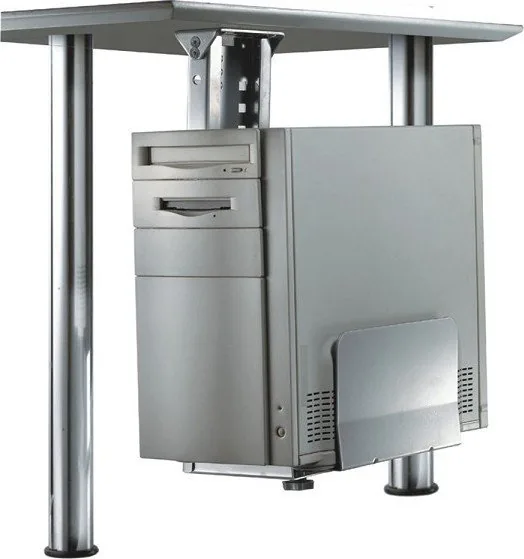
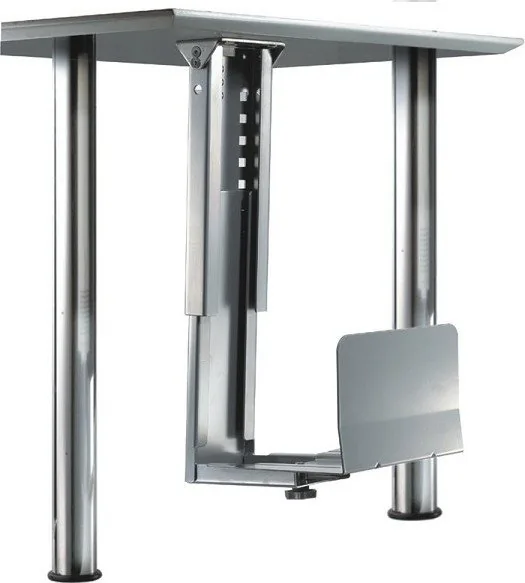
The Neomounts CPU-D200SILVER is a practical under-desk PC holder designed to keep a desktop computer securely positioned while freeing up valuable floor space. Finished in silver, it brings a clean, professional look to modern workstations, offices, and home setups. Instead of leaving a tower exposed beside your desk, this mount tucks the CPU neatly underneath, helping create a tidier and more efficient workspace.
One of the strongest advantages of this holder is its focus on convenience. The design supports easy installation and removal, which is useful when you need access for maintenance, upgrades, or relocation. It is also built with safety in mind: the manual recommends careful preparation, the use of the correct tools, and installation by qualified personnel. For larger or heavier units, having two people involved adds an extra layer of stability during mounting.
The CPU-D200SILVER is made to handle everyday office demands while protecting the computer from unnecessary contact with the surrounding environment. By lifting the tower off the floor, it can help reduce exposure to dust, accidental kicks, and clutter around the workstation. The mount also includes protective caps, showing attention to detail and a cleaner finish after assembly. With a load capacity of up to 30 kg, it is suitable for many standard desktop systems.
This type of under-desk solution is especially appealing in compact offices where efficiency matters. It keeps cables and hardware more organized, makes cleaning easier, and helps maintain a more streamlined appearance. For users who want a functional setup without sacrificing workspace, this holder offers a balanced mix of stability, simplicity, and visual neatness.
Like any mounting accessory, it performs best when installed carefully on a suitable surface. Checking the structure of the desk, tightening screws properly, and avoiding overloading are all important steps. When used correctly, the Neomounts CPU-D200SILVER can be a reliable addition to a productive workstation.
Notes
Under-desk mounting helps save space and improve organization.
The silver finish fits well in professional and minimalist interiors.
Installation should be done carefully, with two people recommended for added safety.




Ludmilla Rothe
7 months ago
Is the CPU holder well packaged and is it easy to install so it stays firmly attached?
Manual.ly
7 months ago
Yes. Customers report that the CPU holder arrives well packaged and protected during shipping. Installation is straightforward: the included mounting hardware makes it easy to secure the holder in place, and it feels stable once fastened. To ensure a firm fit, please follow the instructions in the manual and tighten the screws evenly. If you run into any issue with alignment or attachment, contact our support and share your model details and a photo of the installation, and we will guide you to the correct setup.