
Neomounts ADS20-425BL1 Manual
PDF manual · 4 Pages
English



Quick check
Incorrect answer, please try again.
Chat with your Neomounts ADS20-425BL1 manual using AI
Get instant AI answers from your Neomounts ADS20-425BL1 manual
Ask anything about the Neomounts ADS20-425BL1. Answers come from this manual, with the pages they are based on.
Ask a Question
Do you recommend ADS20-425BL1?
Yes NoFrequently Asked Questions
The mount supports devices weighing up to 5 kilograms securely. This covers most standard laptops including gaming models. Ensure your device falls within this range to avoid instability.
Is this answer helpful?
This unit fits screens measuring from 11.6 inches up to 17.3 inches diagonally. It works well with ultrabooks and larger notebooks alike. Check your device specs before purchasing.
Is this answer helpful?
No, the process involves attaching the holder to the mount and placing the laptop. Basic tools are used for the screws provided in the package.
Is this answer helpful?
While this specific manual references the black version, variations may exist. The current model shown is finished in sleek black to match office decor.
Is this answer helpful?
The 75x75 mm base provides a solid platform. It prevents wobble during normal typing if installed correctly on a flat surface.
Is this answer helpful?
The holder is designed specifically for rigid laptop chassis. Tablets might slip or lack the necessary weight for the clamp to hold them securely.
Is this answer helpful?
The text implies metal components for strength. The finish is powder-coated or painted for durability against scratches and wear over time.
Is this answer helpful?
Advantages and Disadvantages
Advantages

- Supports laptops up to 5 kg weight capacity securely
- Adjustable to fit screen sizes from 11.6 to 17.3 inches
- Compact base size saves desk space effectively
- Easy installation with minimal hardware parts required
- Durable black finish matches most workstation aesthetics
Disadvantages

- Weight limit of 5 kg may restrict larger heavy laptops
- Assembly requires manual screw tightening without power tools
- Base footprint is fixed and cannot be expanded later
- Instructions available in multiple languages may be confusing
- Includes no additional cables or storage for peripherals
Product Specification
Type
Notebook Stand
Compatibility
Notebooks from 11.6 to 17.3 inches
Cooling
N/A
Dimensions
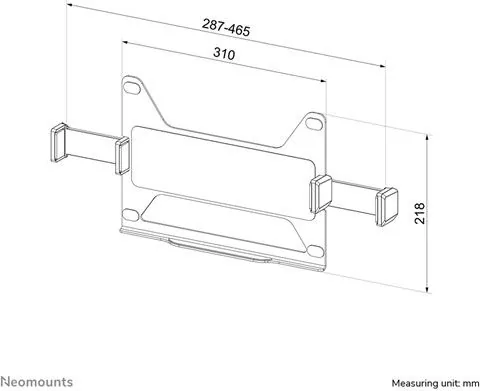
12.20 x 1.54 x 8.58 inches
VESA
2.95x2.95, 3.94x3.94 inches
Material
Steel, Silicone
Product Description
Elevate Your Digital Workspace Experience
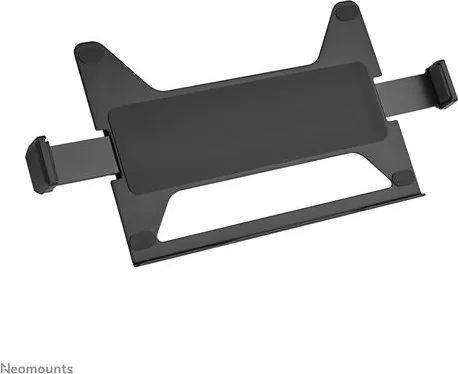
Finding the right accessory for your technology can transform your daily workflow significantly and productive. One standout option in the market today is the Mozos Neomounts Laptop Mount, 11.6-17.3" black Manual. This device is designed to accommodate a wide range of notebook sizes, ensuring stability regardless of whether you have a compact ultrabook or a larger gaming machine. The versatility of the mount makes it a favorite among remote workers and office enthusiasts alike who seek clean desk solutions and improved posture throughout their workday.
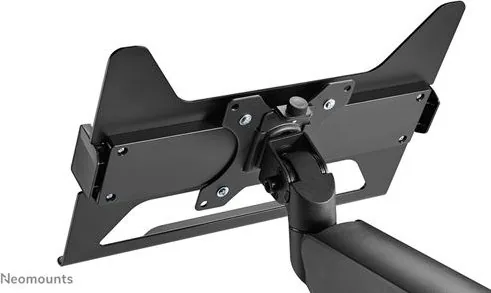
When considering ergonomics, keeping your screen at eye level reduces neck strain during long hours of intense use. The construction supports laptops weighing up to five kilograms, providing ample security for heavier devices used in professional settings. Installation appears straightforward based on the included components which are listed clearly in the guide. You simply attach the laptop holder to the main structural mount and then place your device inside the secure cradle. The base measures seventy-five by seventy-five millimeters, offering a solid footprint on desks or tables without taking up excessive valuable space.
Color plays a major role in aesthetics too, and the sleek black finish blends seamlessly with many modern setups found in homes or offices globally. Users looking for a reliable support system will appreciate the attention to detail found in the packaging design. The instructions come in multiple languages, indicating a global reach and user-friendly approach intended for diverse international customers. Whether you are using the mount primarily at home or in a shared corporate office environment, the core focus always remains on maximizing functionality and ensuring long-term durability for years of service.
It is essential to handle the installation carefully to ensure maximum longevity of the product over time. The manual provides step-by-step guidance to prevent any potential issues during the initial setup phase of the hardware. By securing the screws properly, you guarantee that the mount holds tight under normal usage conditions without wobbling unexpectedly. This product proves that small investments in high-quality hardware accessories yield significant improvements in overall comfort and body posture over time. Embracing such practical tools helps maintain steady productivity while protecting your physical health from repetitive strain injuries associated with poor screen positioning.
In summary, integrating this specialized mount into your daily routine offers tangible benefits for anyone seeking superior organization and personal comfort levels consistently. The combination of extensive size adaptability and generous weight capacity ensures broad utility across various tech environments ranging from students to executives. Always refer to the official documentation for specific maintenance tips and troubleshooting advice related to your specific unit model. Making this informed choice signifies a genuine commitment to a healthier and more efficient digital lifestyle moving forward.
Many users prefer mounts that do not require complex clamping tools. The design suggests ease of use which is critical for people who frequently move their equipment. Adjustability allows for finding the perfect viewing angle suited to your personal needs effectively. This flexibility minimizes fatigue and allows for better engagement with content on display screens. Overall, the build quality seems robust enough to withstand daily adjustments without loosening quickly. Investing in quality mounting gear ultimately pays dividends through reduced discomfort and enhanced focus during demanding projects.
Search for 67,732 Manuals online


Type-in Brand or Model