Manual.ly Logo

Needit Park Lite Solar Manual

0.0 · 0 Ratings

PDF manual · 2 Pages

English

M: qwen/qwen3.5-flash-20260224
page

/ 2

Loading...
6e6f51f8bcdfc8d8354cb37e27492d3f12e5 page 2


Remove the plasc strip carefully and press the baery back into place if
it comes loose. If the baery falls out, insert it again with the + upwards
(same side as the one wrien in the baery compartment). If the baery is
placed correctly, the ”hours” ash on the display (it may take some me for
the display to ash).

1. (The clock in  automacally adjusts to both summer and
winter me, but the funcon may be deacvated manually if necessary,
see secon C)
2. Acvate seng mode by pressing and holding buon ❶ unl the ”hours”
start ashing. When ”hours” are is ashing, press buon ❷ repeatedly
unl the mer is adjusted.
4. Insert the new baery.
5. Carefully insert the baery compartment again.

On our website

you can nd answers to many ques-
ons about your new . If you have any quesons, please
send them to [email protected].
Needit Deutschland GmbH provides the statutory warranty. In the
event of any defects or deciencies during the warranty period, PARK
 may be returned to the retailer. Here, it will be repaired or
replaced with a new one. In case of a complaint, please bring a copy of
your receipt as proof of warranty.


MAINTENANCE
Do not expose PARK LITE Solar to extreme temperatures (below -20 °C
or above +75 °C), as this may damage the electronics and/or aect the
response me. If  is exposed to severe moisture or water,
it must be wiped immediately with a clean cloth. Only use a cloth to clean
the disc. Do not use cleaning agents.

 has been approved by the German Federal Ministry of
Transport, Building and Urban Aairs with reference to Regulaon No. 219,
Design of Electronic Parking Discs (LA22/7332.5/2007968) and approved
by the German Federal Motor Transport Authority (ECE approval No. 10 R -
067203). PARK LITE SOLAR was successfully tested by SGS-TÜV Saar GmbH
on test basis UN-R 10 according to the requirements of EN ISO/IEC 17020.


When the baery is replaced, the clock automacally resets. You can
always adjust all me sengs as previously described.
Please note that the LCD display of your  device will turn
o shortly aer you remove the baery, so avoid parking your car in
places that require a parking disc if there is no baery in your device.

1. Buy a new buon cell baery: no. CR 2477 - 3 Volt
2. Carefully remove the baery compartment completely.
(When changing the baery, make sure that the baery compartment
does not fall between the windscreen and the cockpit.)
3. Remove the old baery.
CE MARKING
With the CE marking, Needit Deutschland GmbH declares that our prod-
uct meets the general safety requirements of any relevant CE marking
direcves and regulaons. With the CE marking, the manufacturer
guarantees that the product has been manufactured in accordance with
the European Union’s requirements for safety, health, and environment.
Needit Deutschland GmbH hereby declares that this parking disc is in
compliance with (CE) EN 61000-6-3 (Electromagnec Compability – Part
6-3: Generic Standards – Emission standard for residenal, commercial
and light-industrial environments) and (CE) EN 61000-6-1 (Electromagnet-
ic Compability – Part 6-1: Generic Standards – Immunity for residenal,
commercial and light-industrial environments)
WEEE
Electrical and electronic equipment (EEE) and materials may be hazardous
and harmful to human health and the environment and must be disposed
of properly. must not be disposed of as normal house-
hold waste and must instead be disposed of separately. The baery may
be returned to the baery retailers, and the  itself may be
returned to the local recycling staon or to the parking disc retailer.

Size in cm: 10.4 x 5.5 x 2.0
Baery specicaons: 
Baery life: 
Clock accuracy (avg.): 
and ”minutes” show ”oN:Su”. Slowly release buon ❶. Press and hold
buon ❷ unl the display shows ”oF:Su”. The display automacally returns
to operang mode.
Your  is now ready for installaon on the inside of your car’s
windscreen. 



1. Find the best spot on the windscreen where the two adhesive pads touch
the glass. Make sure that your eld of vision to the road is not restricted
by the parking disc. Make sure you have access to all the buons on
the back of the clock and that the baery compartment is accessible.
2. Clean the inside of the window where the parking disc is to be
installed and use the included wet wipe to clean the area thoroughly.
3. Make sure the window is at least +15°C, as the adhesive pads do
not work properly at lower temperatures. If necessary, warm up the
window with the car’s blower motor or with a hair dryer with cauon.
4. Remove the protecve lm from the four adhesive pads and press
the parking disc rmly against the window for about 30 seconds.
Apply pressure on the back (avoid pressing the buons). Then check
from the outside that the two pads adhere properly to the window.
You have now installed your  and are ready to drive.
PARK LITE Solar must not be le unaached in the car. It must be
xed to the window to work properly.





If you need to set your  manually, simply press buon
❷ and the clock will count up depending on the seng in 15 or 30
minute increments. Press, hold, and release the buon when the
desired me is displayed. Note that this funcon is only available when
 is in parking mode.

 has integrated solar cells. In daylight, 
uses integrated solar cells, and in the dark, it uses the backup baery.



Congratulaons on your new with an integrated speaker.
With  in the car, you don’t have to remember seng the
parking disc and hence avoid hey parking nes.
The electronics in  register the car’s movements and
automacally set the parking disk at the correct parking me and only
end the parking mode when the car starts moving again.
Before using , we recommend that you read the enre
manual thoroughly. To ensure correct installaon of ,
the instrucons below should be followed:
When you have adjusted the above informaon, no numbers in the dis-
play should ash. Note, however, that the two dots (:) between the hours
and minutes ash connuously. If one of the numbers is ashing, press
buon ❶ repeatedly unl none of the numbers are ashing. If you nd
that you have adjusted  incorrectly, you can always start
over by pressing and holding buon ❶ unl the ”hours” digit ashes.
We recommend that you check the clock sengs regularly, especially
when switching between summer and winter me.

The digital clock is by default set to switch automacally between summer
and winter me. However, if you are in a country where there are no shiing
seasons, you may disable the feature by following the steps below:
Acvate the seng mode by pressing both buon ❶ and ❷ unl ”hours”
10 13
11 14
12 15
4
2
5 8
3
6
Button ❶
Button ❷
Battery
English User Guide
7
9
Response me, parking mode: 
Response me, non-parking mode: 
 is patent pending.
All rights to the product  belong to us:
Needit Deutschland GmbH • Friedrichstr. 95 • 10117 Berlin
Phone number: 030 5858351-80 • Email: [email protected]
Website: www.parklitesolar.de
The contents of this user manual are subject to change without noce.
IMPORTANT.
It is the driver’s responsibility to ensure that the clock is adjusted correct-
ly. Parking ckets are not refunded by Needit Deutschland GmbH nor are
we responsible or liable for any installaon errors.
3. Press buon ❶ once, aer which the ”minutes” will ash on the display.
Adjust the minutes with buon ❷.
4. Set the year, month, and day as above (in that order).
Choose how the parking start me should be handled:
2:PE The parking me is set to the nearest half hour. If you park at 13:07,
the display will show 13:30. This is a requirement, e.g., in Finland, Sweden,
Germany, and Switzerland. 0:PE The parking me is set to the exact hour
and minute. If you park at 13:07, the display will show 13:07. This is a
requirement, e.g., in Estonia and Norway. 1:PE The parking me is set to the
nearest quarter hour. If you park at 13:07, the display will show 13:15. This
is a requirement, e.g., in Denmark and Austria.
5. When all sengs are implemented, only (:) will ash.
PARK LITE SOLAR
Developed by Needit Denmark
Designed by John Sebastian

Chat with your Needit Park Lite Solar manual using AI

Get instant AI answers from your Needit Park Lite Solar manual

Ask anything about the Needit Park Lite Solar. Answers come from this manual, with the pages they are based on.

Park Lite Solar Maintenance Schedule

Regularly
Check clock settings

Check the clock settings regularly, especially when switching between summer and winter time.

When battery is low
Replace battery

Replace the button cell battery (CR 2477) when the alarm sounds or display indicates low power. The manual notes this should happen within a week of the warning.

M: qwen/qwen3.8-flash

Ask a Question

0/1000

Do you recommend Park Lite Solar?

Yes No

Frequently Asked Questions

A

Activate settings mode by holding button one. Press button two repeatedly to adjust hours and minutes. Release when the correct time is shown. Ensure no numbers blink before finishing.

Is this answer helpful?

A

The Needit Park Lite Solar uses a CR 2477 button cell battery rated at 3 Volts. The battery life is approximately nine years under normal conditions.

Is this answer helpful?

A

Yes. You can deactivate the automatic adjustment feature if you live in a country without time shifts by following the manual instructions for summer and winter deactivation.

Is this answer helpful?

A

Install it on the inside of the windscreen. Ensure the pads touch the glass securely and that your view of the road is not restricted by the unit.

Is this answer helpful?

A

Yes. It uses solar power during the day and switches to the backup battery at night to ensure continuous operation and visibility of the time.

Is this answer helpful?

A

Once the warranty period ends, any repairs or replacements are at the owner expense. Keep your receipt as proof of the purchase date to establish the warranty start date.

Is this answer helpful?

A

The battery replacement process takes a few minutes. You must remove the battery compartment, swap the cell, and reset the time settings afterward.

Is this answer helpful?

M: qwen/qwen3.5-flash-20260224

Advantages and Disadvantages

Advantages

  • Integrates solar energy for extended battery life
  • Automatically detects vehicle movement to start and stop parking mode
  • Complies with ECE and CE safety regulations for road use
  • Easy time setting with automatic daylight saving adjustment
  • Statutory warranty provided by Needit Deutschland GmbH
VS

Disadvantages

  • Adhesive pads require glass temperature above 15 degrees Celsius
  • Replacing the battery resets the clock to factory defaults
  • Approximate 40-second delay when activating parking mode
M: qwen/qwen3.5-flash-20260224

Product Specification

Type

Parking disc

M: qwen/qwen3.5-flash-20260224

Product Description

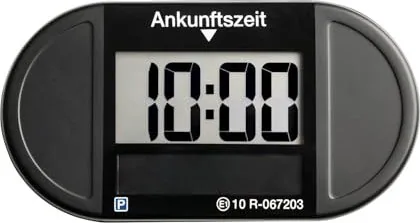
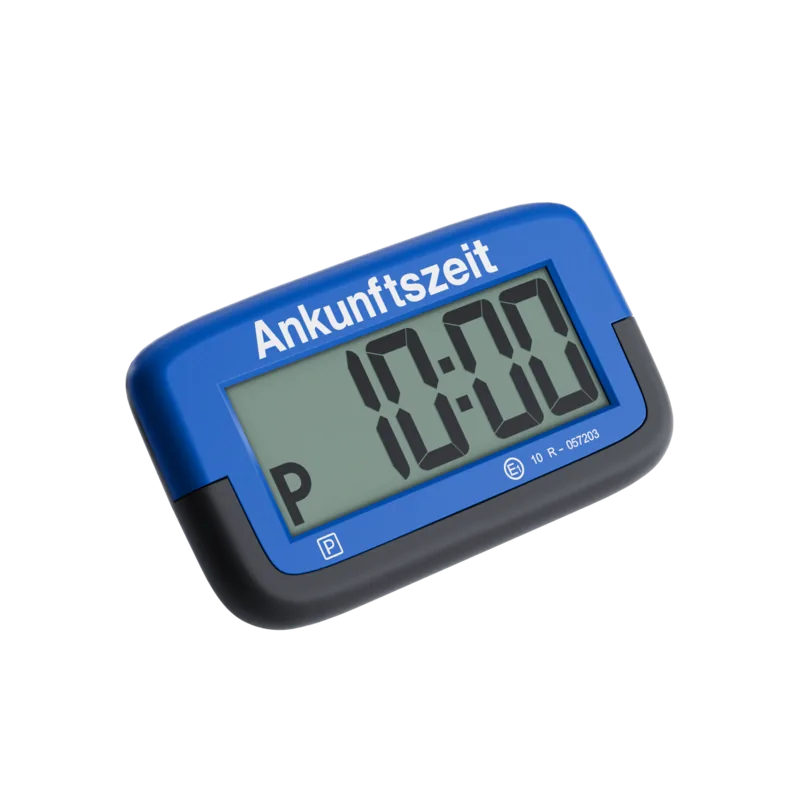
Parking fines can be stressful and expensive for car owners across the European continent. Finding a reliable solution to manage parking time automatically saves you from receiving costly tickets and avoids the hassle of forgetting your arrival time. The Needit Park Lite Solar is a cutting-edge electronic parking disc designed to handle this task effortlessly for modern drivers. This device features integrated solar technology, allowing it to charge during daylight hours while utilizing a high-capacity backup battery during the night. This dual-power system ensures absolute reliability regardless of lighting conditions or weather. When you park your vehicle for the first time, the sophisticated electronics register the motion and set the parking disc automatically based on the current time. Once the car moves again, the parking mode ends without manual intervention.

Following the Needit Park Lite Solar Manual is essential for optimal performance and longevity of the unit. The installation process requires attaching the unit to the windscreen using specific adhesive pads provided in the package. It is crucial that the glass surface is warm, ideally above 15 degrees Celsius, to ensure the pads stick securely without sliding off later. The device complies with strict regulations including ECE approval and CE marking, making it fully legal for use in Germany and various other countries throughout Europe.

The digital clock features automatic summer and winter time adjustments, which can be deactivated via specific button combinations if living in a region without time shifts. If the battery runs out, replacing the CR 2477 cell is straightforward but will reset the internal clock immediately. Proper maintenance involves avoiding extreme temperatures and cleaning only with a dry cloth. With dimensions of 10.4 by 5.5 centimeters, it is compact and discreet enough to remain unseen from the outside.

Needit Deutschland GmbH offers a statutory warranty for this product covering defects during the designated period. Customers can return the device to the retailer if defects occur within the warranty period. This guarantees that drivers will not face parking issues due to device failure. The integrated speaker provides clear timing information to remind you. Whether you park for twenty minutes or four hours, the device handles the duration accurately. It offers configurable rounding modes such as nearest half hours for Finland or exact times for Norway. When manual setting is required, simply press button two to count up in 15 or 30 minute increments. The manual guides users through setting the year, month, and day sequentially. Button one activates settings mode while button two adjusts values. These steps ensure accuracy before the device is mounted permanently. The response time for parking mode activation is approximately 40 seconds. Finally, if you need to claim warranty service, keep a copy of your receipt ready, as this serves as proof of purchase for repairs or replacement. This ensures you never forget your return time. Ultimately, this device offers peace of mind for drivers navigating complex urban parking zones with precision and ease.

M: qwen/qwen3.5-flash-20260224

© Copyright 2026 Manual.ly