
NEC PDVWXUN 55 P Manual
PDF manual · 1 Pages
English


Quick check
Incorrect answer, please try again.
Ask a Question
Do you recommend PDVWXUN 55 P?
Yes NoFrequently Asked Questions
It supports Full HD 1080p resolution for clarity.
Is this answer helpful?
Yes, using VESA compatible brackets with proper load rating.
Is this answer helpful?
No, it is designed for indoor commercial environments.
Is this answer helpful?
No external speakers are required for output.
Is this answer helpful?
Use RS232 or Ethernet for central management control.
Is this answer helpful?
Standard warranty terms apply to verify with the supplier.
Is this answer helpful?
High brightness levels suit bright indoor lighting conditions.
Is this answer helpful?
Advantages and Disadvantages
Advantages

- High brightness ensures visibility in well-lit commercial spaces without glare.
- Full HD resolution provides sharp images for detailed digital signage content.
- VESA mount compatibility allows flexible installation on various wall brackets.
- Robust build quality supports 24/7 continuous operation reliably over years.
- Remote management features enable centralized control for multiple display units.
Disadvantages

- Lack of built-in speakers requires external audio solutions for sound.
- Heavy weight necessitates strong structural support for ceiling mounting.
- No inbuilt web browser limits direct internet content streaming options.
- Initial cost is higher than standard consumer grade display televisions.
Product Specification
Type
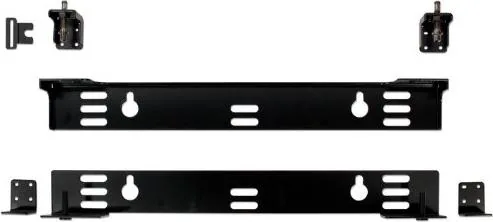
Wall Mount
Number of Monitors
1
Screen Size
55 in
Mobility
Fixed
Distance from Wall
3.78 in
Color
Black
Weight
11.02 lbs
Product Description
Exploring the NEC PDVWXUN 55 P Display Solution
The digital signage market demands reliability and visual excellence for commercial applications. The NEC PDVWXUN 55 P delivers these qualities consistently across various retail and corporate environments. This large format display unit provides a 55 inch viewing area which is ideal for capturing attention in busy locations. High brightness levels ensure content remains visible even under strong ambient lighting conditions. Users can configure the screen orientation to landscape or portrait modes depending on architectural requirements.
Visual clarity is paramount for effective communication. Full HD resolution allows for sharp text and detailed graphics to be displayed accurately. The color reproduction capabilities maintain fidelity over time ensuring brand consistency in advertising campaigns. Owners often refer to the NEC PDVWXUN 55 P Manual for detailed specifications on maintenance procedures. Following standard operating guidelines helps extend the lifespan of the panel components significantly. Proper ventilation during installation prevents overheating issues that could affect performance levels.
Connectivity options facilitate seamless integration with existing media servers and computers. Multiple connection ports support diverse input sources for flexible content management. Network connectivity allows for remote monitoring and control from a centralized dashboard. This capability reduces the need for physical access to each individual unit in large installations. Security settings protect against unauthorized configuration changes during unattended operation periods.
Durability is a core feature designed for continuous operation. The unit is built to withstand the stress of running twenty four hours a day without interruption. Dust resistance features help maintain internal cleanliness over long service intervals. Cooling systems operate quietly to avoid disturbing customers in nearby retail spaces. Mounting hardware compatibility with standard VESA plates simplifies the hanging process during setup.
Energy efficiency features contribute to lower operational costs over the product lifecycle. Power management modes can reduce consumption during idle periods or scheduled downtime. The sleek frame design integrates well with modern interior aesthetics without being obtrusive. Serviceability is enhanced through modular component access for faster repairs if issues arise. Regular updates to firmware ensure compatibility with the latest content management software versions.
Ultimately this display represents a solid choice for businesses prioritizing visual impact. Investing in professional grade hardware reduces long term risks associated with display failure. Training staff on basic troubleshooting empowers teams to handle minor adjustments independently. The comprehensive instructions support quick reference for both installers and end users. Ensuring proper configuration leads to optimal user experience and satisfaction in the final deployment.
Notes: Always check local electrical codes before installation. Ensure adequate clearance for heat dissipation on all sides. Secure mounting brackets firmly to prevent accidental movement.
Search for 67,732 Manuals online


Type-in Brand or Model