
Natec Fury Scrapper Manual
PDF manual · 12 Pages
English



Quick check
Incorrect answer, please try again.
Chat with your Natec Fury Scrapper manual using AI
Get instant AI answers from your Natec Fury Scrapper manual
Ask anything about the Natec Fury Scrapper. Answers come from this manual, with the pages they are based on.
Ask a Question
Do you recommend Fury Scrapper?
Yes NoFrequently Asked Questions
The mouse features a precise optical sensor with a maximum resolution of 6400 DPI, allowing for highly accurate tracking during gameplay.
Is this answer helpful?
Connect the mouse to a USB port, wait for initial driver installation, then download the software from www.fury-zone.com. Run setup.exe and follow the on-screen instructions.
Is this answer helpful?
The product specifications list compatibility with Windows, Linux, and Android. Mac OS is not explicitly mentioned in the standard requirements.
Is this answer helpful?
The Natec Fury Scrapper comes with a 2-year limited manufacturer warranty, provided the device has not been tampered with or damaged through misuse.
Is this answer helpful?
Yes, the mouse includes RGB backlighting that can be customized using the dedicated gaming software to change colors and effects.
Is this answer helpful?
The main button switches are engineered for a lifetime of up to 5 million clicks, ensuring durability for intense gaming sessions.
Is this answer helpful?
Advantages and Disadvantages
Advantages

- High-resolution 6400 DPI optical sensor ensures precise cursor movement.
- Durable main buttons rated for 5 million clicks provide long-term reliability.
- Customizable RGB backlighting enhances visual appeal and personalization.
- Includes advanced software for macro recording and profile management.
- Compatible with multiple operating systems including Windows, Linux, and Android.
Disadvantages

- Requires downloading additional software to access advanced features.
- Driver installation may take approximately 15 seconds upon first connection.
- Ventilation slots must not be blocked to prevent overheating issues.
- Not suitable for use in extremely hot, cold, or humid environments.
- Unauthorized repairs will void the two-year manufacturer warranty.
Product Specification
Suitability
right hand
Keys
7 (total), 2 (main), 2 (top), 2 (left), 1 (scroll wheel click)
Scroll Wheel
1x 2-way
Sensing
red LED/IR
Resolution
6400 dpi, reducible to 500 dpi
Switches
mechanical switches, Huano
Lighting
RGB
Connection
wired (5.25 ft), USB-A 2.0
Power Supply
USB
Dimensions (WxDxH)
2.76x1.57x4.92 in
Approximate Volume
5.61 cu in (approximated shape)
Weight
3.32 oz (without cable)
Color
solid black with logo
Features
thumb rest, fabric cable
Product Description
Dominate the Arena with the Natec Fury Scrapper Gaming Mouse
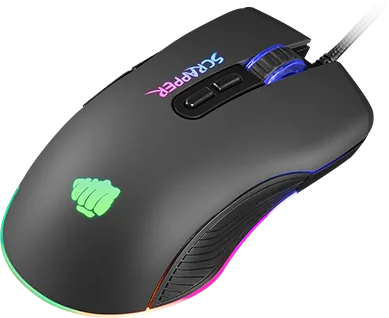
The Natec Fury Scrapper Gaming Mouse in sleek black is designed for gamers who demand precision and speed. This USB peripheral features a high-performance optical sensor capable of reaching an impressive 6400 DPI resolution, ensuring that every movement translates accurately on your screen. Whether you are engaging in fast-paced shooters or strategic real-time strategy games, the responsiveness of this mouse gives you the competitive edge you need.
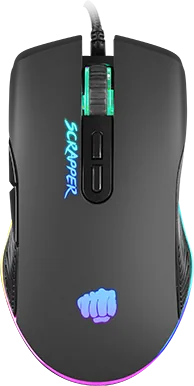
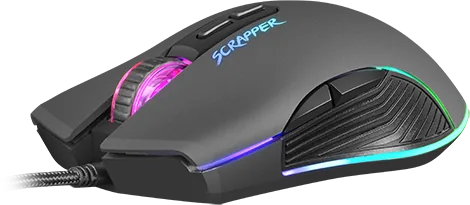
One of the standout features of the Natec Fury Scrapper is its customizable RGB backlighting. You can personalize your setup to match your room decor or team colors, adding a vibrant aesthetic to your gaming station. The main button switches are built for durability, boasting a lifespan of up to 5 million clicks. This ensures that your primary actions remain consistent over long gaming sessions without worrying about premature wear.
For those who want full control, the included software allows for advanced configuration. You can record macros, create custom profiles, and adjust sensitivity settings to suit your specific playstyle. Simply connect the device via USB, wait for the drivers to install, and then download the necessary software from the official website to unlock all potential features. The ergonomic design fits comfortably in your hand, reducing fatigue during extended use.
Safety and compliance are also priorities. The product meets EU requirements and adheres to RoHS standards, meaning it is free from harmful substances. It includes proper ventilation slots to prevent overheating, so you can focus entirely on the game. Remember to avoid exposing the device to extreme temperatures or moisture to maintain its longevity.
Key Highlights
- High Precision: 6400 DPI optical sensor for accurate tracking.
- Durability: Switches rated for 5 million clicks.
- Customization: Full macro support and RGB lighting control.
- Compatibility: Works with Windows, Linux, and Android devices.
- Warranty: Backed by a 2-year limited manufacturer warranty.
Search for 67,732 Manuals online


Type-in Brand or Model