
Natec Fury Hunter 2.0 Manual
PDF manual · 12 Pages
English



Quick check
Incorrect answer, please try again.
Chat with your Natec Fury Hunter 2.0 manual using AI
Get instant AI answers from your Natec Fury Hunter 2.0 manual
Ask anything about the Natec Fury Hunter 2.0. Answers come from this manual, with the pages they are based on.
Ask a Question
Do you recommend Fury Hunter 2.0?
Yes NoFrequently Asked Questions
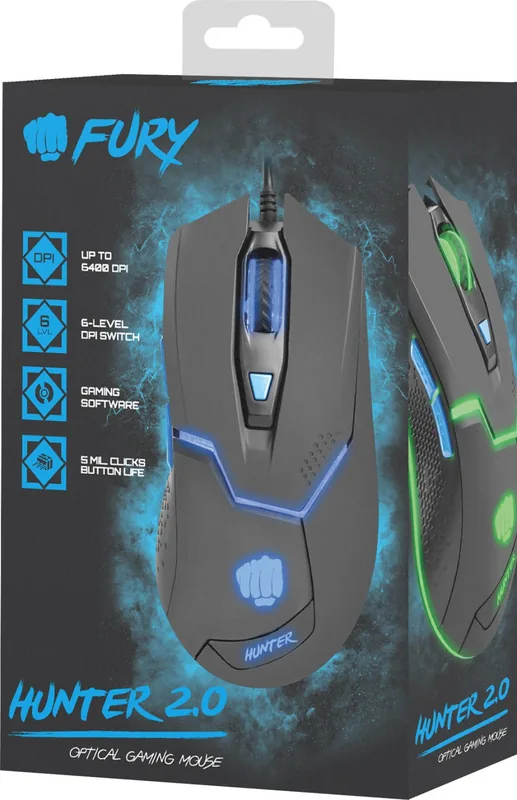
The mouse uses an optical sensor with a maximum resolution of 6400 DPI and a six-stage DPI switch to adjust sensitivity on the fly.
Is this answer helpful?
Basic operation is plug-and-play via USB; drivers initialize in about 15 seconds. To use advanced programmable features you must download and install the gaming software from www.fury-zone.com.
Is this answer helpful?
The device is compatible with Windows XP, Vista, 7, 8, and 10 on USB-capable PCs. No official macOS support is mentioned in the product information.
Is this answer helpful?
Main button switches are rated for a lifetime of up to 5 million clicks, providing extended durability for regular gaming use.
Is this answer helpful?
Yes. The Natec Fury Hunter 2.0 includes a two-year limited manufacturer warranty. Unauthorized repairs or disassembly may void the warranty.
Is this answer helpful?
Download the configuration software and find support information from the official Fury website at www.fury-zone.com. Installation instructions are provided with the setup.exe file.
Is this answer helpful?
Avoid using the mouse in very hot, cold, dusty, or wet environments; do not block ventilation openings; and avoid strong magnetic fields. Handle gently to prevent physical damage.
Is this answer helpful?
Advantages and Disadvantages
Advantages

- High-precision optical sensor up to 6400 DPI for accurate tracking.
- Durable main switches rated for up to 5 million clicks.
- Six-level DPI switch for on-the-fly sensitivity adjustments.
- Customizable via downloadable gaming software with profile support.
- Straightforward USB plug-and-play installation; wide Windows compatibility.
Disadvantages

- Wired USB connection may limit mobility compared to wireless mice.
- Software must be downloaded separately to access advanced features.
- Max tracking speed (32 IPS) may be modest for extreme high-speed play.
- Design is simple—may lack premium materials or RGB lighting for some users.
- No native macOS support listed; primarily Windows-focused compatibility.
Product Specification
Suitability
both hands (left hand, right hand)
Buttons
6 (total), 2 (main), 1 (top), 2 (left), 1 (scroll wheel click)
Scroll wheel
1x 2-way
Tracking
LED-red/IR
Resolution
6400dpi, reducible to 500dpi
Lighting
RGB
Connection
wired (70.87 in), USB-A 2.0
Power supply
USB
Dimensions (WxHxD)
2.68x1.57x5.12 in
Approximate Volume
5.67 in^3 (approximate shape)
Weight
2.65 oz (without cable)
Color
multi-color, black/blue, Logo
Special features
Thumb rest, Textile cable
Product Description
Natec Fury Hunter 2.0 Gaming Mouse — Black/Blue, USB
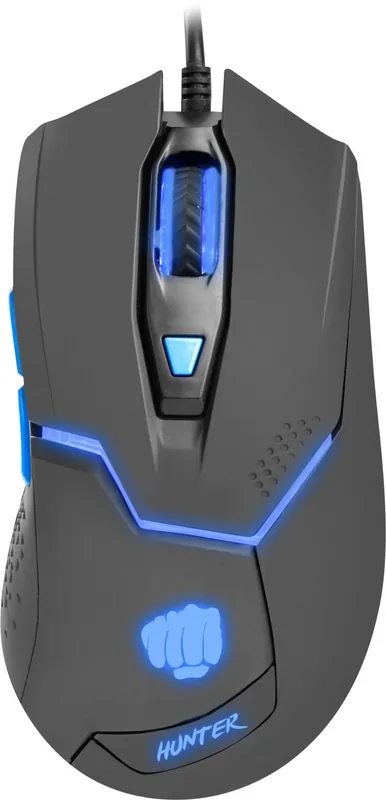
The Natec Fury Hunter 2.0 is a wired USB gaming mouse designed for players who want reliable performance without breaking the bank. Finished in a black and blue color scheme, the Hunter 2.0 combines a precision optical sensor, programmable software support, and durable main switches to deliver a responsive, customizable experience for casual and competitive gamers alike.
Design and Build
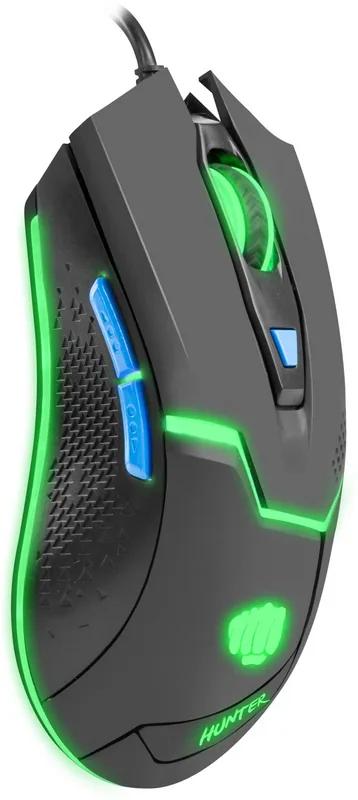
The mouse features an ergonomic silhouette sized at 130 x 68 x 40 mm, offering a comfortable grip for palm and claw users. Its black shell accented with blue details gives it a clear gaming aesthetic while remaining understated. Openings and vents in the casing ensure adequate ventilation; users are advised not to block these to avoid overheating. The cable uses a standard USB connection for plug-and-play convenience.
Performance and Features
At the heart of the Fury Hunter 2.0 is an optical sensor with up to 6400 DPI and a maximal tracking speed of 32 IPS, giving smooth and accurate tracking for most FPS, MOBA, and RTS titles. The main left and right buttons are rated for up to 5 million clicks for long-term reliability, and a six-stage DPI switch on the fly lets you cycle sensitivity quickly during gameplay.
Advanced configuration is available through dedicated gaming software provided by Fury. The software—downloadable from www.fury-zone.com—lets you remap buttons, set DPI stages, and save profiles. After installation, the program runs from a system tray icon for quick access to settings.
Installation and Compatibility
Installation is straightforward: plug the mouse into a USB port and wait roughly 15 seconds for drivers to initialize. For advanced features, download the setup.exe from the Fury website, run the installer, and follow on-screen instructions. The product is compatible with Windows XP through Windows 10 and other USB-capable PCs.
Safety and Warranty
The product meets EU safety and RoHS standards. It carries a two-year limited manufacturer warranty. Users should avoid exposing the mouse to extreme temperatures, moisture, strong magnetic fields, or dusty environments and should not attempt unauthorized repairs or disassembly.
Notes
- Software is required to unlock programmable features and must be downloaded from the official Fury site.
- Keep ventilation openings clear to prevent overheating.
- Warranty voids if the device is disassembled or repaired by unauthorized parties.
Search for 67,732 Manuals online


Type-in Brand or Model